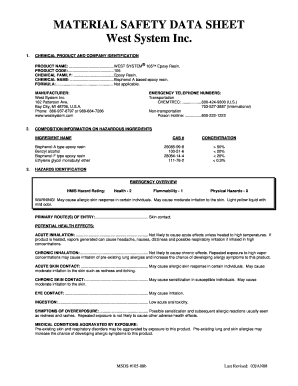
Epoxy Msds Form
Use a Epoxy Msds template to make your document workflow more streamlined.
What is Epoxy Msds Form
Epoxy Msds Form is a safety-document workflow for recording, reviewing, and acknowledging information about epoxy materials. It can contain product identification, hazard communication, handling, storage, protective-equipment, and emergency-response information supplied by the responsible manufacturer or organization. With signNow, a sender uploads the source file, adds fields for required entries and signatures, sends it to designated reviewers, and retains the completed record with an audit trail. The form’s content must remain accurate and current; signNow manages execution and record evidence, not chemical classification or regulatory authorship.
Who uses Epoxy Msds Form
Manufacturers and distributors
Manufacturers and distributors can prepare epoxy safety documentation, route it to quality or compliance reviewers, and retain signed acknowledgments alongside product records. The workflow helps separate preparation from approval while preserving a searchable completion history for customers, facilities, and internal teams.
Operational teams
Construction, maintenance, laboratory, and facilities teams can send epoxy safety documents to employees or contractors before handling materials. Recipients can review the information remotely, sign assigned fields, and return a completed record without coordinating every acknowledgment in person.
Key features for Epoxy Msds Form workflows
Epoxy Msds Form workflows combine structured safety information, signer routing, reusable templates, and auditable electronic records for epoxy-related operations.
Document upload
Upload an existing Epoxy Msds Form, place fields where needed, and preserve the document layout while preparing it for electronic completion and signature collection.
Flexible fields
Add text, date, initials, and signature fields to capture the information required by your epoxy-material workflow without rebuilding the source document.
Signer routing
Route the completed Epoxy Msds Form to responsible staff, contractors, or customers by email, keeping each signer’s assigned fields clearly separated.
Reusable templates
Use a reusable template for recurring epoxy product documentation, reducing repeated preparation when the same safety information must be reviewed or acknowledged.
Audit trail
Keep the signed Epoxy Msds Form with its completion record and audit trail so document history remains available for internal review and customer inquiries.
Mobile access
Work from a desktop or mobile device when collecting acknowledgments at a facility, job site, warehouse, or office handling epoxy products.
How Epoxy Msds Form works
The signNow workflow turns an existing Epoxy Msds Form into a routed electronic record without changing the underlying safety-document content.
Upload document: Upload the source document and inspect its pages. Add fields: Place fields for safety information, review, and signatures. Route fields: Send assigned sections to each responsible reviewer. Archive record: Store the completed document with its audit trail.
 Best ROI. Our customers achieve an average 7x ROI within the first six months.
 Scales with your use cases. From SMBs to mid-market, airSlate SignNow delivers results for businesses of all sizes.
 Intuitive UI and API. Sign and send documents from your apps in minutes.
Inside the Epoxy Msds Form audit trail
The audit trail records evidence surrounding completion of the Epoxy Msds Form, separate from the document’s technical safety content.
Authenticate signer:
Capture timestamps:
Protect document:
Retrieve evidence:
Export archive:
Control access:
Recommended Epoxy Msds Form setup
Configure the workflow around document accuracy, signer identification, audit evidence, and the retention policy for the underlying safety record.
| Setting | Recommendation |
|---|---|
| Authentication method | Email delivery with SMS OTP |
| Signature type | Typed or drawn electronic signature |
| Audit trail | Retain completion certificate and event history |
| Document retention | Apply the underlying OSHA record policy |
| Encryption | TLS 1.2/1.3 and AES-256 protection |
Platform requirements for Epoxy Msds Form
Epoxy Msds Form can be prepared through a browser using Chrome, Firefox, Safari, or Edge on Windows or macOS. signNow mobile apps support iOS and Android access, while encrypted connections use TLS for data in transit.
Browser support Chrome, Firefox, Safari, and Edge support browser-based completion. Desktop systems Windows and macOS support desktop document preparation and review. Mobile systems iOS and Android support mobile signing and document access.
Teams deploying this workflow should manage access through approved accounts and devices, especially when forms contain product, workplace, or employee information. Enterprise deployments can evaluate API access, SSO provisioning, and retention controls against their document-management and safety-record policies.



Security for Epoxy Msds Form records
Transport encryption:
Stored encryption:
Security certification:
Security management:
Healthcare safeguards:
Signature compliance:
Epoxy Msds Form use cases
Organizations use Epoxy Msds Form to document review and acknowledgment across sites, departments, contractors, and regulated work environments.
Construction operations
A construction company can circulate epoxy safety documentation between project managers, site personnel, and contractors before material handling begins.
- Site-ready document routing
signNow supports sequential or assigned signing workflows for documents used on-site or from the office. The company can retain the completed Epoxy Msds Form and its audit trail with project records, giving supervisors a documented acknowledgment process without relying on paper circulation between locations.
Healthcare facilities
A healthcare or laboratory facility can route epoxy-related safety documentation to employees who handle maintenance or specialized materials.
- Controlled staff acknowledgment
Where the document includes private health information, the organization should evaluate its HIPAA obligations and execute a BAA where required. signNow provides HIPAA-compliant workflows with a BAA requirement, while the facility remains responsible for access, retention, and appropriate content.
Best practices for Epoxy Msds Form
Accurate source content, assigned review, controlled access, and documented retention make Epoxy Msds Form workflows easier to manage.
Start with the current source document
Assign technical review before sending
Match retention to the record class
Control access and shared copies
Challenges with Epoxy Msds Form
Uploading an outdated epoxy document can leave employees or contractors relying on superseded hazard, storage, or protective-equipment information. Unassigned fields can leave product identifiers, reviewer acknowledgments, or signature dates incomplete when the document reaches its final recipient. A shared signing link without recipient controls can make it difficult to establish which person reviewed the Epoxy Msds Form. Storing only the signed PDF without its audit trail can weaken the record of delivery, access, and signature events.
Key performance indicators that demonstrate SignNow's proven track record.
Epoxy Msds Form troubleshooting
These answers address document preparation, signer identity, compliance, and record-handling questions for Epoxy Msds Form workflows.
Upload the source PDF again and check whether its fields are flattened, protected, or image-based. signNow can accept uploaded documents and let senders add fields, but technical safety content should be reviewed after conversion.
The Business plan includes templates and audit trails, while Business Premium adds bulk send. Choose the plan based on whether one document or many recipient-specific copies must be distributed.
Use assigned fields rather than one unrestricted signing link when identity matters. signNow can route the document to named recipients, while stronger authentication options should match the organization’s risk assessment.
For records containing protected health information, signNow states that HIPAA-compliant workflows require a BAA. The healthcare organization must also limit access and determine its retention obligations under applicable policy and law.
Electronic signatures can have legal effect under ESIGN and UETA when intent, consent, attribution, and record reproduction requirements are met. Consumer-facing workflows may also require the ESIGN disclosure in 15 U.S.C. §7001(c).
Export the completed document together with its audit trail, then apply the retention rule for the underlying safety record. OSHA requirements differ by record type, including exposure and injury records.
BE READY TO GET MORE
Get this form now!

If you believe that this page should be taken down, please follow our DMCA take-down process.