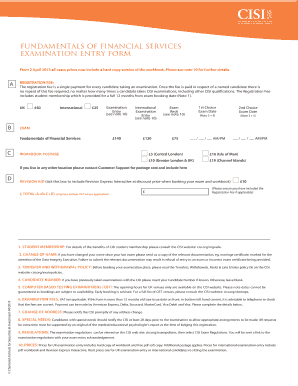
Cisi Study Material Form
Use a Cisi Study Material Pdf template to make your document workflow more streamlined.
What the Cisi Study Material Form is
The Cisi Study Material Form is a document for recording study-material information, participant details, or completion acknowledgments, depending on the issuing organization’s requirements. signNow lets a sender upload the form, auto-detect fillable fields, assign those fields to recipients, and send a signing request. Each signer reviews the displayed content, completes required fields, and signs electronically. The completed PDF and audit trail can then be stored together. Because no issuing agency, official filing deadline, or mandated field set is identified here, confirm the form owner’s instructions before submission.
Who uses the Cisi Study Material Form
Education teams
Education and training teams can distribute study materials, collect learner acknowledgments, and preserve signed completion records in one workflow.
Organizations
Employers and professional organizations can route study acknowledgments to named participants and retain evidence of completed review.
How the Cisi Study Material Form works
signNow turns the Cisi Study Material Form into a controlled digital workflow from upload through signed-record storage.
Upload form: Upload the Cisi Study Material Form to signNow. Review fields: Auto-detect fillable areas and review each field. Send form: Assign recipients and send signature invitations. Store record: Store the signed form with its audit trail.
Steps to complete the Cisi Study Material Form
Use this sequence to prepare, route, and complete the Cisi Study Material Form in signNow without skipping field or recipient checks.
Upload:
Upload the form file. Review:
Check detected fields and labels. Assign:
Assign each field to a signer. Send:
Send the signing request.
 Best ROI. Our customers achieve an average 7x ROI within the first six months.
 Scales with your use cases. From SMBs to mid-market, airSlate SignNow delivers results for businesses of all sizes.
 Intuitive UI and API. Sign and send documents from your apps in minutes.
How the Cisi Study Material Form audit trail works
The audit trail records who handled the Cisi Study Material Form, what happened, and when, creating a reviewable history separate from document setup.
Signer authentication:
Timestamp capture:
Document hashing:
Tamper-evident sealing:
Event correlation:
Audit export:
Platform requirements for Cisi Study Material Form
Complete the Cisi Study Material Form through signNow in Chrome, Firefox, Safari, or Edge on Windows or macOS. Signers can also use signNow mobile apps on iOS and Android devices, with encrypted connections using TLS.
Browser support Chrome, Firefox, Safari, and Edge support browser-based form completion. Operating systems Windows, macOS, iOS, and Android support signNow access. Mobile apps signNow mobile apps support signing from iOS and Android devices.
Organizations deploying this form should manage access on approved Windows, macOS, iOS, or Android devices. Enterprise teams may connect signNow through API access, SSO provisioning, or named integrations such as Microsoft 365, Google Workspace, Salesforce, and NetSuite. Configure retention and authentication according to the information handled.
Cisi Study Material Form challenges to avoid
Incomplete learner, course, or authorization details can delay review because missing fields require clarification before signature. Sending the form before checking recipient roles can route signature requests to the wrong person or department. Unclear consent language may weaken the record’s evidence of intent under ESIGN and applicable UETA requirements. Retaining only the signed PDF without its audit trail can reduce the available evidence of signer attribution and document history.
Signer authentication and certificates
PKI:
X.509 certificates:
Two-factor authentication:
SMS OTP:
ID verification:
Audit evidence:
Business types using the Cisi Study Material Form
The Cisi Study Material Form fits organizations that need documented study participation, controlled routing, and retrievable electronic records.
Solo educators can prepare one Cisi Study Material Form, collect learner signatures, and retain completion evidence without coordinating a separate paper workflow. Training providers can reuse a controlled template, route forms to multiple participants, and review audit trails for each completed study record. Enterprise learning teams can connect signNow with Microsoft 365, Salesforce, or NetSuite while administrators manage access and document retention policies.
These tasks are executed by both individual contributors and centralized administrators depending on organizational policy and required controls.
Recommended workflow setup
Configure the Cisi Study Material Form around signer identity, field ownership, audit evidence, retention policy, and controlled workspace access.
| Setting | Recommendation |
|---|---|
| Authentication method | Email link with SMS OTP |
| Signature type | Typed or drawn eSignature |
| Audit trail | Enable completion history export |
| Document retention | Follow the organization’s written policy |
| User provisioning | Assign role-based workspace access |
Legal standing of the Cisi Study Material Form
For a U.S. business transaction, an electronic Cisi Study Material Form may be admissible when the signer demonstrates intent, consents to electronic records, can be attributed to the signature, and the record remains accessible and reproducible under ESIGN, 15 U.S.C. ch. 96, and applicable UETA rules. Wills, codicils, testamentary trusts, court orders, and certain family-law documents are excluded from ESIGN coverage.

Cisi Study Material Form troubleshooting
Resolve Cisi Study Material Form issues by checking signer identity, plan capabilities, document integrity, and the legal record requirements before sending.
Business includes audit trails, templates, mobile apps, and legally binding eSignatures at $8 per user monthly when billed annually. The plan includes 100 signature invites per user per year, with overage fees applying after that allowance.
Business Premium adds bulk send, kiosk mode, request payments, and quick invite links. It costs $15 per user monthly with annual billing. Choose it when the Cisi Study Material Form must be distributed repeatedly to many recipients.
signNow supports ESIGN and UETA compliance, but the form’s enforceability still depends on signer intent, consent, attribution, and retained reproducible records. Consumer-facing transactions may also require disclosures under 15 U.S.C. §7001(c).
Use two-factor authentication or SMS OTP when the Cisi Study Material Form contains sensitive learner, employee, or organizational information. Authentication strengthens attribution, but it does not replace required consent, authorization, or document-specific legal review.
Business Premium includes bulk send, while Enterprise adds advanced signer authentication, formula fields, and conditional fields. If the form needs conditional routing or stronger identity controls, review Enterprise requirements before deployment.
The Site License is priced at $1.50 per signature invite and supports unlimited users for organizations handling at least 1,000 documents annually. Subscription plans instead include 100 signature invites per user yearly, with overage fees.
Key performance indicators that demonstrate SignNow's proven track record.
BE READY TO GET MORE
Get this form now!

If you believe that this page should be taken down, please follow our DMCA take-down process.