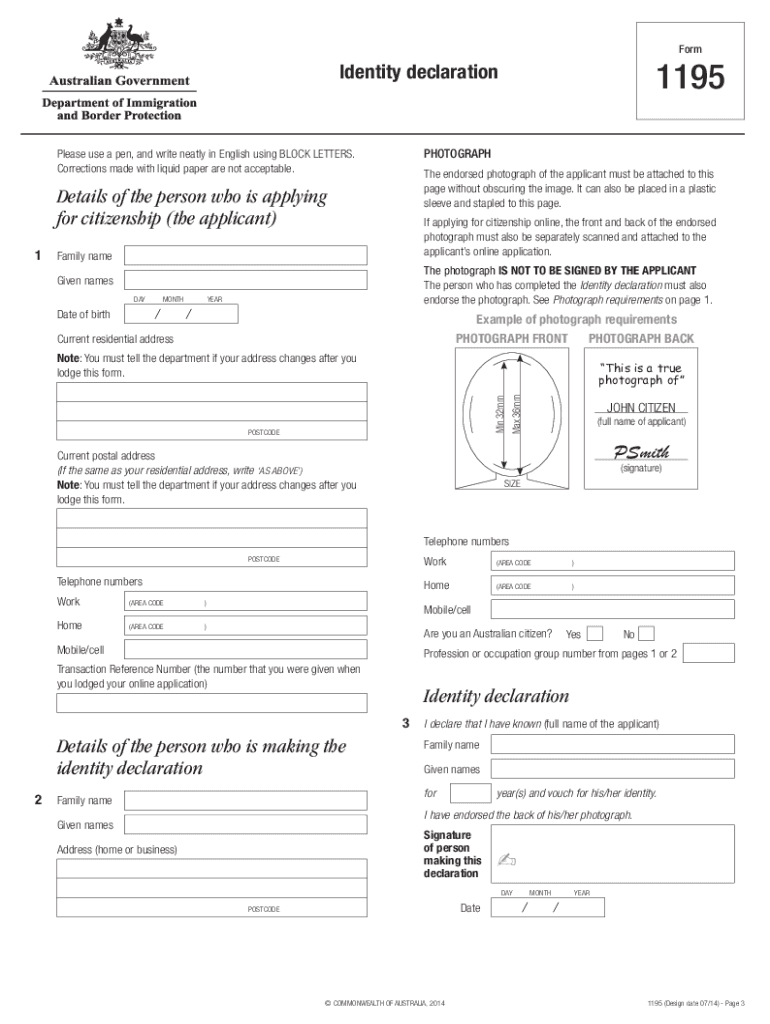
Form 1195 Identity Declaration
Use a Form 1195 Identity Declaration template to make your document workflow more streamlined.
What Form 1195 Identity Declaration does
Form 1195 Identity Declaration records a person’s identity declaration and associated acknowledgement for a business or organizational workflow. The supplied materials do not identify a federal issuing agency, filing deadline, mandatory field list, or form-specific statutory retention period, so those details should be confirmed with the requesting organization or applicable state authority. In signNow, upload the document, review or add fillable fields, assign signers, collect signatures, and retain the completed file with its audit trail. ESIGN and UETA provide the broader U.S. framework for qualifying electronic transactions.
Who uses Form 1195 Identity Declaration
Legal and real estate
Real estate and legal teams can route Form 1195 Identity Declaration alongside contracts, NDAs, consent forms, and related records. Use reusable signNow templates to place identity, signature, date, and acknowledgement fields consistently before sending to each signer.
Regulated business teams
Healthcare, finance, and operations teams can attach the declaration to onboarding, invoice, approval, or consent workflows. Review whether HIPAA, consumer-disclosure, or state requirements apply before collecting personal information electronically.
Business types using the declaration
Form 1195 Identity Declaration can support legal, construction, real estate, healthcare, and enterprise workflows when the requesting organization accepts electronic completion.
Solo legal practitioners can use a reusable declaration template to collect identity information and signatures from clients without coordinating paper exchanges. The practitioner should still confirm whether the requesting authority imposes notarization, witnessing, filing, or retention requirements beyond electronic signing technology. Real estate and construction businesses can attach the declaration to contract or onboarding workflows, route it to the correct parties, and keep the signed copy with its audit trail. State-specific deed, notarization, or recording rules must be checked separately. Healthcare and enterprise operations teams can standardize identity declarations through controlled templates, role-based access, and authenticated invitations. HIPAA-covered workflows require a business associate agreement with signNow and safeguards for protected health information.
These tasks are executed by both individual contributors and centralized administrators depending on organizational policy and required controls.
How the signNow workflow works
Complete Form 1195 Identity Declaration through four focused signNow actions, from document preparation to audit-ready storage.
Upload document: Upload the Form 1195 file to signNow. Prepare fields: Review detected fields and add missing fields. Send for signature: Assign recipients and send signature invitations. Store record: Collect signatures and retain the completed evidence.
 Best ROI. Our customers achieve an average 7x ROI within the first six months.
 Scales with your use cases. From SMBs to mid-market, airSlate SignNow delivers results for businesses of all sizes.
 Intuitive UI and API. Sign and send documents from your apps in minutes.
How the audit trail records signing
signNow records technical evidence around Form 1195 Identity Declaration signing, from authentication through export of the completed record.
Authenticate signer:
Capture timestamp:
Hash document:
Seal document:
Log actions:
Retrieve evidence:
Recommended Form 1195 setup
Configure identity checks, signing evidence, access, encryption, and retention before sending Form 1195 Identity Declaration.
| Setting | Recommendation |
|---|---|
| Authentication method | Email link with optional SMS verification |
| Signature type | Typed, drawn, or click-to-sign eSignature |
| Audit trail and retention | Export completion records and follow applicable retention rules |
| Encryption | TLS 1.2 or 1.3 in transit and AES-256 at rest |
| User provisioning | Assign role-based access through managed team controls |
Security for signed declarations
Transport protection:
Storage protection:
Control reporting:
Security certification:
Electronic records:
Health information:
Platform requirements for signing
Use current Chrome, Firefox, Safari, or Edge on Windows or macOS to upload, complete, and sign Form 1195 Identity Declaration. signNow also provides iOS and Android apps for mobile document access.
Browsers Chrome, Firefox, Safari, and Edge Desktop systems Windows and macOS desktop access Mobile apps iOS and Android signNow apps
Organizations should review managed-device controls, identity authentication, and access provisioning before deployment. Teams needing automated routing can evaluate signNow API access and integrations, while regulated workflows should configure the required agreement, retention, and certificate controls before collecting declarations.



Best practices for record handling
Accurate field review, documented consent, controlled access, and complete audit evidence reduce avoidable disputes around Form 1195 Identity Declaration.
Confirm the source document and instructions
Review fields before sending
Document electronic consent clearly
Archive the complete evidence package
Risks requiring document review
Incomplete declaration
Attribution dispute
Access failure
Scope exclusion
Troubleshooting Form 1195 workflows
Resolve field-detection, signer-access, authentication, compliance, plan, and audit-evidence questions before relying on a completed Form 1195 Identity Declaration.
If the uploaded Form 1195 Identity Declaration is not recognized, confirm the file is readable, then use signNow’s editor to place fields manually. Business includes templates and audit trails, while Business Premium adds bulk send when multiple prepared copies require distribution.
A signer can complete Form 1195 Identity Declaration through the email invitation without creating an account when the workflow permits guest signing. Add SMS verification or stronger authentication when the identity declaration contains sensitive personal information or organizational policy requires it.
The Business plan is listed at $8/user/month with annual billing and includes legally binding eSignatures and audit trails. It includes 100 signature invites per user each year; overage fees may apply, so confirm expected volume before deployment.
For healthcare workflows containing protected health information, signNow identifies HIPAA compliance as requiring a business associate agreement. Configure the agreement and access controls before routing Form 1195 Identity Declaration with protected health information.
ESIGN and UETA generally recognize electronic signatures when intent, consent, attribution, and record retention are established. Consumer-facing records also require the disclosures described in 15 U.S.C. §7001(c), including paper access and consent withdrawal procedures.
After completion, signNow captures the signing event in an audit trail with timestamps, IP information, and action history. Export the completed document and certificate of completion, then retain them under the applicable business or industry rule.
Key performance indicators that demonstrate SignNow's proven track record.
BE READY TO GET MORE
Get this form now!

If you believe that this page should be taken down, please follow our DMCA take-down process.