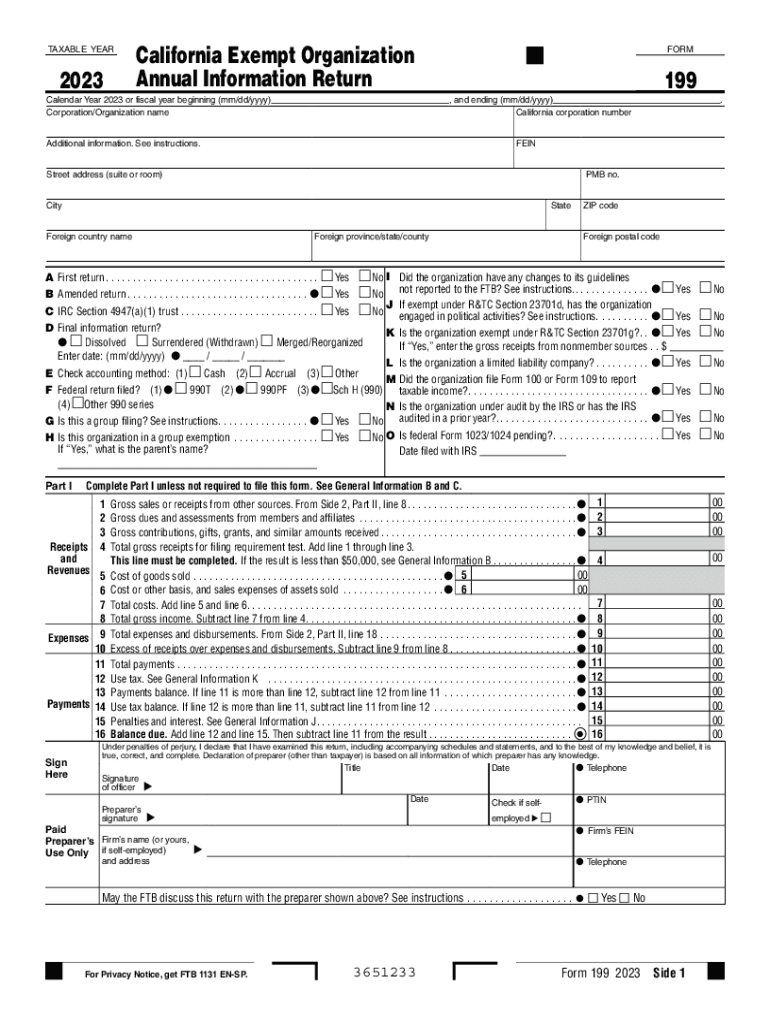
Form 199 California Exempt Organization Annual Information Return
Use a Form 199 California Exempt Organization Annual Information Return , Form 199, California Exempt Organization Annual Information template to make your document workflow more streamlined.
What Form 199 is and how it works
Form 199 is California’s Exempt Organization Annual Information Return for organizations required to provide annual information to the state. The return records identifying information and financial details for the organization’s reporting period, then moves through review, authorization, signature, and filing. A preparer should reconcile the figures to approved books and records, confirm the organization’s filing obligation and deadline under current California instructions, and preserve the submitted return. signNow can route the prepared document for electronic review and signature while retaining the completed PDF and audit trail.
How the Form 199 workflow works
Form 199 moves from prepared organizational information to authorized review, signature, completion, and secure record storage in signNow.
Upload form: Upload the prepared Form 199 PDF to signNow. Prepare fields: Auto-detect fillable fields and place missing fields. Route for signature: Assign review and signature fields to authorized officers. Archive record: Store the completed return with its audit trail.
Steps to complete Form 199 online
Prepare the California organization’s information first, then use signNow to route Form 199 through review, signature, and record storage.
Upload Form 199:
Upload the completed Form 199 PDF. Check form fields:
Let signNow detect fields, then add missing fields. Assign signers:
Assign review and signature fields to authorized officers. Send for signing:
Send the return and monitor completion status. Store records:
Download the signed PDF and audit trail.
Why teams look for DocuSign alternatives
Organizations seek alternatives when they need different pricing models, stronger native automation, simpler bulk affidavit workflows, or more flexible identity-verification options than those available in a legacy envelope-based vendor.

 Best ROI. Our customers achieve an average 7x ROI within the first six months.
 Scales with your use cases. From SMBs to mid-market, airSlate SignNow delivers results for businesses of all sizes.
 Intuitive UI and API. Sign and send documents from your apps in minutes.
Key features for Form 199 workflows
signNow connects Form 199 preparation, authorized review, electronic signature, and audit-ready storage in one documented workflow.
Form preparation
Upload the prepared Form 199 PDF and use detected fields as a starting point for assigning organization-specific information, review fields, and signatures.
Signer routing
Route Form 199 to an authorized officer without requiring every participant to create a separate document workflow.
Audit trail
Capture timestamps, signer activity, and completion history alongside the signed return for internal review and recordkeeping.
Mobile signing
Use signNow mobile apps so authorized personnel can review and sign Form 199 from iOS or Android devices.
Record storage
Store the signed Form 199 and its audit evidence together, helping staff locate the record during later internal review.
Data protection
Apply access controls and encrypted transport when handling organizational, financial, or personally identifying information in the return.
Recommended Form 199 workflow settings
Use controlled signer access, an exportable audit trail, and a retention policy that matches the organization’s California and federal recordkeeping obligations.
| Setting | Recommendation |
|---|---|
| Authentication method | Email verification with SMS OTP |
| Signature type | Typed or drawn electronic signature |
| Audit trail | Capture timestamps, IP addresses, and actions |
| Document retention | Retain according to organizational policy and tax counsel |
| Encryption | TLS 1.2/1.3 in transit, AES-256 at rest |
Platform requirements for Form 199
Form 199 can be prepared and signed through signNow using Chrome, Firefox, Safari, or Edge on Windows and macOS. Mobile access is available through iOS and Android apps, with TLS 1.2 or later protecting the connection.
Browsers Chrome, Firefox, Safari, Edge Operating systems Windows, macOS, iOS, Android Secure access TLS 1.2 or later connection
Organizations using managed devices should enforce current browser versions, screen-lock policies, and account controls before routing Form 199. Administrators can also evaluate SSO provisioning, API access, and certificate or long-term validation requirements when the return is part of a larger compliance archive.



Best practices for preparing Form 199
Accurate source records, controlled approval, and complete retention make Form 199 easier to review and defend.
Reconcile figures before routing
Separate preparation and approval
Archive the complete record
Confirm filing requirements first
Form 199 preparation challenges
Transcribing Form 199 financial figures from accounting records can introduce inconsistent totals or omitted revenue and expense categories. Routing the return to an unauthorized signer can delay completion or require the organization to repeat its approval process. Using an outdated template may leave required Form 199 information incomplete or inconsistent with current California filing instructions. Saving only the signed PDF without its audit trail removes useful evidence about identity, timing, and signing activity.
Form 199 processing timeline
Processing time depends on preparation, internal review, signer availability, and the filing deadline confirmed under current California instructions.
Prepare the return
Deliver to signers
Complete signer review
Complete and archive
Managing Form 199 teams and permissions
Workspace administrators can limit who prepares, reviews, sends, and signs Form 199. Shared templates help staff begin with consistent field placement while preserving organization-specific information for each reporting period. Delegated sending keeps routine routing with approved team members without giving every user administrative access., Finance teams can connect Form 199 approvals to accounting or storage processes, while outside tax professionals prepare or review the return. signNow audit trails document signer actions, and role-based access helps keep organizational financial information visible only to assigned participants.
Form 199 troubleshooting questions
These answers address field detection, signer routing, audit evidence, and retention decisions for a Form 199 workflow.
If Form 199 fields do not auto-detect, upload a clear PDF and place text, date, and signature fields manually. signNow’s Business plan includes templates and audit trails, but the preparer remains responsible for matching fields to California’s current form.
If the wrong officer received the request, void or correct the workflow before completion and resend it to the authorized representative. Use role-based permissions to limit who can edit or send the organization’s Form 199.
If a signer cannot open the request, confirm the email address, resend the invitation, or provide a controlled signing link. Business Premium adds quick invite links, while all paid plans include mobile apps for supported devices.
If the return needs multiple officers, assign each person only the fields they must complete or sign. signNow records signer actions and timestamps in the audit trail, supporting evidence of the completed electronic transaction under ESIGN and UETA.
If the organization handles protected health information alongside the return, HIPAA compliance requires a business associate agreement with signNow. Form 199 itself does not establish a HIPAA retention requirement; apply the rule to records containing PHI.
If the completed record is missing, retrieve the signed PDF and audit trail from the signNow workspace or export location. Keep the record under the organization’s retention policy and verify California filing requirements separately with the responsible authority.
Key performance indicators that demonstrate SignNow's proven track record.
BE READY TO GET MORE
Get this form now!

If you believe that this page should be taken down, please follow our DMCA take-down process.