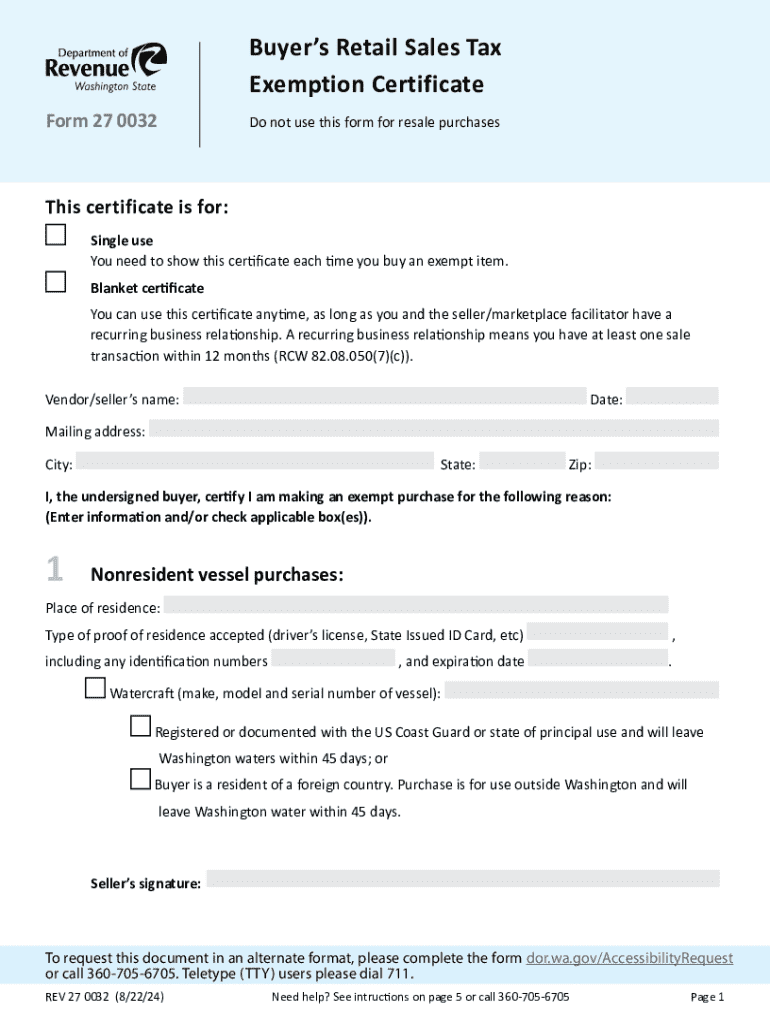
Buyers Retail Sales Tax Exemption Certificate Form 27 0032
Use a Buyers Retail Sales Tax Exemption Certificate Form 27 0032 template to make your document workflow more streamlined.
What Form 27 0032 does
Buyers Retail Sales Tax Exemption Certificate Form 27 0032 records a buyer’s claim that a purchase qualifies for sales-tax exemption under the applicable state rule. The buyer supplies the requested business and exemption information, signs the certificate, and gives it to the seller for transaction records. The seller remains responsible for determining whether the certificate is sufficient and whether the purchase qualifies. signNow can upload the form, detect fillable fields, route it to the authorized signer, and preserve the signed PDF with an audit trail.
Who uses this sales tax certificate
Retail buyers
Retail buyers use the certificate to document an exemption claim when purchasing qualifying goods for an eligible business purpose. They should confirm the form’s required purchaser information, exemption basis, and signature before giving it to the seller.
Sellers and tax teams
Sellers and tax teams retain the completed certificate with transaction records, review whether the stated exemption applies, and provide it to auditors or taxing authorities when requested. The certificate supports documentation but does not replace state-specific tax rules.
Teams that manage certificate workflows
Purchasing administrators at retail businesses use shared signNow templates to standardize buyer details, route Form 27 0032 to authorized personnel, and restrict editing after required fields are completed. Admin controls help separate template maintenance from day-to-day sending and review responsibilities. Tax and accounts-payable teams use delegated sending and completed-document access to connect each certificate with purchase records. They can organize signer roles, maintain a consistent workflow, and retrieve the signed PDF and audit trail when reviewing an exemption claim.
Complete and send Form 27 0032
Use signNow to prepare Buyers Retail Sales Tax Exemption Certificate Form 27 0032, route it to the authorized buyer, and preserve the completed record.
Upload form:
Upload the completed Form 27 0032 PDF. Check fields:
Review detected fields and add missing fields. Set signer:
Assign the buyer or authorized signer. Send request:
Send the certificate for electronic signature. Store records:
Download the signed certificate and audit trail.
How the certificate workflow works
Form 27 0032 moves from buyer information to authorized signature, then into a preserved transaction record.
Upload: Upload the certificate PDF. Prepare: Review fields and recipients. Route: Send Form 27 0032. Complete: Sign and archive evidence.
 Best ROI. Our customers achieve an average 7x ROI within the first six months.
 Scales with your use cases. From SMBs to mid-market, airSlate SignNow delivers results for businesses of all sizes.
 Intuitive UI and API. Sign and send documents from your apps in minutes.
Ways to send and sign the certificate
- Use the signNow web app when preparing the buyer’s Form 27 0032 on a desktop, reviewing fields, assigning the authorized signer, and preserving the completed certificate with its audit trail.
- Use the signNow mobile app when a buyer or purchasing employee must review and sign Form 27 0032 from an iOS or Android device during a business purchase workflow.
- Use kiosk mode when an authorized buyer signs the certificate on a shared business device under controlled supervision, with the seller maintaining responsibility for the transaction record.
- Use a shareable signing link when the seller needs to distribute the same Form 27 0032 workflow without entering each recipient manually, while still collecting the signer’s completed record.
What the Form 27 0032 audit trail records
The audit trail connects the buyer’s signature to the delivered certificate, recorded actions, completion status, and retained transaction evidence.
Signer authentication:
Timestamp capture:
Document history:
Tamper evidence:
Completion record:
Audit export:



Protect certificate data in signNow
Transport encryption:
Stored encryption:
Security certification:
Information security:
Privacy controls:
Signature framework:
Platform requirements for completing the certificate
Buyers Retail Sales Tax Exemption Certificate Form 27 0032 can be prepared through signNow’s browser-based workflow using Chrome, Firefox, Safari, or Edge on Windows or macOS. signNow also provides mobile apps for iOS and Android, allowing a buyer or seller to review and sign from a supported phone or tablet.
Browsers Chrome, Firefox, Safari, and Edge Desktop systems Windows and macOS desktop access Mobile access iOS and Android mobile apps
Organizations should use managed Windows, macOS, iOS, or Android devices when the certificate contains business or tax information. Administrators can control access through signNow user management, connect records through supported integrations or API options, and retain the completed certificate with its audit trail according to the applicable state policy.
Retain and protect certificate records
A completed exemption certificate is useful only when its connection to the underlying purchase remains clear and the record can be reproduced accurately.
Apply the governing retention rule
Export the audit trail
Archive the signed original securely
Review changed exemption information
Retention periods for related records
Form 27 0032 is a state sales-tax certificate, so retention depends on the seller’s jurisdiction and the records connected to the purchase.
Three years from filing
Six years when understated
Six years for PHI
Three years for payroll
Longer period when required
Risks of an incomplete certificate
Missing certificate
Incorrect basis
Incomplete fields
Unsigned record
Troubleshoot Form 27 0032 workflows
Resolve field, signer, evidence, and retention questions before relying on a completed Buyers Retail Sales Tax Exemption Certificate Form 27 0032.
Upload the original Form 27 0032 PDF again and confirm its file format. signNow’s field detection can identify fillable areas, but you should review every detected field before sending because an exemption certificate may contain state-specific fields that require manual placement.
Open the recipient settings and confirm that the buyer’s email address is correct. The signNow Business plan includes legally binding eSignatures, templates, and audit trails, so the signer can complete the certificate without changing the seller’s prepared fields.
Use signNow’s audit trail to verify delivery, access, timestamps, and completed actions. ESIGN and UETA recognize electronic signatures when intent, consent, attribution, and record retention requirements are satisfied; retain the certificate and audit trail together.
Check whether the buyer’s exemption basis and purchasing activity actually match the applicable state rule. signNow can document the signed representation, but it does not determine whether a state tax exemption is legally available.
Export the completed PDF and audit trail from signNow, then store them with the related invoice or purchase order. Apply the seller’s state retention rule because no single federal period governs every sales-tax exemption certificate.
If several buyers need the same certificate, Business Premium includes bulk send. For one transaction, prepare and send an individual request so the buyer’s information and exemption basis remain specific to that purchase.
Key performance indicators that demonstrate SignNow's proven track record.
BE READY TO GET MORE
Get this form now!

If you believe that this page should be taken down, please follow our DMCA take-down process.