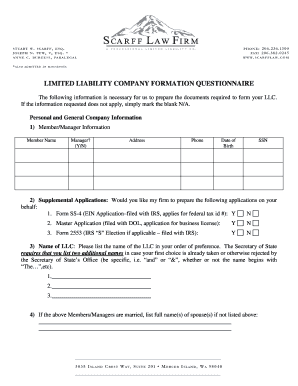
LLC Formation Questionnaire
Use a Llc Formation Questionnaire template to make your document workflow more streamlined.
What the LLC Formation Questionnaire does
The LLC Formation Questionnaire gathers the ownership, management, business-purpose, address, and tax details needed to prepare an LLC’s formation documents and state filing information. It is an information-gathering document, not itself a certificate of organization or a filing receipt from a Secretary of State. With signNow, a sender uploads the questionnaire, reviews detected fillable fields, assigns fields to organizers or members, and sends it for completion and eSignature. The completed record and audit trail can then be retained with the operating agreement and state filing materials.
Who uses an LLC formation questionnaire
Founders and members
Founders and members use the questionnaire to provide entity names, principal addresses, ownership percentages, management choices, business purpose, and tax details. Formation staff can route signature fields to the people responsible for confirming those facts, then retain the executed record with the operating agreement and state filing materials.
Formation professionals
Attorneys, accountants, and registered-agent teams use the questionnaire as an intake record before preparing Articles of Organization, operating agreements, EIN applications, and state-specific submissions. signNow templates, role assignments, and audit trails help separate drafting responsibility from the client’s factual approval.
How to complete the questionnaire
Use this sequence to collect entity details, signatures, and evidence without losing the connection between the questionnaire and the LLC formation file.
Upload:
Upload the LLC Formation Questionnaire to signNow. Check fields:
Review detected fields and correct their assignments. Assign signers:
Add organizers, members, or managers as signers. Send:
Send the questionnaire through email or a link. Archive:
Review the completed record and audit trail.
Platform requirements for completion
Open the LLC Formation Questionnaire in Chrome, Firefox, Safari, or Edge on Windows or macOS. SignNow also provides mobile apps for iOS and Android, allowing organizers and members to review assigned fields and sign from supported mobile devices.
Browsers Chrome, Firefox, Safari, Edge Computers Windows and macOS desktops Mobile iOS and Android mobile apps
For a managed formation process, confirm that devices can reach signNow, that administrators can assign the correct signer roles, and that the organization’s storage and identity policies permit retaining the completed questionnaire and audit trail. Test any API, SSO, or integration configuration before routing live entity information.
 Best ROI. Our customers achieve an average 7x ROI within the first six months.
 Scales with your use cases. From SMBs to mid-market, airSlate SignNow delivers results for businesses of all sizes.
 Intuitive UI and API. Sign and send documents from your apps in minutes.
Features for LLC formation questionnaires
signNow connects the questionnaire’s participant fields, signing sequence, evidence, and storage workflow so formation teams can manage one controlled record.
Field detection
Upload the LLC Formation Questionnaire and review signNow’s detected fields before assigning names, ownership percentages, addresses, management choices, and signature fields to the correct participants.
Signer roles
Assign organizer, member, manager, and reviewer roles so each person completes only the information required for the formation package, reducing omissions and conflicting entries.
Remote completion
Send the questionnaire by email or signing link, allowing organizers and members to complete separate sections without coordinating paper copies or office appointments.
Audit evidence
Capture the final questionnaire with a certificate of completion and audit trail, preserving evidence of who acted, when they acted, and how the document changed.
Reusable templates
Use reusable templates for recurring LLC formations while updating state-specific provisions, ownership structures, and filing instructions before each new transaction.
Mobile access
Complete the questionnaire from signNow mobile apps when organizers review entity details away from the office, then return the finished record to the formation file.
LLC questionnaire use cases
Real signNow customer stories illustrate how mobile completion, controlled routing, and compliance-focused workflows can support formation teams.
Real estate founder
Tim Martin, founder of Martin Properties, describes processing and executing documents online while working on mobile or offline. A property-focused formation team can use the same workflow for organizer and member questionnaires.
- Collect entity and ownership details remotely
For a real estate LLC, mobile completion can keep formation information moving between property visits and the office. The questionnaire remains connected to the signed record, while signNow’s audit trail helps the formation team show when each participant completed the assigned fields and signature.
Healthcare founder
John Butler, founder of Fertility Centers of Illinois, cites signNow’s API and compliance focus. A healthcare-related LLC formation workflow can apply controlled access when formation records contain sensitive operational information.
- Route sensitive details through assigned signers
A healthcare organization should separate entity-formation information from patient records and collect only what the formation process requires. Where protected health information is involved, signNow identifies HIPAA compliance as requiring a business associate agreement; the organization must verify its specific workflow and obligations.
Retention periods for related records
The questionnaire itself has no single nationwide retention period; apply the rule attached to the record’s actual tax, employment, health, or operational purpose.
Three years: federal tax records
Six years: material understatement
Six years: HIPAA records
Three years: payroll records
Five years: injury records
Recordkeeping practices for LLC formation
Protect the questionnaire, signed record, and audit evidence through controlled retention, export, and archival procedures.
Apply the state-specific retention rule
Export the audit trail with the record
Restrict sensitive ownership information
Preserve the executed final version
Security for formation records
Encryption in transit:
Encryption at rest:
Independent assurance:
Security certification:
Privacy frameworks:
Protected health information:
Privacy pitfalls in LLC questionnaires
Member addresses, tax identifiers, and ownership percentages can appear in the executed questionnaire and require restricted access throughout review and storage. A missing electronic-consent disclosure may weaken evidence when a consumer signs electronically, especially if the questionnaire includes financial or healthcare information. Sending every field to one recipient can expose another member’s personal information or leave required organizer approvals undocumented. Shared links without suitable authentication can allow an unintended person to complete ownership or management fields in the LLC questionnaire.
Risks of incomplete formation records
State filing delay
Attribution dispute
Reduced enforceability
Conflicting records
Troubleshooting LLC questionnaire workflows
Resolve field, plan, authentication, and evidence questions before sending the LLC Formation Questionnaire to organizers or members.
Business plans include templates, audit trails, and legally binding eSignatures, while Business Premium adds bulk send. Check the selected plan before sending repeated questionnaires to many organizers or members.
Use signNow’s audit trail and certificate of completion to preserve signer identity, timestamps, and document history. ESIGN and UETA establish electronic-signature validity when intent, consent, attribution, and record retention requirements are satisfied.
Business is listed at $8/user/month with annual billing and includes 100 signature invites per user per year. Overages may apply, so review invite usage before distributing many questionnaires.
If fields are not detected correctly, review the uploaded questionnaire and place or adjust text, date, checkbox, and signature fields manually before sending. Confirm every member and organizer field has the correct signer role.
The Business plan includes mobile apps, templates, and audit trails. Business Premium adds kiosk mode and quick invite links; choose the plan according to whether members sign remotely or at an office.
For health information included in an LLC questionnaire workflow, signNow states HIPAA compliance requires a business associate agreement. Confirm that the workflow actually handles protected health information before collecting it.
Key performance indicators that demonstrate SignNow's proven track record.
BE READY TO GET MORE
Get this form now!

If you believe that this page should be taken down, please follow our DMCA take-down process.