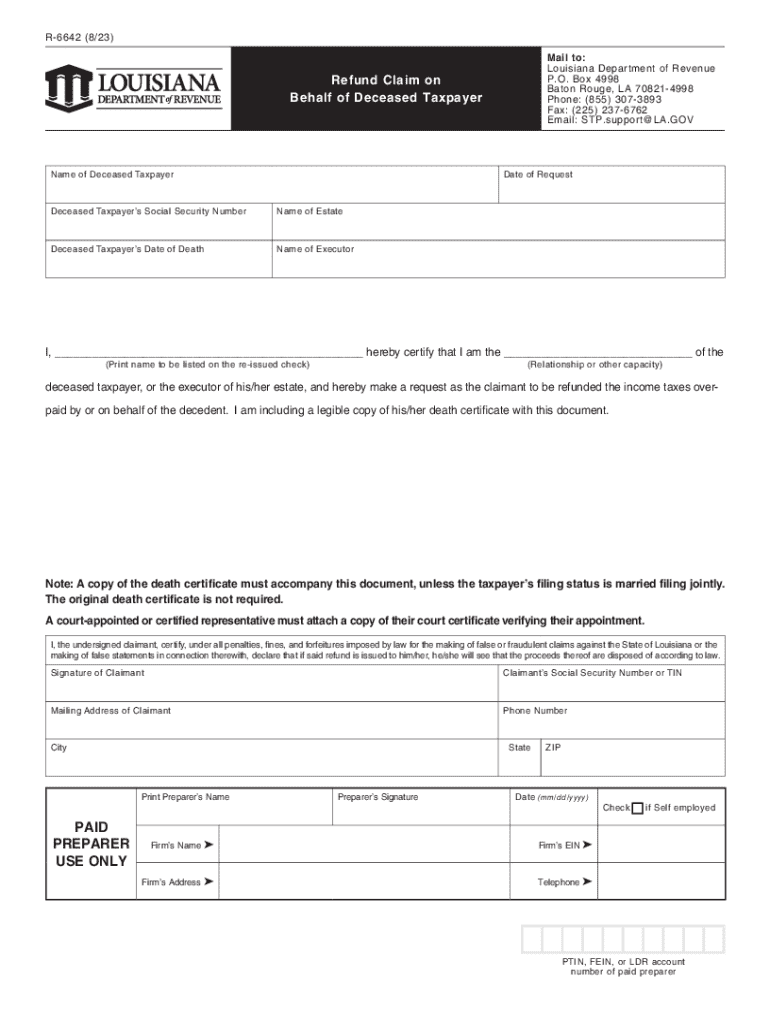
A Certificate Of Death Must Accompany This Document Form
Use a A Certificate Of Death Must Accompany This Document template to make your document workflow more streamlined.
What this certificate document does
A Certificate Of Death Must Accompany This Document Form is a supporting-document instruction or form used when another filing, claim, account request, or estate record requires proof of death. It does not itself establish a universal federal filing deadline or replace the issuing jurisdiction’s certified death certificate. The sender should attach the correct certificate, verify the recipient’s authority, and follow the receiving organization’s submission rules. With signNow, the sender can upload the package, review or add fields, route it to authorized signers, and retain the completed record with its audit trail. State law and the receiving institution determine whether an electronic copy is acceptable.
Who uses this certificate form
Estate and probate
Probate attorneys and estate administrators use the certificate to support probate petitions, beneficiary changes, account closures, and other post-death records. They should confirm the receiving court, institution, or fiduciary accepts electronic copies and should avoid sending unrelated personal information.
Claims and accounts
Insurers, banks, and benefits administrators may need the certificate to process a claim, release funds, or update ownership records. Their teams should verify authority, apply least-privilege access, and follow the receiving organization’s state-specific submission rules.
Businesses that handle this document
The form is most useful where a death certificate supports a controlled estate, claim, account, or benefits process.
Solo probate attorneys can attach the certificate to estate filings, collect an authorized signature, and preserve a searchable completion record without exchanging multiple paper copies. Insurance agencies can route death-related claim documents to beneficiaries, adjusters, and supervisors while restricting certificate access and retaining the completed package for claim review. Enterprise banks and financial institutions can standardize account-closure or beneficiary workflows through approved templates, role-based permissions, and audit-trail exports for controlled case management.
These tasks are executed by both individual contributors and centralized administrators depending on organizational policy and required controls.
Complete the document in four steps
Prepare the certificate and related document, then use signNow to place fields, route the package, capture signatures, and preserve completion records.
Upload files:
Upload the completed certificate and accompanying document. Check fields:
Review detected fields and add missing fields manually. Add recipients:
Enter authorized recipients and choose signing order. Complete and archive:
Send, monitor completion, and download the audit trail.
 Best ROI. Our customers achieve an average 7x ROI within the first six months.
 Scales with your use cases. From SMBs to mid-market, airSlate SignNow delivers results for businesses of all sizes.
 Intuitive UI and API. Sign and send documents from your apps in minutes.
Set up the death certificate document workflow
Use controlled access, recorded signer intent, and secure storage when preparing this sensitive supporting document.
| Setting | Recommendation |
|---|---|
| Authentication method | Email verification with optional SMS OTP |
| Signature type | Click-to-sign with signer intent recorded |
| Audit trail | Detailed timestamps, IP addresses, and action history |
| Document retention | Retain according to applicable state records policy |
| Encryption and provisioning | AES-256 protection with role-based user access |
What the signNow audit trail records
The audit trail connects signer activity to the final certificate package through identity checks, timestamps, document history, and exportable completion evidence.
Confirm signer identity:
Record each signing event:
Associate the final file:
Protect completed content:
Create signing evidence:
Download the activity record:
Security controls for sensitive certificates
At-rest encryption:
In-transit protection:
Healthcare workflows:
Control certification:
Security certification:
Signer verification:
Privacy and disclosure pitfalls to avoid
Uploading an unredacted death certificate can expose Social Security numbers, addresses, or medical information to recipients without a documented need. Sending the document before confirming the recipient’s authority can disclose sensitive personal information to an estate or claims contact incorrectly. A missing consent or disclosure record can make it difficult to show why electronic delivery was appropriate for a consumer-facing transaction. Shared folders and broad team permissions can allow staff to download or forward the certificate beyond the intended probate, insurance, or financial workflow.
Best practices for completing the document
Accuracy, recipient verification, controlled access, and complete records reduce disclosure and evidentiary problems when this certificate accompanies another document.
Verify recipient authority before sending
Match certificate details to the case
Limit fields and document access
Archive the signed record securely
Timing the certificate workflow
This document has no universal federal processing schedule in the supplied authority; the receiving court, insurer, bank, or agency may set timing rules.
Document preparation
Recipient delivery
Signer turnaround
Completion and archival
Legal standing and document limits
Electronic signatures may satisfy ESIGN and UETA requirements when the signer demonstrates intent, consents to electronic records, can be identified, and the record is retained and reproducible. Those laws exclude wills, certain court filings, and family-law decrees, so state and receiving-institution rules must be checked before electronic submission.

Troubleshoot this document workflow
Resolve field, authentication, retention, and compliance questions before sending a death certificate with its accompanying document.
If the uploaded document has no detectable fields, signNow can still let the sender place signature, date, text, and attachment fields manually before sending the death certificate package.
Business includes templates, audit trails, and legally binding eSignatures at $8 per user monthly when billed annually. Business Premium adds bulk send, which may help repeated estate workflows.
For protected health information, signNow lists HIPAA compliance with a business associate agreement required. Confirm that the workflow, recipients, and storage practices meet the covered entity’s obligations.
The signNow audit trail records actions, timestamps, and signer activity. Export the completed document and certificate of completion together so reviewers can connect the signature event to the final file.
ESIGN and UETA generally recognize electronic signatures when intent, consent, attribution, and record retention are established. Wills, court filings, and other statutory exclusions require separate legal handling.
Business plans include 100 signature invites per user per year, with overage fees. The Site License is usage-based at $1.50 per signature invite and adds SSO and full API access.
Key performance indicators that demonstrate SignNow's proven track record.
BE READY TO GET MORE
Get this form now!

If you believe that this page should be taken down, please follow our DMCA take-down process.