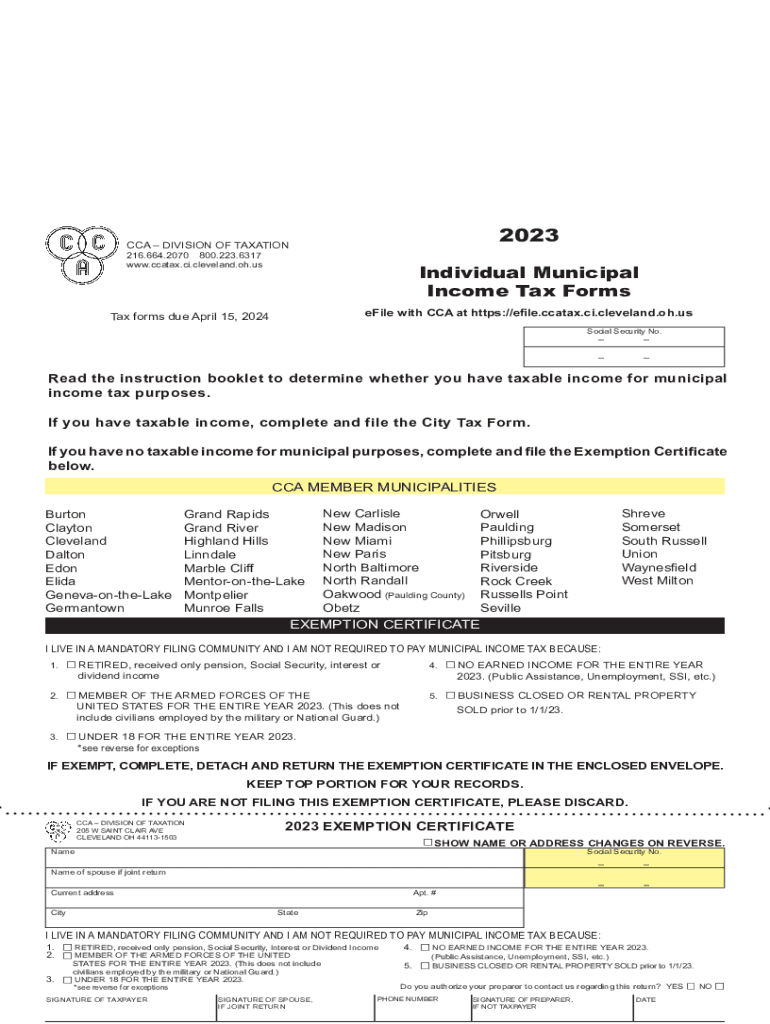
2023ESTIMATE Tax Form Cca Division Of Taxation
Use a 2023ESTIMATE TAX FORM CCA Division Of Taxation template to make your document workflow more streamlined.
What this estimate form does
The 2023ESTIMATE Tax Form Cca Division Of Taxation is a Division of Taxation estimate document identified by that exact form name. The supplied form information does not establish its issuing state, filer categories, required fields, filing deadline, or tax calculation rules, so those details should be confirmed in the original instructions before completion. signNow can support the document workflow by accepting the PDF, detecting fillable fields, routing it to designated recipients, capturing electronic signatures, and retaining the completed file with an audit trail.
Who uses this estimate form
Tax professionals
Tax professionals and Division of Taxation filers use the form to document an estimate, capture required approvals, and retain a signed copy with its audit history.
Business filers
Businesses and individuals preparing this specific estimate can review fields electronically, route it to an authorized signer, and preserve the completed record.
How to complete this estimate
Use this sequence to prepare, route, sign, and retain the 2023ESTIMATE Tax Form Cca Division Of Taxation in signNow.
Upload form:
Upload the original Division of Taxation PDF to signNow. Check fields:
Review detected fields against the source estimate. Assign signers:
Assign recipients and signature fields before sending. Retain record:
Store the signed PDF with its audit trail.
How signNow records this form
The audit trail preserves signer identity, document integrity, and transaction history for each completed 2023ESTIMATE Tax Form Cca Division Of Taxation.
Authenticate signer:
Capture timestamp:
Hash document:
Seal record:
Log activity:
Export evidence:
 Best ROI. Our customers achieve an average 7x ROI within the first six months.
 Scales with your use cases. From SMBs to mid-market, airSlate SignNow delivers results for businesses of all sizes.
 Intuitive UI and API. Sign and send documents from your apps in minutes.
Features that support this form
signNow connects document preparation, signer routing, audit evidence, and controlled storage around the 2023ESTIMATE Tax Form Cca Division Of Taxation workflow.
PDF preparation
Upload the exact estimate PDF and review signNow’s detected fields before assigning recipients, reducing manual field placement errors in the Division of Taxation document.
Signer routing
Route the estimate to designated recipients by email or signing link, keeping the document workflow separate from unrelated business forms and agreements.
Audit trail
Capture signatures, timestamps, action history, and completion evidence in one transaction record for later review of the submitted estimate.
Access control
Use role-based access and separate accounts to control who prepares, reviews, signs, and retrieves the completed tax document.
Mobile signing
Complete the estimate from a desktop browser or signNow mobile app when the authorized signer is working away from the office.
Record retention
Retain the signed PDF and certificate of completion together, subject to the applicable Division of Taxation and tax-record requirements.
Platform requirements for signing
Use signNow through Chrome, Firefox, Safari, or Edge on Windows or macOS. signNow also provides mobile applications for iOS and Android, allowing the 2023ESTIMATE Tax Form Cca Division Of Taxation to be reviewed and signed from supported mobile devices.
Browsers Chrome, Firefox, Safari, Edge Desktop systems Windows and macOS desktops Mobile access iOS and Android mobile apps
Organizations should manage access through named user accounts and appropriate permissions. Teams requiring API access, SSO provisioning, managed devices, or specialized certificate configuration should confirm availability for their signNow plan and internal records policy before deployment.
Signer authentication options
Email authentication:
SMS verification:
PKI certificates:
X.509 credentials:
ID verification:
Two-factor authentication:
Recommended workflow setup
Prepare the Division of Taxation estimate with named users, controlled signing, and a reproducible record of completion.
| Setting | Recommendation |
|---|---|
| Authentication and provisioning | Named accounts with SMS verification |
| Signature type | Typed or drawn electronic signature |
| Audit trail | Capture timestamps and completion history |
| Document retention | Retain signed PDF and certificate together |
| Encryption and access | Use TLS and role-based permissions |
Best practices for completing this form
Accurate source verification, field review, controlled access, and complete records reduce errors when preparing this specific Division of Taxation estimate.
Verify the source form and instructions
Review detected fields before sending
Preserve the completed record
Restrict access and attribution
Privacy controls for this form
Personal tax and business information can remain visible to every recipient unless document access and role permissions are configured before sending. A signer may complete the form without documented electronic consent if the workflow omits the required disclosure and consent step. Forwarded signing links can expose the form to an unintended person when recipient identity is not verified with an additional authentication method. Shared administrator accounts weaken attribution because the audit trail may not identify which employee uploaded, edited, or sent the form.
Legal standing for this form
An electronic signature on this estimate can be admissible when the signer demonstrates intent, consents to electronic records, can be identified, and the completed record remains reproducible. ESIGN, 15 U.S.C. chapter 96, and applicable state UETA or ESRA rules support electronic transactions, but they do not replace Division of Taxation filing requirements.

Key performance indicators that demonstrate SignNow's proven track record.
Questions about completing this form
These answers address signNow workflow questions and the legal record requirements relevant to the 2023ESTIMATE Tax Form Cca Division Of Taxation.
Upload the original PDF again and inspect the detected fields before sending. signNow’s Business plan includes templates and audit trails, but field detection still requires human review against the 2023ESTIMATE Tax Form Cca Division Of Taxation source.
A signer can usually open the request from the email invitation without a signNow account. If stronger attribution is required, configure SMS authentication or another available signer-authentication method before delivery.
The Business plan is listed at $8 per user per month with annual billing and includes 100 signature invites per user per year. Confirm current overage terms before sending high-volume tax workflows.
Electronic records can satisfy ESIGN and UETA requirements when intent, consent, attribution, and reproducibility are established. For consumer-facing records, review the disclosure requirements in 15 U.S.C. §7001(c).
Keep the signed PDF and certificate of completion with the audit trail. The applicable tax authority’s instructions and federal or state retention rules control how long this estimate must be preserved.
Use separate named accounts, review recipient addresses, and limit retrieval permissions. signNow provides audit trails, while the filer remains responsible for verifying the form, signer, and destination before submission.
BE READY TO GET MORE
Get this form now!

If you believe that this page should be taken down, please follow our DMCA take-down process.