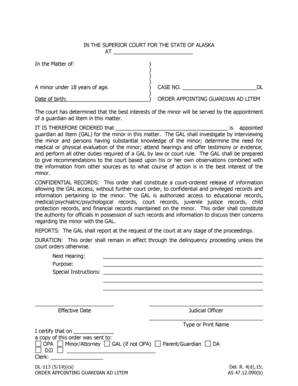
Dl 113 Order Appointing Guardian As Litem 514 Childrens Proceedings Forms
Use a DL 113 Order Appointing Guardian As Litem 514 Pdf Fill In Childrens Proceedings Forms template to make your document workflow more streamlined.
What the DL 113 appointment form does
Dl 113 Order Appointing Guardian As Litem 514 Childrens Proceedings Forms is a court-related document used to record the appointment of a guardian ad litem in children’s proceedings. The form identifies the appointment and supports the case record through the required signatures and filing process. In signNow, an authorized user uploads the form, reviews detected fillable fields, assigns recipients, and sends it for signing. The completed PDF and audit trail can then be retained together. Court acceptance, filing, service, and any required in-person steps remain governed by applicable court rules and state law.
Who uses this appointment form
Family law counsel
A guardian ad litem appointment workflow can involve counsel, court staff, appointed guardians, and other authorized participants. Use the uploaded DL 113 form to preserve the appointment record, route required signatures, and retain the completed document with its signing history.
Child welfare teams
A child-welfare or juvenile-court practice may coordinate appointment paperwork across attorneys, guardians, and administrators. Role-based routing helps identify each participant, while the completed DL 113 record remains associated with its audit trail for internal case administration.
Features for completing the DL 113 form
signNow connects form preparation, signer routing, authentication, and recordkeeping for the DL 113 appointment workflow.
Field detection
Upload the DL 113 form and review detected fields before sending. This reduces manual recreation of appointment details and helps preserve the original court-form structure during electronic completion.
Signer routing
Route the form to the guardian ad litem, counsel, or other authorized signer in the required sequence. Signers can review assigned fields without editing unrelated case information.
Audit trail
Capture signer actions, timestamps, and access details in an audit trail. The record helps counsel explain how the completed appointment form was handled after signing.
Signer verification
Use SMS authentication when the appointment workflow requires stronger signer attribution. A one-time code adds an additional access check before the signer completes assigned fields.
Document storage
Keep the completed form and certificate of completion together. This gives the legal team a single record for internal case files and later document review.
Mobile access
Complete the workflow from a desktop or supported mobile app. Counsel and authorized participants can review the DL 113 form without requiring every step to occur in person.
How to complete the DL 113 form
Use this sequence to prepare the specific appointment form, verify its fields, route it to authorized participants, and preserve the completed signing record.
Upload form:
Upload the DL 113 source document. Check fields:
Review detected fields and appointment details. Route document:
Assign each authorized signer and recipient. Complete record:
Send, sign, and export the record.
 Best ROI. Our customers achieve an average 7x ROI within the first six months.
 Scales with your use cases. From SMBs to mid-market, airSlate SignNow delivers results for businesses of all sizes.
 Intuitive UI and API. Sign and send documents from your apps in minutes.
Recommended DL 113 workflow setup
Configure the appointment workflow around signer identity, document integrity, controlled retention, and the receiving court’s filing requirements.
| Setting | Recommendation |
|---|---|
| Authentication method | SMS OTP for assigned signers |
| Signature type | Electronic signature with signer intent |
| Audit trail | Export with completed DL 113 PDF |
| Document retention | Follow court and state schedules |
| Encryption | TLS 1.2/1.3 and AES-256 |
Signer authentication for this court form
PKI authentication:
X.509 certificates:
Two-factor authentication:
SMS OTP:
ID verification:
Certificate evidence:
What the DL 113 audit trail records
The audit trail documents signer access and document events separately from the steps used to prepare and send the court form.
Authenticate signer:
Capture timestamp:
Record document state:
Seal activity history:
Export audit trail:
Archive evidence:
Platform requirements for completing DL 113
Complete the DL 113 form through Chrome, Firefox, Safari, or Edge on Windows or macOS, or use signNow mobile apps on iOS and Android. TLS 1.2/1.3 protects data in transit while the form moves between authorized participants.
Browser support Chrome, Firefox, Safari, and Edge on Windows or macOS Mobile apps signNow mobile apps for iOS and Android Transport security TLS 1.2/1.3 protects data in transit
Legal teams should use managed devices, current browser versions, and controlled accounts when handling child-related court records. Enterprise deployments can connect signNow through API access, SSO provisioning, or named integrations, subject to the organization’s security configuration and the court’s filing requirements.
Challenges when handling the DL 113 form
Child-related personal information can be exposed when the completed DL 113 form is emailed without controlled access or recipient verification. An incorrect signer sequence can leave the appointment record incomplete or associate a signature with the wrong participant. Court-specific filing instructions may require paper delivery or additional authentication that an electronic signing workflow does not provide. Unexported audit evidence can make it harder to reconstruct who accessed, signed, or completed the appointment document.
Best practices for DL 113 records
Careful field review, controlled routing, audit-trail export, and authority-based retention reduce uncertainty when managing this court-related appointment record.
Review every appointment field
Export the audit trail
Apply the governing schedule
Protect sensitive case information
Legal standing and court acceptance
Electronic signing can support intent, attribution, and reproducible records under the ESIGN Act, 15 U.S.C. ch. 96, and UETA, but those laws do not guarantee acceptance of an official court form. Court orders, filings, and family-law decrees are exceptions, so verify the applicable court’s rules before relying on electronic submission.

Troubleshooting the DL 113 workflow
Resolve field, authentication, plan, and filing questions before treating the completed DL 113 form as part of the official case record.
Upload the source DL 113 document again, then review signNow’s detected fields before sending. Auto-detection does not replace legal review: confirm names, appointment language, signature locations, and any court-specific instructions against the required filing version.
The Business plan includes templates and audit trails at $8 per user per month with annual billing. If the workflow needs bulk sending, Business Premium adds that capability at $15 per user per month annually.
signNow supports ESIGN and UETA requirements, including intent, attribution, and record retention. Those statutes do not override court rules or exclusions for official court filings, so confirm whether the receiving court accepts electronic signatures.
Use SMS one-time-password authentication when email access alone does not provide sufficient signer assurance. For a higher-risk matter, configure the available authentication controls and document the selected method in the case file.
The Business plan provides audit trails, while Site License adds HIPAA and 21 CFR Part 11 as add-ons. Choose controls based on the information handled and the organization’s documented security requirements.
A signNow completion record does not establish that a court accepted or filed the DL 113 form. Export the signed document and audit trail, then follow the applicable court’s submission, service, and retention instructions.
Key performance indicators that demonstrate SignNow's proven track record.
BE READY TO GET MORE
Get this form now!

If you believe that this page should be taken down, please follow our DMCA take-down process.