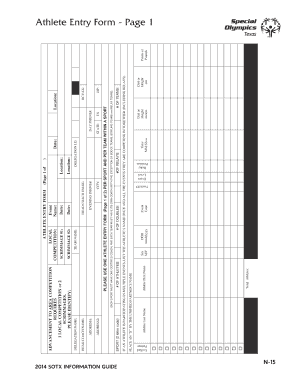
Athlete Entry Form Special Olympics Texas Sotx
Use a Athlete Entry Form pdf Special Olympics Texas Sotx template to make your document workflow more streamlined.
What this Texas athlete form does
The Athlete Entry Form Special Olympics Texas Sotx is a participation document used to collect and confirm information required for an athlete’s Special Olympics Texas process. In signNow, an administrator uploads the form, reviews or adds fillable fields, assigns the athlete and any required representative, and sends it for electronic signature. Recipients can complete it from a supported device, while signNow records signing events and preserves the finished document. The form’s official instructions, required approvals, and submission requirements remain controlling, so the program should confirm them before relying on an electronic workflow.
Who uses this athlete entry form
State programs
Special Olympics Texas programs can use the Athlete Entry Form to organize athlete intake, acknowledgments, and signature collection in one controlled workflow.
Athlete households
Athletes, parents, guardians, coaches, and event administrators can review the same form remotely, reducing paper handling and preserving a completed record.
How the athlete form workflow works
The signNow workflow moves the Athlete Entry Form Special Olympics Texas Sotx from an uploaded document to a completed, traceable record.
Upload: Upload the Athlete Entry Form PDF. Prepare: Add fields for each participant and signer. Route: Send it to the designated recipients. Complete: Store the signed form with its audit trail.
Steps for completing the athlete form
Prepare the exact Athlete Entry Form Special Olympics Texas Sotx version, route it to the correct people, and retain the completed record.
Upload form:
Upload the current form PDF. Check fields:
Review detected fields and add missing fields. Assign signers:
Assign athlete, guardian, and administrator roles. Track signing:
Send the form and monitor completion.
 Best ROI. Our customers achieve an average 7x ROI within the first six months.
 Scales with your use cases. From SMBs to mid-market, airSlate SignNow delivers results for businesses of all sizes.
 Intuitive UI and API. Sign and send documents from your apps in minutes.
Features for athlete entry workflows
signNow organizes the Athlete Entry Form Special Olympics Texas Sotx workflow from document preparation through signature and record completion.
Field placement
Upload the Athlete Entry Form and place signature, initials, date, and required text fields without recreating the document.
Signer routing
Send the completed form to an athlete, parent, guardian, or program representative in a defined signing order.
Reusable template
Use a reusable template when the Texas program collects the same athlete information across multiple events or registration cycles.
Audit trail
Capture timestamps, signer actions, and completion history so administrators can review the form’s signing record.
Mobile signing
Let participants review and sign from a desktop or mobile device when travel or scheduling prevents office visits.
Record storage
Keep the signed Athlete Entry Form and completion record together for program administration and later reference.
Security for athlete entry records
Data encryption:
Transport security:
Stored encryption:
Security certification:
Control framework:
Health information:
Mobile options for athlete forms
Participants can review and sign the Athlete Entry Form Special Olympics Texas Sotx through signNow mobile apps for iOS and Android, including workflows that support offline signing and camera-based document capture.
Mobile apps Android app and iOS app Offline signing Offline signing available in mobile workflows Camera capture Camera capture for paper documents
Administrators should confirm that managed iOS and Android devices have the current signNow application, sufficient storage, and a secure connection before synchronizing completed forms. Offline work should be reconciled promptly so the final record and audit trail remain available to the responsible Texas program.



What the audit trail records
For the Athlete Entry Form Special Olympics Texas Sotx, the audit trail documents who acted, when they acted, and how the completed record was preserved.
Authenticate signer:
Capture timestamps:
Hash document:
Seal record:
Track assignments:
Export audit trail:
Texas rules and document limits
Notarization requirements
Wills and codicils
Family law documents
Real-estate deeds
Athlete entry form troubleshooting
These answers address document preparation, signer access, authentication, privacy, plan limits, and electronic-signature requirements for this Texas athlete form.
Upload the current Athlete Entry Form PDF or template, then use signNow’s field tools to place required signature, date, and text fields. Business includes templates and audit trails at $8/user/month when billed annually; confirm the document version before sending.
If a participant cannot open the invitation, verify the email address, resend the request, or provide a signNow signing link when appropriate. The signer can often complete the form without creating an account, depending on the workflow configured by the sender.
Use SMS authentication or another available signer-authentication control when the program needs stronger identity evidence than an email link. Advanced signer authentication is listed with Enterprise at $30/user/month billed annually; configure it before sending.
The Business plan includes audit trails, while signNow identifies HIPAA compliance as requiring a business associate agreement. Athlete information should be handled according to the program’s privacy policy and applicable Texas requirements.
Business includes 100 signature invites per user per year under the verified subscription note, with overage fees. Business Premium is $15/user/month annually and includes bulk send; select the plan based on the program’s sending volume.
Under ESIGN, electronic signatures generally have legal equivalence in interstate commerce when intent, consent, attribution, and record retention are established. Consumer-facing workflows may require an electronic-record disclosure under 15 U.S.C. §7001(c).
Key performance indicators that demonstrate SignNow's proven track record.
BE READY TO GET MORE
Get this form now!

If you believe that this page should be taken down, please follow our DMCA take-down process.