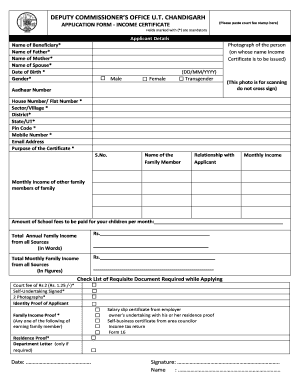
Application To Deputy Commissioner Form
Use a Application To Deputy Commissioner template to make your document workflow more streamlined.
What this application form does
The Application To Deputy Commissioner Form is a structured document used to provide information and obtain authorization for a matter involving a deputy commissioner’s office. Its exact fields, supporting documents, filing destination, and signature requirements depend on the issuing authority’s version and instructions. In signNow, a sender uploads the form, reviews detected fillable areas, assigns each field to the responsible person, and sends it for completion. Signers review the populated record, provide consent and signatures, and receive a completed copy with an audit trail. Confirm agency acceptance before electronic submission.
Business types using this form
The Application To Deputy Commissioner Form suits organizations that need structured submissions, identifiable signers, and retrievable records.
Solo consulting practices use the Application To Deputy Commissioner Form to submit authorization materials, track approvals, and preserve a signed copy without coordinating paper exchanges. Property-management companies use the Application To Deputy Commissioner Form for applicant information, owner approvals, and related records requiring controlled access and documented signer intent. Regional enterprises use the Application To Deputy Commissioner Form through shared templates, delegated sending, and audit trails when multiple departments handle deputy commissioner submissions.
These tasks are executed by both individual contributors and centralized administrators depending on organizational policy and required controls.
Who uses this form workflow
Administrative offices
Consultants and administrative offices can complete the Application To Deputy Commissioner Form, contracts, NDAs, HR forms, invoices, and consent records in controlled signing workflows. Assign each field to its responsible person, capture consent, and preserve the completed record with its audit trail.
Industry teams
Property, healthcare, legal, and construction teams can adapt the workflow to their own records, provided the receiving authority accepts electronic execution and the organization verifies applicable state or agency requirements before submission.
How this form works in signNow
The signNow workflow follows the Application To Deputy Commissioner Form from preparation to signed-record storage without changing the agency’s substantive requirements.
Upload form: Upload the Application To Deputy Commissioner Form to signNow. Assign fields: Review detected fields and assign each responsible signer. Send form: Send the prepared form for secure completion and signature. Store evidence: Store the signed record with its audit trail.
 Best ROI. Our customers achieve an average 7x ROI within the first six months.
 Scales with your use cases. From SMBs to mid-market, airSlate SignNow delivers results for businesses of all sizes.
 Intuitive UI and API. Sign and send documents from your apps in minutes.
Ways to send and sign this form
- Use the signNow web app to upload the Application To Deputy Commissioner Form, review detected fields, assign recipients, and prepare the document before delivery.
- Use the signNow mobile app when an authorized user must review or sign the Application To Deputy Commissioner Form from an iOS or Android device.
- Use kiosk mode when several people complete the Application To Deputy Commissioner Form at one controlled location and each signer needs a guided handoff.
- Create a shareable signing link when the responsible office distributes the same Application To Deputy Commissioner Form through an approved internal channel.
Features for completing this form
signNow organizes the Application To Deputy Commissioner Form from upload through signature, while preserving the document history needed for later review.
Field detection
Upload the Application To Deputy Commissioner Form and use signNow’s field detection to identify areas requiring completion, initials, dates, or signatures before sending it to the responsible parties.
Signer roles
Assign each Application To Deputy Commissioner Form field to a named signer so responsibilities remain clear and incomplete sections can be identified before final submission.
Flexible delivery
Send the form by email or a signing link, allowing authorized recipients to review and complete the document without exchanging physical copies.
Audit trail
Capture timestamps, signer actions, and document history in an audit trail that helps explain how the completed Application To Deputy Commissioner Form was executed.
Reusable templates
Use templates for recurring Application To Deputy Commissioner Form submissions, preserving field placement and reducing repeated preparation work for authorized teams.
Secure records
Store completed forms with their audit records so the signed Application To Deputy Commissioner Form can be retrieved for internal review or an authorized request.
Recommended form workflow setup
Configure the Application To Deputy Commissioner Form around verified signer identity, documented consent, auditability, and secure record handling.
| Setting | Recommendation |
|---|---|
| Authentication method | Email verification with SMS OTP |
| Signature type | Typed or drawn electronic signature |
| Audit trail | Enable complete signer activity history |
| Document retention | Retain signed records under applicable state policy |
| Encryption | Use TLS 1.2/1.3 and AES-256 |
Security for this application form
Transport encryption:
Stored encryption:
Control reporting:
Security certification:
Signature framework:
Health data:
How the audit trail records this form
The audit trail documents the signing event separately from the form’s substantive answers, creating a reviewable record of execution and handling.
Authenticate signer:
Capture timestamp:
Hash document:
Seal document:
Log activity:
Export evidence:
Retention periods for related records
Retention depends on the Application To Deputy Commissioner Form’s purpose and the receiving authority; apply only the record class that actually covers your submission.
Agency-specific period
Three years tax records
Six years tax exception
Six years HIPAA records
Longer state period
Challenges when completing this form
Missing signer assignments can leave required portions of the Application To Deputy Commissioner Form incomplete or attributed to the wrong person. Unclear receiving-office instructions can cause an electronically signed Application To Deputy Commissioner Form to be rejected despite a valid signing event. Incorrect field placement can shift names, dates, or authorization details away from the intended lines on the Application To Deputy Commissioner Form. Failing to retain the signed document and audit trail can weaken evidence of intent, attribution, and the completed submission history.
Troubleshooting this form workflow
Use these answers to resolve preparation, signer-identity, plan, and acceptance questions before submitting the Application To Deputy Commissioner Form.
Upload the original Application To Deputy Commissioner Form as a PDF or supported document, then check every detected field manually. signNow’s field detection can accelerate preparation, but the sender remains responsible for confirming labels, signer assignments, and required entries.
The Business plan includes legally binding eSignatures, templates, audit trails, and mobile apps at $8/user/month when billed annually. If this Application To Deputy Commissioner Form requires bulk sending, Business Premium adds that capability at $15/user/month annually.
ESIGN and UETA generally recognize electronic signatures when intent, consent, attribution, and record retention are established. For a government submission, confirm the receiving office’s instructions because a specific agency or state rule may require another signing method.
Use signNow’s signer authentication options, including email verification or SMS OTP, and retain the audit trail with the completed form. Stronger identity verification may be appropriate when the receiving office requires evidence beyond email attribution.
Review the completed document before sending it onward. signNow can preserve the signed copy and certificate of completion, but it does not determine whether the Application To Deputy Commissioner Form contains every agency-required answer.
signNow’s HIPAA compliance applies when a required business associate agreement is in place, while SOC 2 Type II and ISO 27001 address platform controls. Neither certification replaces a government office’s own filing, privacy, or retention requirements.
Key performance indicators that demonstrate SignNow's proven track record.
BE READY TO GET MORE
Get this form now!

If you believe that this page should be taken down, please follow our DMCA take-down process.