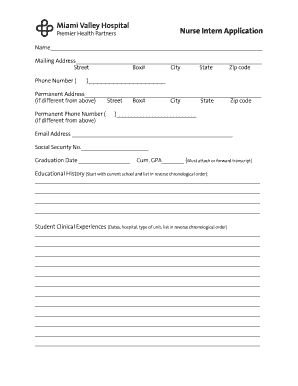
Mvh Nursing Internship Form
Use a Mvh Nursing Internship Form template to make your document workflow more streamlined.
What the Mvh Nursing Internship Form does
The Mvh Nursing Internship Form records the terms, participants, approvals, and acknowledgments connected with a nursing internship placement. Because the supplied form name does not identify an issuing agency, statutory deadline, or fixed field list, the school or clinical organization should confirm its local requirements before use. In signNow, upload the form, review auto-detected fillable fields, assign student and supervisor responsibilities, send the packet, capture signatures, and retain the completed document with its audit trail. ESIGN and applicable UETA rules provide the U.S. framework for eligible electronic transactions.
Organizations that use the form
The Mvh Nursing Internship Form fits nursing education and clinical placement workflows where several parties must review and sign one internship record.
Nursing schools use the form to coordinate student placement terms, faculty approvals, clinical-site acknowledgments, and signed internship records across education and healthcare teams. Hospitals and outpatient clinics use it to confirm assigned students, supervising personnel, placement conditions, and required acknowledgments before clinical activity begins. Independent clinical educators and enterprise health systems use it to route repeat internship packets, track completion, and preserve evidence for authorized academic or compliance reviews.
These tasks are executed by both individual contributors and centralized administrators depending on organizational policy and required controls.
How to complete the internship form
Use this sequence to prepare, route, sign, and preserve the Mvh Nursing Internship Form in signNow.
Upload form:
Upload the original form into signNow. Check fields:
Review detected fields and add missing fields. Assign signers:
Assign student, faculty, and supervisor recipients. Send packet:
Send the packet and monitor completion. Store record:
Download the signed form and audit trail.
What the audit trail records
The audit trail separates signing evidence from the form’s substantive internship terms and helps authorized reviewers verify how completion occurred.
Authenticate signer:
Capture timestamps:
Preserve document:
Seal evidence:
Export record:
Archive securely:
 Best ROI. Our customers achieve an average 7x ROI within the first six months.
 Scales with your use cases. From SMBs to mid-market, airSlate SignNow delivers results for businesses of all sizes.
 Intuitive UI and API. Sign and send documents from your apps in minutes.
Recommended internship form setup
Configure the Mvh Nursing Internship Form around signer identity, traceable completion, restricted access, and the organization’s approved retention policy.
| Setting | Recommendation |
|---|---|
| Authentication method | Email verification with SMS OTP |
| Signature type | Typed or drawn electronic signature |
| Audit trail | Enabled for every completed form |
| Document retention | Follow the school’s approved schedule |
| Encryption | TLS 1.2/1.3 and AES-256 |
Security for internship documents
Data encryption:
Independent assurance:
Security management:
Health data protection:
Privacy controls:
Electronic signatures:
Platform requirements for signers
Signers can access the Mvh Nursing Internship Form through Chrome, Firefox, Safari, or Edge on Windows and macOS. signNow also provides mobile apps for iOS and Android. Secure connections use TLS 1.2/1.3.
Browsers Chrome, Firefox, Safari, and Edge Desktop systems Windows and macOS desktops Mobile apps iOS and Android signNow apps
Organizations should test the form on managed Windows, macOS, iOS, and Android devices before deployment. Administrators should also confirm browser updates, email delivery, mobile access policies, SSO or API requirements, and any certificate or long-term validation settings required for regulated records.



Record-keeping practices for internships
A documented retention and export process keeps each signed internship record complete, traceable, and available to authorized reviewers.
Set the applicable retention period
Export the audit trail with each record
Archive records with restricted access
Check placement details before archiving
Privacy controls for internship records
Personal identifiers may appear in signed internship records; restrict access to authorized education and clinical staff. Missing student consent can weaken authorization evidence; capture affirmative consent before sharing health-related information. Open sharing links can expose placement details; use authenticated recipients and expiration controls. Broad team permissions can reveal student records; assign access according to role and placement duties.
Why teams look for DocuSign alternatives
Organizations seek alternatives when they need different pricing models, stronger native automation, simpler bulk affidavit workflows, or more flexible identity-verification options than those available in a legacy envelope-based vendor.

Troubleshooting internship form workflows
These answers address field detection, signer routing, privacy controls, plan selection, access problems, and evidence for completed internship records.
Upload the original Mvh Nursing Internship Form as a clear PDF or supported document. In signNow, review auto-detected fields and add missing text, date, initials, or signature fields before assigning them to the student, faculty member, or clinical supervisor.
Open the recipient settings and confirm each signer has the correct email address and assigned fields. Sending the form again with corrected routing prevents a student or supervisor from signing another participant’s placement section.
For student health information, configure the workflow according to the organization’s HIPAA obligations. signNow identifies HIPAA compliance with a business associate agreement requirement; the organization must establish that agreement where applicable.
A signNow Business plan includes templates and audit trails at $8 per user per month with annual billing. Business Premium is $15 and adds bulk send, while Enterprise is $30 and adds advanced signer authentication.
If the student cannot open the signing request, verify the email address, resend the invitation, or provide a controlled signing link. The signer can use signNow mobile apps, subject to the organization’s device and access policies.
Electronic signing generally requires intent, consent, attribution, and a reproducible record under ESIGN and applicable UETA rules. Retain the completed form and signNow audit trail, and follow the school’s academic-record policy.
Key performance indicators that demonstrate SignNow's proven track record.
BE READY TO GET MORE
Get this form now!

If you believe that this page should be taken down, please follow our DMCA take-down process.