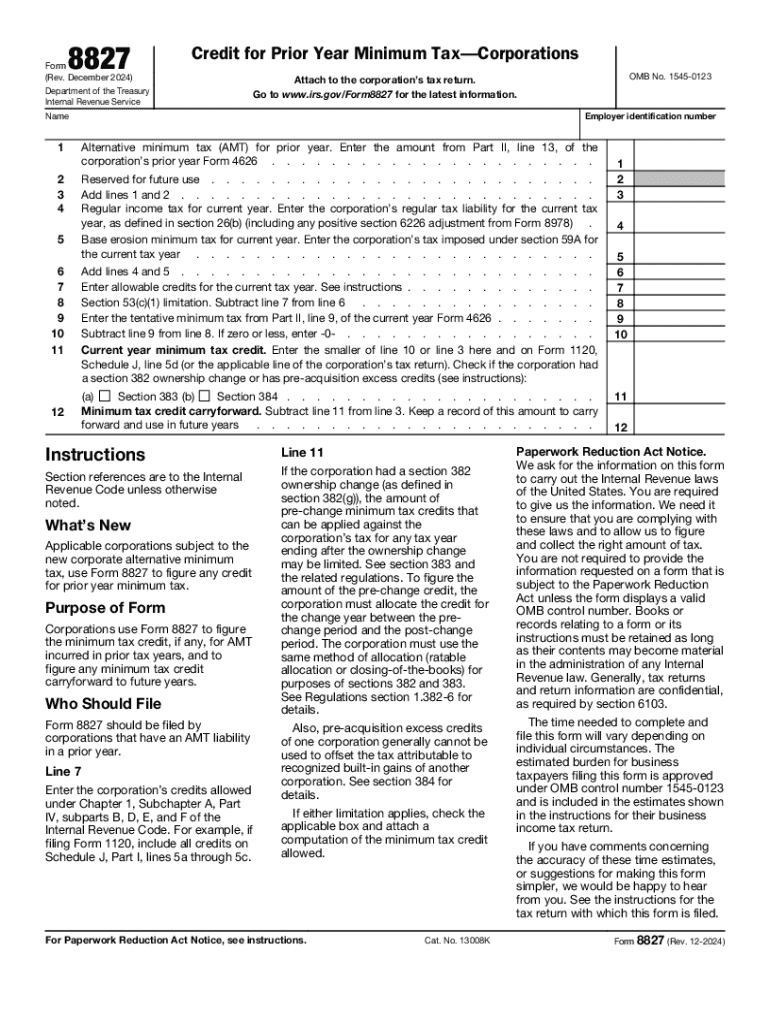
About Form 8827, Credit For Prior Year Minimum Tax
Use a About Form 8827, Credit For Prior Year Minimum Tax template to make your document workflow more streamlined.
What Form 8827 is used for
Form 8827, Credit for Prior Year Minimum Tax, is an IRS tax form used to calculate the minimum tax credit available from alternative minimum tax paid in earlier years. The form carries prior-year minimum-tax information into the current tax return and limits the credit to the taxpayer’s regular tax liability after applicable adjustments. It is not a general signature agreement or a substitute for tax software. signNow can upload the IRS form, add fillable fields, collect an electronic signature, and preserve the completed record, while the taxpayer or tax professional remains responsible for accurate calculations and filing.
Who uses Form 8827
Taxpayers
Individuals and businesses carrying forward an allowable minimum tax credit use Form 8827 to document the current-year credit calculation alongside the applicable federal income tax return. signNow helps collect taxpayer or authorized preparer signatures, route review, and retain the completed PDF and audit trail.
Tax professionals
CPAs, enrolled agents, and corporate tax departments use Form 8827 when prior-year minimum tax information must be reconciled with current-year regular tax liability. signNow supports controlled templates, signer routing, timestamps, and downloadable records for the tax file.
How the Form 8827 workflow works
The signNow workflow organizes Form 8827 without replacing the IRS calculation instructions or tax professional review.
Upload form: Upload the current IRS Form 8827 PDF to signNow. Add data: Review detected fields and add taxpayer-specific entries. Send review: Route the completed calculation for preparer or taxpayer review. Archive record: Sign, download, and preserve the PDF with its audit trail.
Key Form 8827 workflow features
signNow organizes Form 8827 completion, review, signing, and evidence preservation without substituting for IRS tax guidance or professional calculation.
Form upload
Upload the IRS Form 8827 PDF, place taxpayer and preparer fields, and preserve the document’s original tax-form structure while preparing it for controlled electronic completion.
Field review
Automatic field detection can accelerate setup, but every detected field should be compared with the current Form 8827 instructions before tax amounts or taxpayer information are entered.
Signer routing
Route Form 8827 to authorized recipients in sequence, separating preparer review from taxpayer approval when the engagement requires independent confirmation of the credit calculation.
Audit trail
Capture timestamps, recipient actions, and completion history in an audit trail that accompanies the signed Form 8827 record for internal review and retention.
Record export
Export a readable signed PDF and its audit trail, then store both with the related federal return and calculation workpapers under the applicable IRS policy.
Tax responsibility
Use signNow’s electronic-signature controls for the signing event while keeping the IRS instructions, tax calculations, and filing responsibility with the taxpayer or authorized professional.
Recommended Form 8827 workflow setup
Set up Form 8827 workflows around taxpayer identity, review authority, IRS recordkeeping, and reproducible electronic evidence.
| Setting | Recommendation |
|---|---|
| Authentication method | Email verification with SMS 2FA |
| Signature type | Legally binding electronic signature |
| Audit trail | Enabled for every completed form |
| Document retention | Three years from filing under IRC §6501(a) |
| Encryption and provisioning | TLS 1.2/1.3, AES-256, administrator-managed users |
 Best ROI. Our customers achieve an average 7x ROI within the first six months.
 Scales with your use cases. From SMBs to mid-market, airSlate SignNow delivers results for businesses of all sizes.
 Intuitive UI and API. Sign and send documents from your apps in minutes.
What the Form 8827 audit trail records
The signNow audit trail documents signing evidence separately from the IRS calculations, so reviewers can connect the final Form 8827 to its approval history.
Authenticate signer:
Timestamp activity:
Hash document:
Seal record:
Log workflow:
Export evidence:
Form 8827 processing milestones
Form 8827 has no standalone universal signing deadline; coordinate preparation, review, filing, and retention with the related federal return.
Prepare document
Deliver to signers
Complete signer review
Complete and archive
Form 8827 record retention schedule
Retain Form 8827 with the return and calculation support according to the applicable federal tax limitation and any longer state or engagement requirement.
Three years from filing
Six years for major understatement
Indefinite for fraud or no return
Tax-record retention period
Longer state period
Best practices for Form 8827
Accurate Form 8827 preparation depends on reconciling prior-year tax data, reviewing each credit limitation, and preserving evidence of approval and signing.
Reconcile prior-year minimum tax records
Build a controlled Form 8827 template
Route review before taxpayer signing
Archive the signed tax record
Risks of inaccurate Form 8827
Tax understatement
Audit challenge
Signing dispute
Interest exposure
Security for Form 8827 records
Transport encryption:
Stored encryption:
Security certification:
Information security:
Electronic signatures:
Health information:



Pricing relevant to Form 8827 workflows
For Form 8827, compare verified signNow plan details with competitor information only where pricing or feature data is available.
| Features | signNow | DocuSign | Adobe Sign | PandaDoc | Dropbox Sign |
|---|---|---|---|---|---|
| Business annual price | $8/user/month, billed annually | Not verified | Not verified | Not verified | Not verified |
| Free trial | 7 days, no credit card required | Not verified | Not verified | Not verified | Not verified |
| Bulk send availability | Business Premium, $15/user/month annually | Not verified | Not verified | Not verified | Not verified |
| Audit trail availability | Business includes audit trails | Not verified | Not verified | Not verified | Not verified |
| HIPAA availability | Available with required BAA | Not verified | Not verified | Not verified | Not verified |
Form 8827 questions and troubleshooting
Use these answers to separate signNow workflow questions from Form 8827 tax calculations, IRS filing requirements, and electronic-record considerations.
Form 8827 calculates the minimum tax credit from prior-year minimum tax, so signNow cannot validate tax eligibility or calculate amounts. Use the platform to complete, route, and preserve the IRS form, then confirm every figure against the applicable IRS instructions before filing.
On the signNow Business plan, upload the IRS PDF and place fields manually or use automatic field detection where available. Review every detected field against Form 8827 lines because tax-specific labels and calculations require taxpayer verification.
Business includes legally binding eSignatures and audit trails, but tax preparation remains the sender’s responsibility. Use signNow’s completed document and audit trail as records supporting the signing event, not as an IRS acceptance or filing confirmation.
Form 8827 supports tax-credit computation rather than a standalone commercial agreement. Under ESIGN and UETA, an electronic signature can establish intent and attribution when applicable, but the IRS filing instructions and return-submission rules still control.
If multiple tax professionals or authorized representatives review the form, use signNow role-based routing and ordered recipients. Confirm that the person signing has authority for the taxpayer and retain supporting authorization with the completed Form 8827 record.
Business Premium includes bulk send, but bulk sending does not replace taxpayer-specific review. For Form 8827, use a reusable template only for stable layout fields, then verify each prior-year minimum-tax amount and credit calculation individually.
Key performance indicators that demonstrate SignNow's proven track record.
BE READY TO GET MORE
Get this form now!

If you believe that this page should be taken down, please follow our DMCA take-down process.