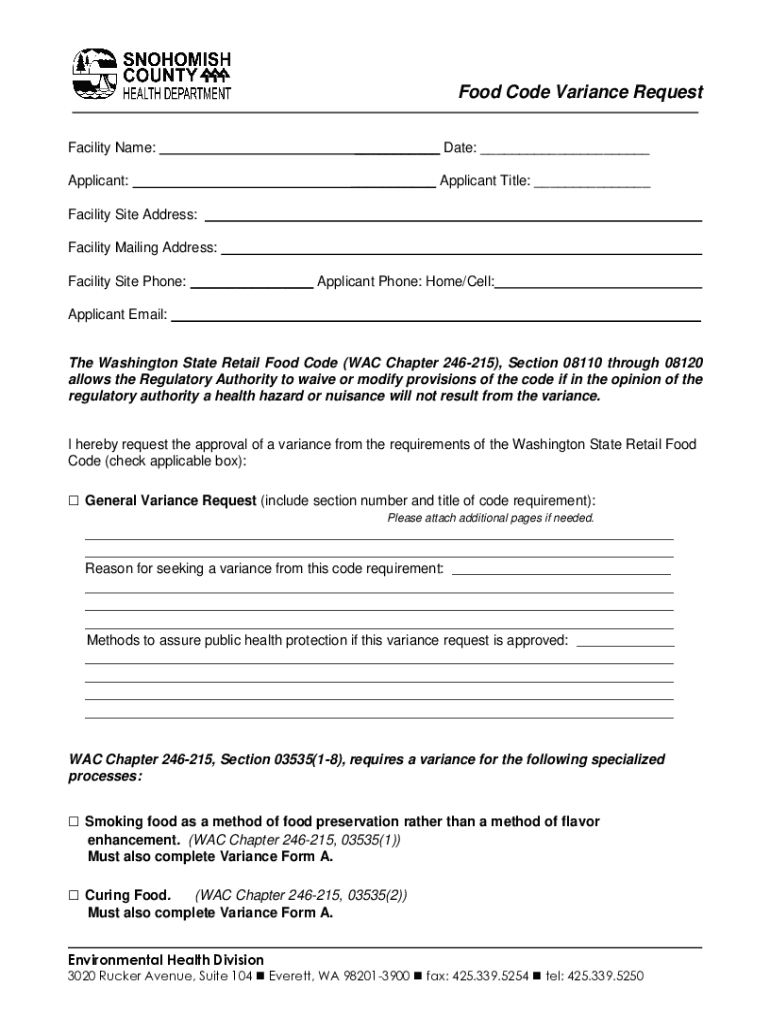
Food Code Variance Request Form
Use a Food Code Variance Request template to make your document workflow more streamlined.
What the variance request form does
Food Code Variance Request Form documents a food establishment’s request to use an alternative practice when it cannot meet a specified Food Code provision as written. The applicant identifies the affected operation, explains the proposed variance, describes controls that protect food safety, and supplies supporting evidence for the reviewing authority. With signNow, the completed PDF can be uploaded, fillable fields can be detected and placed, signatures can be assigned, and the finalized record can be stored with its audit trail. Agency requirements and approval decisions remain governed by applicable state or local food regulations.
Who benefits from variance workflows
Food Code Variance Request Form serves operators, multi-site food businesses, and public health teams managing alternative food-safety controls.
A small restaurant operator can use the form to document an alternative food-safety process, attach supporting controls, collect an authorized signature, and preserve the request for the local regulatory authority’s review and follow-up questions. A multi-site food manufacturer can standardize variance submissions through shared templates, delegated sending, and administrator-managed roles, while keeping facility-specific process descriptions, attachments, approvals, and completed audit trails associated with each location. A county or municipal food program can receive completed requests from regulated establishments, route internal review tasks, and retain signed records electronically. Role-based access helps separate applicant information from agency review and final disposition activities.
These tasks are executed by both individual contributors and centralized administrators depending on organizational policy and required controls.
Who uses this variance request
Food operators
Food establishment operators describe the requested alternative process, affected Food Code requirement, controls, monitoring, and corrective actions before agency review.
Regulatory reviewers
Public health reviewers examine the variance evidence, request clarifications, record approval conditions, and retain the final signed submission.
How to complete the variance request
Use a controlled sequence to prepare, sign, route, and preserve the Food Code Variance Request Form.
Upload form: Upload the completed variance request Check fields: Auto-detect and verify fillable fields Route signatures: Assign operator and reviewer signatures Archive record: Store signed form and audit trail
Quick signing steps for the form
Prepare the Food Code Variance Request Form in signNow using these document-specific steps.
Upload form:
Upload the variance form PDF Add fields:
Place fields for required details Send request:
Send to assigned signers Store record:
Download the completed record
 Best ROI. Our customers achieve an average 7x ROI within the first six months.
 Scales with your use cases. From SMBs to mid-market, airSlate SignNow delivers results for businesses of all sizes.
 Intuitive UI and API. Sign and send documents from your apps in minutes.
Food Code Variance Request Form setup
Configure the form around signer identity, variance evidence, agency review, and a reproducible electronic record.
| Setting | Recommendation |
|---|---|
| Authentication method | Email link with SMS OTP |
| Signature type | Typed or drawn electronic signature |
| Audit trail | Capture IP address and signing timestamps |
| Document retention | Follow the responsible state agency schedule |
| Encryption | AES-256 at rest and TLS 1.2/1.3 in transit |
How the variance audit trail works
The audit trail records who handled the variance request, what they did, and when the signed record was completed.
Signer authentication:
Timestamp capture:
Document association:
Tamper-evident sealing:
Action history:
Audit export:
Signer authentication controls
PKI support:
X.509 certificates:
Two-factor sign-in:
SMS OTP:
ID verification:
Access controls:



Mobile options for variance forms
Food Code Variance Request Form can be prepared through signNow web workflows and signNow mobile apps for iOS and Android. Use camera-based capture when supporting records begin as paper documents, and confirm the completed form before routing it to the responsible reviewer.
Mobile apps iOS and Android apps Document capture Camera capture for paper records Offline work Offline signing availability
Mobile access helps food operators collect signatures at a facility, inspection site, or production location. Device management, network access, signer authentication, and offline availability should be tested against the agency’s submission process before relying on a mobile workflow for a time-sensitive variance request.
Privacy pitfalls in variance submissions
Attaching employee names, facility addresses, or contact details without limiting access can expose personal information beyond the variance review team. Leaving the electronic-record consent step undocumented may weaken the evidence that each signer intended to sign the submitted variance request. Assigning the operator’s signature field to the wrong participant can make authorship and approval responsibility difficult to establish. Storing the signed form without its supporting attachments or audit trail can leave the agency unable to reconstruct the submitted variance record.
Risks of incomplete variance records
Review delay
Approval dispute
Variance denial
Record weakness
Legal standing of the signed request
A signed Food Code Variance Request Form can provide evidence of the applicant’s intent, signer attribution, consent, and record history when those elements are captured and retained. ESIGN and applicable state electronic-transactions law, including UETA or New York ESRA, support electronic signatures, but food authorities still control acceptance, approval, and any agency-specific submission rules.

Choose a signing method for the request
- Use the signNow web app when preparing the Food Code Variance Request Form, placing fields, and coordinating a review involving several participants.
- Use the signNow mobile app when an operator or authorized representative must review and sign the variance request from a facility or inspection location.
- Use kiosk mode when multiple people sign at a controlled location and the Business Premium plan’s kiosk capability matches the organization’s workflow.
- Use a shareable signing link when the responsible reviewer needs a controlled route to the specific variance document without a separate email invitation.
Key performance indicators that demonstrate SignNow's proven track record.
Troubleshooting the variance workflow
These answers address field assignment, signer identity, agency acceptance, plan selection, privacy, and record preservation for this request.
Upload the Food Code Variance Request Form PDF to signNow, then use field placement and auto-detection to check that each operator, reviewer, date, and acknowledgment field is assigned correctly. The Business plan includes templates and audit trails for controlled repeat workflows.
signNow can capture electronic signatures, but the reviewing food authority may require a specific portal, paper copy, notarization, or agency format. Confirm the applicable state or local food program’s submission rule before treating a signed PDF as the final filing.
Use signNow signer authentication options such as email access, SMS OTP, or stronger controls available to the account. Record the signer’s role and preserve the completion certificate so the operator’s attribution can be evaluated with the variance record.
The Business plan is listed at $8 per user per month with annual billing and includes legally binding eSignatures, audit trails, and templates. Business Premium is $15 per user per month annually and adds bulk send and kiosk mode.
If the variance packet contains protected health information, signNow identifies HIPAA compliance as requiring a business associate agreement. The organization must execute the required BAA and confirm the food program’s own handling requirements before including PHI.
Export the completed Food Code Variance Request Form together with its audit trail and supporting attachments. Store the package under the responsible state or local agency’s retention policy; no universal Food Code retention period is established in the supplied authority record.
BE READY TO GET MORE
Get this form now!

If you believe that this page should be taken down, please follow our DMCA take-down process.