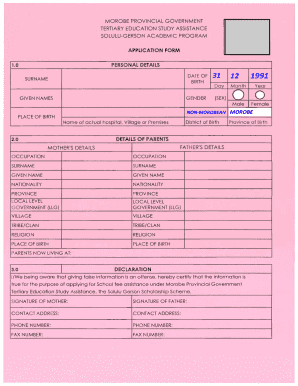
Morobe Provincial Government Form
Use a MOROBE PROVINCIAL GOVERNMENT template to make your document workflow more streamlined.
What the Morobe Provincial Government Form is
The Morobe Provincial Government Form is a government document identified by its connection to Morobe Provincial Government; the available information does not specify its issuing office, legal purpose, fields, filing deadline, or U.S. equivalent. In signNow, an administrator can upload the form, review automatically detected fillable fields, assign signing roles, and send it for electronic completion. The resulting document can include an audit trail showing signer activity, timestamps, and record history. Confirm the issuing authority’s instructions before relying on electronic signatures, submission methods, or retention periods.
Who can use this form workflow
Government administration
Public-sector clerks can route the Morobe Provincial Government Form for review, signature, and controlled record storage.
External applicants
Contractors and residents can complete assigned fields electronically when the issuing office accepts signNow records.
Manage access to government form workflows
A provincial records administrator can publish a shared Morobe Provincial Government Form template, control editing rights, and delegate sending to authorized clerks while preserving document history. Department supervisors can assign signing roles through signNow templates, review pending requests, and use team permissions to limit access to submitted Morobe Provincial Government Form records.
How the Morobe form workflow works
signNow turns the Morobe Provincial Government Form into a controlled digital workflow from upload through signed-record storage.
Upload form: Upload the Morobe Provincial Government Form PDF to signNow. Detect fields: Auto-detect fillable areas and review each field. Assign signers: Assign required fields to authorized signers. Complete record: Send, sign, and store the completed record.
Quick steps for completing the form
Prepare the Morobe Provincial Government Form in signNow, validate its fields, route it to the correct people, and retain the completed record.
Upload document:
Upload the Morobe Provincial Government Form PDF. Check fields:
Review detected fields and correct their placement. Assign roles:
Assign each field to the responsible signer. Send request:
Send the completed request through signNow.
 Best ROI. Our customers achieve an average 7x ROI within the first six months.
 Scales with your use cases. From SMBs to mid-market, airSlate SignNow delivers results for businesses of all sizes.
 Intuitive UI and API. Sign and send documents from your apps in minutes.
Platform requirements for the Morobe form
Use signNow in Chrome, Firefox, Safari, or Edge on Windows or macOS. signNow also provides mobile apps for iOS and Android, allowing authorized users to review and sign the Morobe Provincial Government Form from supported devices.
Browser support Chrome, Firefox, Safari, and Edge Desktop systems Windows and macOS desktop access Mobile access iOS and Android mobile apps
For regulated deployments, administrators should manage supported devices, identity provisioning, and access policies centrally. Confirm that the organization’s signNow plan provides the required API, SSO, authentication, certificate, and long-term record configuration before placing the Morobe Provincial Government Form into production.
Audit trail for the Morobe form
The audit trail documents who handled the Morobe Provincial Government Form, when actions occurred, and how the completed record can be reviewed.
Authenticate signer:
Capture timestamp:
Hash document:
Seal record:
Record actions:
Export trail:
Recommended Morobe form setup
Configure the Morobe Provincial Government Form around verified signer identity, controlled access, audit evidence, and the issuing authority’s retention instructions.
| Setting | Recommendation |
|---|---|
| Authentication method | Email authentication with SMS verification |
| Signature type | Electronic signature with signer intent |
| Audit trail | Enabled for every signing request |
| Document retention | Follow the issuing authority’s written schedule |
| Encryption and provisioning | AES-256 storage with role-based access |
Security controls for signed records
Transport encryption:
Stored encryption:
Security reporting:
Security management:
Privacy controls:
Electronic signatures:



Best practices for completing the form
Accurate source validation, controlled routing, and documented retention reduce avoidable errors when handling the Morobe Provincial Government Form.
Validate the source document
Map fields to signers
Preserve the completed record
Confirm acceptance rules
Privacy and disclosure pitfalls
Including personal information in an unnecessary attachment can expose more data than the Morobe Provincial Government Form requires. Sending the form without recording signer consent may weaken evidence that the recipient agreed to use an electronic record. Sharing a completed form through an unrestricted link can expose government information to unauthorized recipients. Leaving former staff with template or document permissions can permit access after their role ends.
Rules that may limit electronic completion
Electronic signature may not satisfy notarization
ESIGN exception applies
Court-specific rules may control
State recording rules may require acknowledgment
Retention rules for related records
No form-specific retention period was supplied, so retain the Morobe Provincial Government Form according to the issuing authority and the record category actually involved.
Authority schedule required
Tax records: verify period
PHI records: six years
I-9 records: required period
Broker records: six years
Troubleshooting the Morobe form workflow
Resolve field, routing, audit, plan, and acceptance questions before treating a completed Morobe Provincial Government Form as filed.
Upload the original Morobe Provincial Government Form PDF again and check whether its permissions prevent editing. If fields remain undetected, place signNow fields manually and compare them with the source document before sending.
Check the assigned signer’s email address, role, and required fields. A recipient cannot complete the Morobe Provincial Government Form until every field assigned to that recipient is available and the request has been sent successfully.
Use signNow’s audit trail to review timestamps, signer actions, and authentication events. Export the trail with the completed document when the issuing office or internal records policy requires evidence of the signing process.
Business pricing is $8 per user monthly when billed annually, while Business Premium is $15 and Enterprise is $30. Subscription plans include 100 signature invites per user annually; overage fees may apply.
signNow states that HIPAA workflows require a business associate agreement. Do not classify the Morobe Provincial Government Form as HIPAA-covered merely because it contains personal information; confirm whether protected health information is actually involved.
ESIGN and UETA recognize qualifying electronic signatures, but a government office may impose separate submission or signature rules. Confirm the Morobe issuing authority’s acceptance requirements before replacing paper or in-person delivery.
Key performance indicators that demonstrate SignNow's proven track record.
BE READY TO GET MORE
Get this form now!

If you believe that this page should be taken down, please follow our DMCA take-down process.