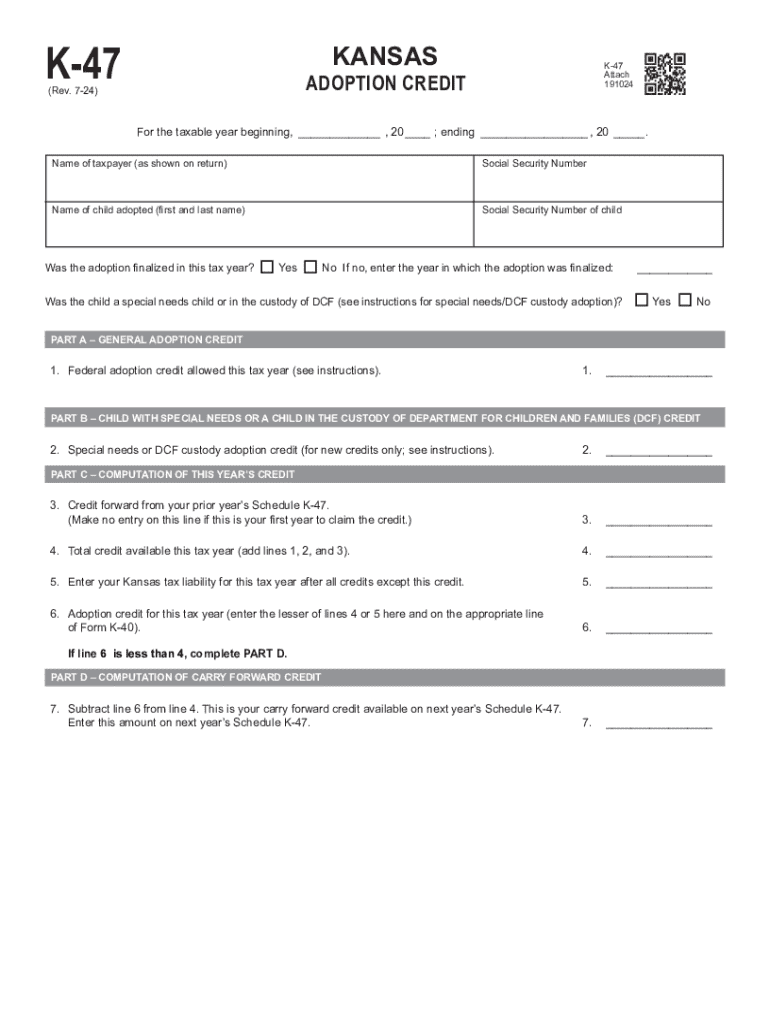
K 47 Kansas Adoption Credit Revised 7 24 Form
Use a K 47 Kansas Adoption Credit Revised 7 24 template to make your document workflow more streamlined.
What the K 47 Kansas Adoption Credit form does
The K 47 Kansas Adoption Credit Revised 7 24 Form is a Kansas tax document used to report information supporting an adoption credit claim. It helps a taxpayer or authorized preparer organize adoption-related details for the Kansas filing, review the entries, and preserve the signed record. In signNow, the sender uploads the revised PDF, checks automatically detected fillable fields, assigns signer roles, and sends the form for completion. The completed PDF and Audit Trail can then be downloaded together. Kansas tax instructions and the applicable filing-year requirements control the credit, eligibility, and submission process.
How the K 47 workflow works
The K 47 process moves from document preparation to assigned completion, then preserves the executed form for the related Kansas filing.
Upload: Upload the revised K 47 document to signNow. Review: Review detected fields against the Kansas form. Send: Send assigned fields to the taxpayer or preparer. Archive: Store the signed PDF with its Audit Trail.
Complete the K 47 form online
Prepare the revised Kansas adoption credit form in signNow by checking fields, assigning responsible parties, and preserving the completed record.
Upload form:
Upload the revised K 47 PDF to signNow. Check fields:
Review detected fields and add missing fields. Assign roles:
Assign taxpayer and preparer signing roles. Finish filing:
Send, complete, and download the signed record.
Choose the right signing method
- Use the signNow web app when preparing the K 47 form at a desk, placing fields, checking taxpayer information, and sending the completed document to designated recipients.
- Use the signNow mobile app when reviewing or signing the K 47 form from an iOS or Android device during field or remote work.
- Use kiosk mode when a staff member assists an individual completing the K 47 Kansas Adoption Credit form on an organization-managed device.
- Use a shareable signing link when several authorized recipients need access to the same K 47 form without separate email invitations.
 Best ROI. Our customers achieve an average 7x ROI within the first six months.
 Scales with your use cases. From SMBs to mid-market, airSlate SignNow delivers results for businesses of all sizes.
 Intuitive UI and API. Sign and send documents from your apps in minutes.
Recommended K 47 form setup
Configure the K 47 Kansas Adoption Credit form around verified signer identity, traceable completion, secure storage, and controlled team access.
| Setting | Recommendation |
|---|---|
| Authentication method | Email verification with SMS OTP |
| Signature type | Typed or drawn electronic signature |
| Audit trail and encryption | Detailed Audit Trail with AES-256 |
| Document retention | Retain through applicable Kansas tax review |
| User provisioning | Admin-managed roles and shared templates |
Best practices for K 47 completion
Accurate field review, controlled templates, and documented retention make the K 47 Kansas Adoption Credit workflow easier to audit and correct.
Verify taxpayer information before sending
Lock the approved form layout
Export the form and Audit Trail
Match retention to tax rules
Retention periods for K 47 records
Keep the completed K 47 form and related evidence according to the rule governing the underlying record. State requirements may extend federal periods.
Three years from filing
Six years for understatement
Six years for HIPAA
Three years for payroll
Five years for injuries
How the K 47 Audit Trail works
The Audit Trail records the technical events surrounding completion of the K 47 form, creating evidence separate from the form’s tax data.
Authenticate signer:
Capture timestamp:
Hash document:
Seal record:
Track actions:
Export history:
Platform requirements for K 47
The K 47 Kansas Adoption Credit form can be prepared in signNow through supported desktop browsers, with mobile access available through iOS and Android apps. Use an up-to-date browser and an internet connection for uploading, field placement, signer delivery, and completed-form retrieval.
Browsers Chrome, Firefox, Safari, Edge Operating systems Windows 11, macOS, iOS, Android Devices Desktop, iPhone, iPad, Android
Organizations should manage access through approved Windows, macOS, iOS, or Android devices. Teams using signNow integrations, SSO, or API workflows should confirm the selected plan provides those controls. Keep completed K 47 forms and Audit Trails in an approved, access-controlled repository that supports Kansas tax-record policies.
Risks from incomplete K 47 records
Tax review
Evidence gap
Signature dispute
Record loss
K 47 form troubleshooting questions
Resolve field, signer, authentication, disclosure, plan, and record-retention issues before relying on a completed K 47 Kansas Adoption Credit form.
Upload the original revised K 47 PDF again and check whether its pages contain selectable text. signNow can detect fillable areas, but a scanned or unusually structured PDF may require manual field placement before sending.
Open the recipient settings and confirm that each K 47 field has the correct signer or preparer role. A field assigned to the wrong recipient can prevent completion even when the document itself uploaded successfully.
Use signNow’s SMS OTP or another available authentication control when the workflow requires stronger signer attribution. ESIGN and UETA focus on intent, consent, attribution, and record retention; the chosen method should match the filing risk.
The signNow Business plan includes legally binding eSignatures, templates, mobile apps, and Audit Trails. Business Premium adds bulk send and kiosk mode, while Enterprise adds advanced signer authentication and conditional fields.
For a consumer-facing electronic record, provide the ESIGN consumer disclosure required by 15 U.S.C. §7001(c), including paper-record access and withdrawal procedures. signNow features do not replace the sender’s disclosure responsibilities.
Download the completed K 47 PDF and its Audit Trail after signing, then store them under the retention rule for the underlying Kansas tax record. IRC §6501(a) generally provides three years from filing for federal assessment.
Key performance indicators that demonstrate SignNow's proven track record.
BE READY TO GET MORE
Get this form now!

If you believe that this page should be taken down, please follow our DMCA take-down process.