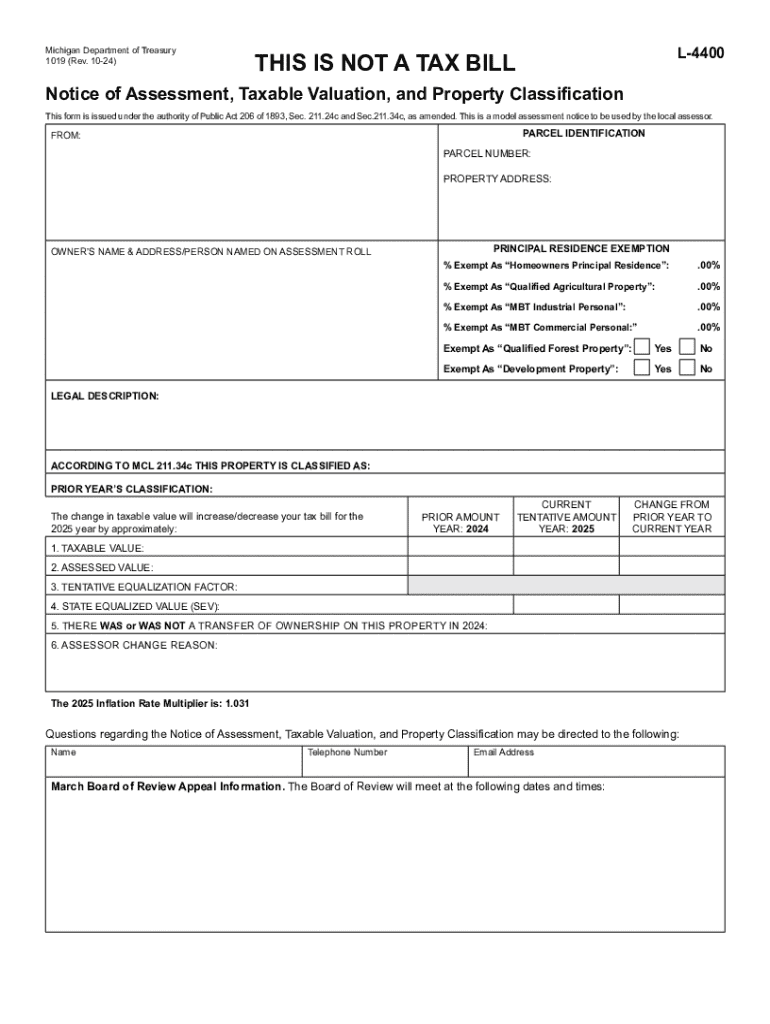
1019, Notice Of Assessment, Taxable Valuation, And Property Classification Form
Use a 1019, Notice Of Assessment, Taxable Valuation, And Property Classification template to make your document workflow more streamlined.
What form 1019 records
The 1019, Notice Of Assessment, Taxable Valuation, And Property Classification Form records an assessment notice, the taxable valuation assigned to property, and its classification. It gives the recipient a structured record to review before acknowledgment or signature. Because the supplied form name does not identify a state, county, issuing office, filing deadline, appeal period, or required attachments, those details must be confirmed with the agency that issued the notice. signNow can upload the source document, detect or add fields, route it for signature, and preserve the completed record with an Audit Trail.
Who benefits from digital assessment notices
The 1019 workflow is most useful where assessment information must move between public offices, property stakeholders, and authorized representatives.
County assessment departments can prepare and route notices to property owners, preserving taxable valuation and classification details with signer evidence for administrative files. Tax professionals and property managers can review owner information, coordinate acknowledgments, and store the signed notice alongside property records without recreating the assessment data. Property owners and authorized representatives can inspect the notice remotely, identify discrepancies before signing, and retain a complete electronic copy for later correspondence or review.
These tasks are executed by both individual contributors and centralized administrators depending on organizational policy and required controls.
How the 1019 workflow works
The signNow flow keeps the issued assessment notice intact while adding controlled completion, signature, and evidence steps.
Upload notice: Upload the issued notice to signNow. Review fields: Review detected fields for assessment information. Route document: Route the notice to the authorized signer. Archive evidence: Store the signed record with its Audit Trail.
Complete and sign form 1019
Move the 1019 from source document to signed record through a controlled signNow workflow.
Upload form:
Upload the source PDF to signNow. Check fields:
Review detected fields and add missing valuation or classification fields. Assign signer:
Assign the authorized recipient and signature fields. Send notice:
Send the notice for electronic signature. Store record:
Download the signed 1019 and audit evidence.
 Best ROI. Our customers achieve an average 7x ROI within the first six months.
 Scales with your use cases. From SMBs to mid-market, airSlate SignNow delivers results for businesses of all sizes.
 Intuitive UI and API. Sign and send documents from your apps in minutes.
Useful signNow features for form 1019
signNow organizes the 1019 notice from field completion through acknowledgment, audit evidence, and controlled record access.
Structured fields
Capture the notice number, assessment details, taxable valuation, and property classification in one organized record for review before signing.
Digital routing
Send the completed assessment notice to the appropriate signer without printing, scanning, or manually tracking separate copies.
Acknowledgment
Collect a signer’s electronic acknowledgment while preserving the completed 1019 document for later reference.
Audit trail
Use signNow Audit Trails to record signer actions, timestamps, and document activity associated with the completed notice.
Central record
Keep valuation and classification information together with the signed record, reducing uncertainty when reviewing a property file.
Mobile access
Access the form through signNow web and mobile apps when assessment work moves between office and field locations.



Protecting assessment records and signatures
Two-factor authentication:
Identity verification:
PKI signatures:
X.509 certificates:
Audit evidence:
Transport security:
Privacy and disclosure pitfalls
Leaving parcel identifiers, owner information, or valuation details visible to unauthorized recipients can expose sensitive property records. Sending the notice before confirming taxable valuation and property classification can preserve inaccurate information in the signed record. Failing to document electronic consent may weaken evidence that the signer agreed to receive or sign the assessment notice electronically. Giving every team member editing access can allow unauthorized changes to assessment data before signature.
Legal standing for electronic records
A completed 1019 may be admissible when the signer demonstrates intent, consents to electronic records, can be identified, and the record remains reproducible. ESIGN, 15 U.S.C. ch. 96, and applicable UETA rules support electronic transactions, but wills, court filings, family-law decrees, and other statutory exclusions remain outside that framework.

Best practices for form 1019
Use the source notice and issuing agency instructions as the controlling references while signNow manages completion, routing, and evidence.
Verify every assessment detail
Restrict editing permissions
Preserve audit evidence
Confirm agency requirements
Troubleshooting form 1019 workflows
Resolve field, signer, authentication, retention, and compliance questions before finalizing the 1019 assessment record.
Upload the original 1019 PDF again, then use signNow’s field placement tools to add missing fields manually. Review valuation and classification entries before sending.
Use signNow’s signer authentication options, including SMS verification where configured, to strengthen attribution. Confirm the recipient’s email address and resend the invitation if delivery fails.
The Business plan includes legally binding eSignatures and Audit Trails. For advanced signer authentication, Enterprise adds advanced authentication controls, subject to plan configuration.
A completed electronic record should remain accessible and reproducible. ESIGN requires intent, consent, attribution, and retention capability; apply any longer state or agency retention rule governing this notice.
Use signNow’s Audit Trail to review timestamps, signer actions, and document history. Export the completed record and audit evidence together when the property file requires an external archive.
If the notice contains protected health information, use a signNow HIPAA workflow with a required BAA. HIPAA’s six-year rule applies to covered records under 45 CFR 164.530(j).
Key performance indicators that demonstrate SignNow's proven track record.
BE READY TO GET MORE
Get this form now!

If you believe that this page should be taken down, please follow our DMCA take-down process.