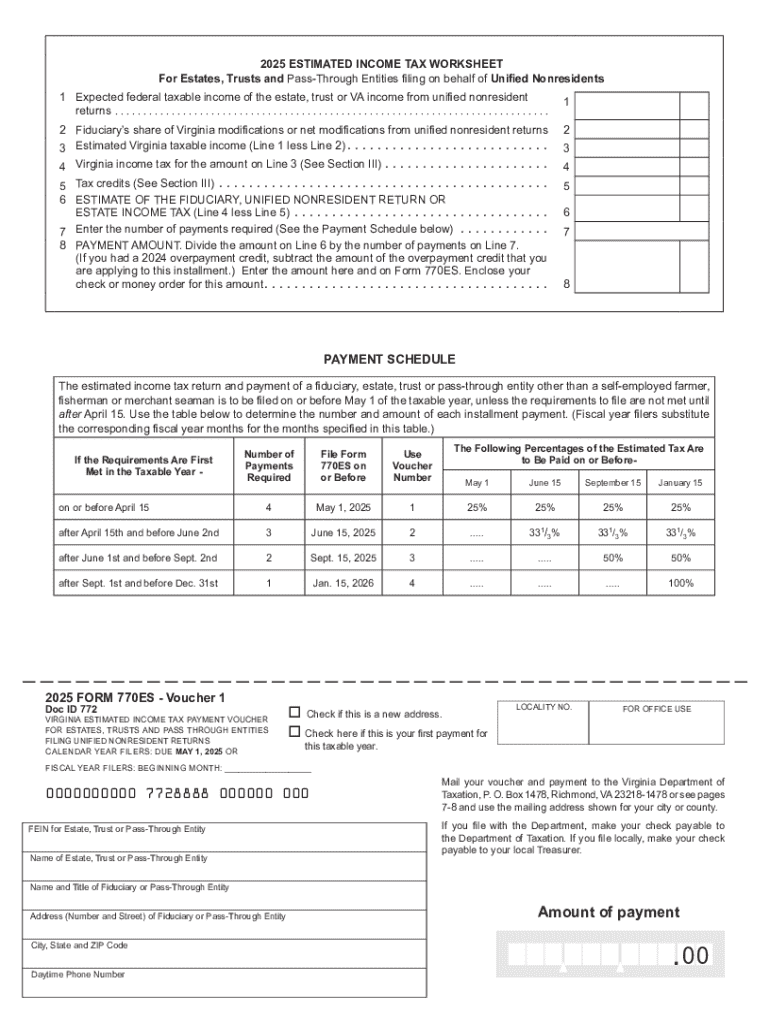
Form 770ES, Virginia Estimated Income Tax Payment
Use a Form 770ES, Virginia Estimated Income Tax Payment template to make your document workflow more streamlined.
What Form 770ES is used for
Form 770ES, Virginia Estimated Income Tax Payment, records an estimated income tax payment made to Virginia. Taxpayers and their representatives use it to submit payment information for an estimated tax period and retain evidence of the transaction. The form should be completed with the taxpayer’s identifying information, payment amount, and applicable period before signing. Federal recordkeeping guidance generally uses a three-year limitation period from filing under IRC §6501(a), with six years for a 25% or greater income understatement and indefinite retention for fraud or no return.
Who uses Form 770ES in Virginia
Virginia individual taxpayers and pass-through owners use Form 770ES to document estimated income tax payments, then preserve the signed form and payment evidence for their tax records. signNow lets them complete the prepared document electronically and maintain an audit trail showing signer activity and timestamps. Financial-services and accounting teams prepare Form 770ES packets for clients with estimated Virginia tax obligations. They can use reusable signNow templates, assign signing roles, and retain completed forms alongside payment confirmations without relying on paper circulation.
How Form 770ES works in signNow
The signNow workflow moves Form 770ES from prepared payment information to a signed, traceable electronic record.
Upload form: Upload the prepared Form 770ES PDF. Complete payment details: Review detected fields and enter payment information. Request signature: Send the form to the designated signer. Preserve evidence: Store the signed form with its audit trail.
Complete Form 770ES online
Use this sequence to prepare, sign, and preserve a Form 770ES payment record in signNow.
Upload form:
Upload the current Form 770ES document to signNow. Complete fields:
Check detected fields and add missing payment details. Assign signer:
Assign the taxpayer or authorized signer. Store record:
Send the completed record and retain confirmation.
 Best ROI. Our customers achieve an average 7x ROI within the first six months.
 Scales with your use cases. From SMBs to mid-market, airSlate SignNow delivers results for businesses of all sizes.
 Intuitive UI and API. Sign and send documents from your apps in minutes.
Form 770ES filing challenges
Entering an estimated payment amount that does not match the taxpayer’s current income projection can create an incomplete or inaccurate payment record. Failing to identify the correct Virginia estimated-tax payment period can make later reconciliation with the taxpayer’s return more difficult. Sending the form without confirming signer identity, payment details, and required fields can delay review or require a corrected form. Saving the signed form without its payment confirmation or audit trail weakens the supporting record for later tax inquiries.
Recommended Form 770ES workflow setup
Configure Form 770ES workflows around signer identity, traceable completion, secure storage, and the applicable IRS retention period.
| Setting | Recommendation |
|---|---|
| Authentication method | Email verification with SMS OTP |
| Signature type | Typed or drawn electronic signature |
| Audit trail | Export with completed Form 770ES |
| Document retention | Three years under IRC §6501(a) |
| Encryption | TLS 1.2/1.3 and AES-256 |
What the Form 770ES audit trail records
A signNow audit trail links Form 770ES completion to signer activity, document history, and an exportable record for later review.
Authenticate signer:
Capture timestamps:
Hash document:
Seal document:
Export evidence:
Archive record:
Form 770ES record retention schedule
Keep Form 770ES payment records according to the federal limitation period and any longer Virginia requirement that applies.
Three years: filed payment record
Six years: substantial understatement records
Indefinite: no return filed
Indefinite: fraudulent filing records
State-required period: Virginia records
Best practices for Form 770ES records
Accurate retention and a complete signing record help connect each Form 770ES payment to the taxpayer, period, and supporting evidence.
Apply the correct federal retention period
Export the audit trail with each form
Archive forms by taxpayer and period
Check Virginia rules before destruction
Security for Form 770ES records
Encryption:
Security certification:
Information security:
Electronic signatures:
Signer verification:
Document history:
Risks when Form 770ES is mishandled
Record gap
Payment mismatch
Attribution issue
Possible interest
Why teams look for DocuSign alternatives
Organizations seek alternatives when they need different pricing models, stronger native automation, simpler bulk affidavit workflows, or more flexible identity-verification options than those available in a legacy envelope-based vendor.

Form 770ES signing and record FAQ
These answers address document preparation, electronic signing, payment evidence, and retention issues specific to Form 770ES.
Upload the original Form 770ES PDF again and check whether the document is password-protected or damaged. signNow’s field detection can identify fillable areas, but fields still require a manual review before sending.
Confirm the signer’s email address and resend the invitation from the document workflow. A signNow Business plan includes templates and audit trails, while Business Premium adds quick invite links and kiosk mode.
Use signNow’s audit trail to review the signer’s timestamps, actions, and completion record. ESIGN and UETA recognize electronic signatures when intent, consent, attribution, and record retention are established.
A signed Form 770ES does not replace the underlying Virginia payment obligation or confirm that a payment cleared. Preserve the payment confirmation separately and reconcile it with the completed form.
For consumer-facing electronic records, provide the required ESIGN disclosure and access information before signing. The disclosure must explain paper-record rights, electronic access, and withdrawal procedures under 15 U.S.C. §7001(c).
Use signNow’s completed-document history and export the audit trail with the signed form. Business includes audit trails; Enterprise adds advanced signer authentication, but neither changes Virginia filing instructions.
Key performance indicators that demonstrate SignNow's proven track record.
BE READY TO GET MORE
Get this form now!

If you believe that this page should be taken down, please follow our DMCA take-down process.