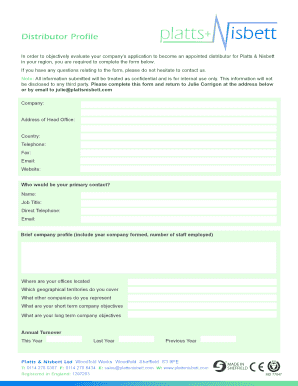
Distributor Profile Format
Use a Distributor Profile Format template to make your document workflow more streamlined.
What the Distributor Profile Format does
The Distributor Profile Format is a business document used to collect and confirm information from a distributor before the relationship or transaction proceeds. In signNow, the sender uploads the form, places or reviews fillable fields, assigns each signature or acknowledgment, and sends it electronically. Recipients review the exact document, provide required information, and sign with an attributable electronic record. The completed form and audit trail can then be stored together. ESIGN and UETA generally recognize qualifying electronic signatures, while document-specific exclusions and state requirements still require review.
Who uses this distributor form
Distributor operations
Distributor operations teams use the form to collect business identity, contact, territory, and approval information before activating or renewing a distributor relationship. They can route the document to authorized representatives and retain the signed record for internal review.
Business administrators
Manufacturers, wholesalers, and finance teams use the form alongside agreements, invoices, and compliance records. The form itself does not replace a contract, tax filing, license, or government submission, so each organization should confirm its required supporting documents.
Features that support distributor workflows
signNow connects preparation, recipient routing, electronic signing, and evidence preservation around the Distributor Profile Format.
Field preparation
Upload the Distributor Profile Format and review signNow’s detected fillable fields before adding any missing distributor, approval, date, or signature inputs.
Recipient routing
Assign each required field to a named recipient so the distributor representative completes only the information and approvals belonging to that person.
Flexible delivery
Send the same prepared format to individual distributors through controlled email invitations or a shareable signing link when appropriate.
Mobile signing
Use mobile apps when distributor representatives need to review or sign from a phone or tablet during field-based operations.
Audit evidence
Capture timestamps, signer activity, and document history in an audit trail that accompanies the completed Distributor Profile Format.
Record preservation
Store the signed form and completion evidence together so internal reviewers can connect the distributor’s submission with the exact executed document.
How to complete the form online
Prepare the Distributor Profile Format in signNow by checking its fields, routing it to the correct representative, and preserving the completed record.
Upload the form:
Upload the Distributor Profile Format to signNow. Check fillable fields:
Review detected fields and add missing inputs. Assign recipients:
Assign fields to each distributor representative. Send for signature:
Send the prepared form for electronic signature. Archive the record:
Store the signed form with its audit trail.
 Best ROI. Our customers achieve an average 7x ROI within the first six months.
 Scales with your use cases. From SMBs to mid-market, airSlate SignNow delivers results for businesses of all sizes.
 Intuitive UI and API. Sign and send documents from your apps in minutes.
Ways to send and sign the form
- Use the signNow web app when preparing the Distributor Profile Format on a desktop, placing fields, assigning recipients, and reviewing the completed record.
- Use the signNow mobile app when completing or sending the Distributor Profile Format from a phone or tablet during field-based distributor work.
- Use kiosk mode when distributors sign the Distributor Profile Format at a staffed counter, shared workstation, event, or supervised intake location.
- Use a shareable signing link when many distributors need the same Distributor Profile Format without receiving individually prepared email invitations.



Best practices for this distributor form
Accurate recipient assignment, controlled access, and complete records make the Distributor Profile Format easier to review and defend.
Verify distributor information first
Map fields to recipients
Preserve completion evidence
Control template permissions
Challenges when managing distributor forms
Distributor details may be entered inconsistently across the form, agreement, invoice, and internal master record, complicating approval and later reconciliation. A sender may assign a signature or acknowledgment field to the wrong distributor representative, weakening attribution and delaying completion. The completed form may be stored without its audit trail, making it harder to show who signed, when the event occurred, and what record was completed. Uncontrolled copies can leave outdated distributor information in circulation after a territory, contact, or authorization changes.
Retention periods depend on use
The Distributor Profile Format has no universal federal retention period; apply the rule governing the records and information attached to it.
Three years after filing
Six years for understatement
Indefinite for fraud
Six years for PHI
Later of two employment dates
Platform requirements for signing
Complete the Distributor Profile Format through signNow in Chrome, Firefox, Safari, or Edge on Windows or macOS, or through signNow mobile apps on iOS and Android. Secure connections use TLS 1.2 or TLS 1.3.
Supported browsers Chrome, Firefox, Safari, Edge Operating systems Windows, macOS, iOS, Android Secure connection TLS 1.2 and TLS 1.3
Organizations should confirm that managed devices permit document upload, recipient email delivery, and access to completed records. Teams using integrations, SSO, API workflows, or regulated records should verify the selected signNow plan and configure administrative controls before distributing the form.
Legal standing of the completed form
A Distributor Profile Format may be admissible when the parties demonstrate intent, consent, signer attribution, and reliable record retention under the ESIGN Act, 15 U.S.C. ch. 96, and applicable UETA law. Electronic treatment does not cover wills, codicils, testamentary trusts, certain court orders, or family-law decrees excluded by 15 U.S.C. §7003.

Distributor Profile Format troubleshooting
Resolve the form issues that affect field assignment, signer identity, electronic consent, plan selection, and preservation of the completed distributor record.
The Business plan includes templates and audit trails for Distributor Profile Format workflows. Confirm that the uploaded file contains the expected fields, then place missing signature or date fields manually before sending.
Business Premium includes bulk send, which is useful when the same Distributor Profile Format goes to multiple distributors. Business does not include that feature, so send individually or review plan eligibility.
signNow supports legally binding eSignatures and states ESIGN and UETA compliance. For a consumer-facing form, provide the required electronic-record disclosure and confirm access to the electronic record under 15 U.S.C. §7001(c).
The Business plan is listed at $8 per user per month with annual billing. Month-to-month pricing is higher at $20 per user per month, according to the verified signNow pricing information.
Use SMS authentication or another available signer-authentication control when the distributor’s identity needs additional verification. Advanced signer authentication is listed among Enterprise capabilities; confirm availability for the selected plan.
Export the completed Distributor Profile Format with its audit trail or certificate of completion, then store both under your applicable records policy. The correct retention period depends on the record’s business and legal use.
Key performance indicators that demonstrate SignNow's proven track record.
BE READY TO GET MORE
Get this form now!

If you believe that this page should be taken down, please follow our DMCA take-down process.