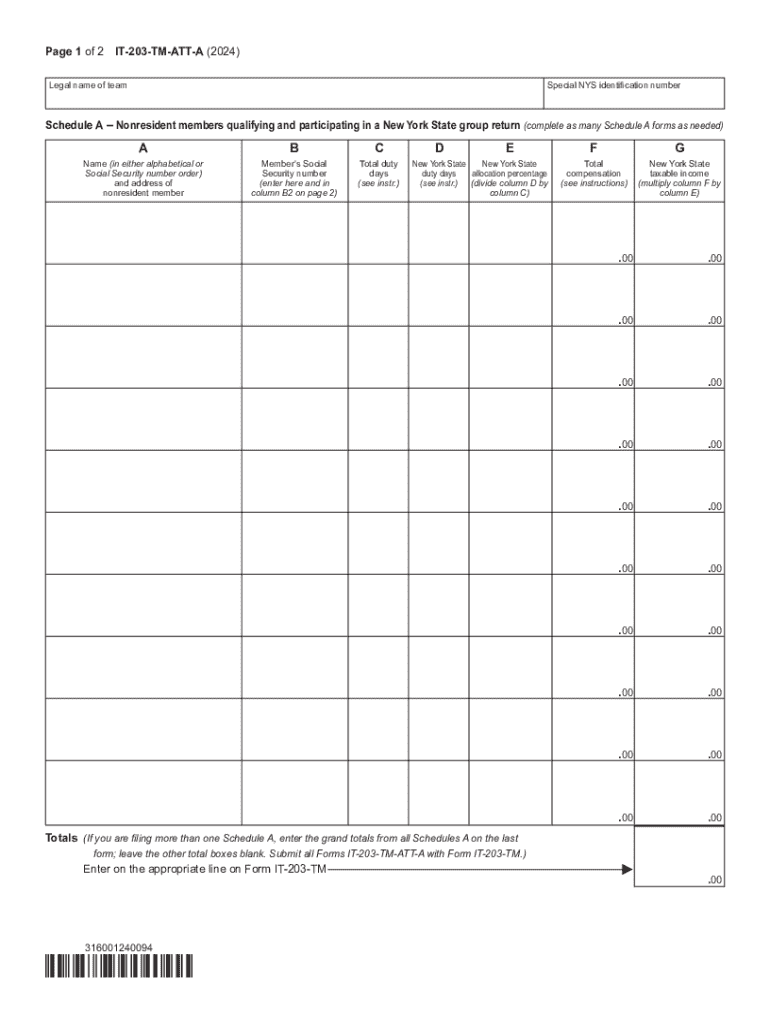
Form It 203 Tm Att A Schedule A Group Return For Nonresident Athletic Team Members Tax Year
Use a Form IT 203 TM ATT A Schedule A Group Return For Nonresident Athletic Team Members Tax Year template to make your document workflow more streamlined.
What this athletic team return does
Form It 203 Tm Att A Schedule A Group Return For Nonresident Athletic Team Members Tax Year is a tax document used to organize a group filing for nonresident athletic team members. Its schedule identifies the relevant members and supporting tax information for the return. An authorized organization representative reviews the entries, obtains required signatures, and retains the completed record. signNow can upload the PDF, detect or add fillable fields, route it to designated signers, capture the signing history, and preserve the executed copy. Confirm the applicable New York instructions before filing.
Who works with this group return
Athletic organizations
Athletic organizations use the return to organize information for nonresident athletic team members whose compensation or participation requires the listed tax details. Administrators can circulate one controlled document, collect designated signatures, and retain the completed record with its audit trail.
Tax administrators
Tax and payroll teams review the completed schedule, reconcile member information, and preserve supporting records. signNow provides a controlled signing workflow, while the organization remains responsible for confirming New York filing rules and submission requirements.
Business types using this return
The form is most useful where athletic organizations coordinate nonresident member information and signatures across a recurring tax workflow.
Athletic departments can coordinate member information and authorized signatures in one controlled group-return workflow, reducing separate email attachments and preserving a single completion record for tax administration. Sports organizations with recurring nonresident team members can reuse an approved template, assign delegated senders, and route each year’s return to the responsible representative without giving every user editing access. Tax professionals supporting athletic organizations can review field placement, monitor signer completion, export audit evidence, and reconcile the executed return with their existing tax-record process.
These tasks are executed by both individual contributors and centralized administrators depending on organizational policy and required controls.
Features for this group return
signNow organizes the form-specific upload, field placement, signer routing, authentication, and recordkeeping steps around one completed athletic team return.
Controlled fields
Upload the athletic team return and place fields over member details, signer information, dates, and approvals without recreating the document.
Role-based routing
Route one group return to designated representatives and track each required action from delivery through completion.
Audit evidence
Capture timestamps, signer actions, IP information, and completion evidence for later tax administration review.
Signer verification
Use SMS OTP or other available authentication controls when taxpayer information requires stronger signer verification.
Secure storage
Preserve the executed return and its certificate of completion in a controlled digital record.
Reusable template
Reuse a reviewed return template for recurring athletic team reporting while limiting editing access to authorized users.
How this return moves through signNow
The document moves from source PDF to field review, signer routing, execution, and audit-ready storage.
Upload: Upload the group-return PDF into signNow. Prepare: Review detected fields and add required inputs. Route: Route member and representative fields to signers. Complete: Collect signatures and preserve the audit trail.
 Best ROI. Our customers achieve an average 7x ROI within the first six months.
 Scales with your use cases. From SMBs to mid-market, airSlate SignNow delivers results for businesses of all sizes.
 Intuitive UI and API. Sign and send documents from your apps in minutes.
Complete the return in signNow
Use this sequence to prepare, route, sign, and preserve the group return without changing its tax content.
Upload form:
Upload the Form IT-203-TM PDF. Check fields:
Confirm detected fields and add missing fields. Assign roles:
Assign member and representative signing roles. Send return:
Send the completed envelope for review. Sign document:
Review, sign, and complete required dates. Store records:
Export the return and audit trail.
Set up this athletic team return
Configure signNow around signer identity, tax-record handling, and the completed group return workflow.
| Setting | Recommendation |
|---|---|
| Authentication method | Email link with SMS OTP for sensitive tax data |
| Signature type | Typed or drawn electronic signature with signer intent |
| Audit trail | Capture signer identity, timestamps, IP address, and actions |
| Document retention | Keep tax records three years from filing under IRC §6501(a) |
| Encryption | Use TLS 1.2 or 1.3 in transit and AES-256 at rest |
Review the audit trail for this return
The signNow audit trail connects each signer action to the completed athletic team return, creating a reviewable record of execution.
Signer authentication:
Timestamp capture:
Document hashing:
Tamper-evident sealing:
Event linking:
Audit export:



Authenticate athletic team return signers
PKI signing:
X.509 certificates:
Two-factor authentication:
SMS OTP:
ID verification:
Signing evidence:
Process the return in four stages
A controlled sequence keeps the athletic team return complete, attributable, and ready for the organization’s filing and retention review.
Document preparation
Delivery to signers
Signer turnaround
Completion and archival
Retain the completed return
Retention depends on the filing circumstances and applicable New York requirements. Apply the federal assessment periods below only with the organization’s tax-record policy.
Three years from filing
Six years for major understatement
Indefinite period for fraud
Indefinite period without filing
State period may differ
Check document exclusions
Notarization
Wills
Family law
Real-estate deeds
Troubleshoot this athletic team return
Resolve field, signer, authentication, plan, legal, and retention questions before submitting the completed return.
Upload the official PDF again, then check whether fields are detected as fillable. If detection remains incomplete, place signNow fields manually over the required member and signer areas before sending the return.
Open the document’s recipient roles and confirm that each designated signer has the correct email address. Resend from the signNow envelope after correcting the role rather than creating conflicting copies.
Use the audit trail to confirm delivery, authentication, and signing events. For sensitive taxpayer information, add SMS OTP or another available authentication control before resending the document.
A Business subscription is listed at $8 per user per month when billed annually. Business Premium is $15 and includes bulk send; Enterprise is $30 and adds advanced signer authentication.
signNow supports ESIGN and UETA requirements, including intent, attribution, and record retention evidence. Confirm any New York-specific filing or signature rule with the applicable state authority before submission.
Export the completed document and audit trail together, then store them under the organization’s tax-record policy. Federal tax records generally follow IRC §6501(a), which provides a three-year assessment period from filing.
Key performance indicators that demonstrate SignNow's proven track record.
BE READY TO GET MORE
Get this form now!

If you believe that this page should be taken down, please follow our DMCA take-down process.