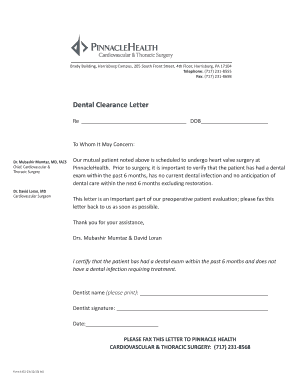
Dental Clearance Letter Form
Use a Dental Clearance Letter template to make your document workflow more streamlined.
What a dental clearance letter does
A Dental Clearance Letter Form records a dental professional’s written clearance for a named patient and a defined medical, surgical, treatment, employment, or program-related purpose. The form generally identifies the patient, documents relevant dental findings or treatment status, states whether clearance is provided, and captures the dentist’s date and signature. A practice can upload the letter to signNow, add or confirm fillable fields, assign patient and dentist signers, and send it electronically. ESIGN and UETA generally recognize electronic signatures for business records, while HIPAA and applicable state law govern health-information handling.
Who benefits from dental clearance forms
Dental Clearance Letter Form workflows are most useful when dental findings must be documented, signed, and shared with a receiving healthcare or organizational party.
A solo dental practice can use a reusable Dental Clearance Letter Form template to collect patient details, clinical clearance, dentist credentials, dates, and signatures without printing multiple copies. A multisite dental group can standardize clearance letters across offices, assign patient and dentist fields consistently, and retain signed PDFs with audit trails for surgical or treatment coordination. A hospital or surgical center can receive completed dental clearance records from outside practices, verify signer attribution, and organize the final documents within a controlled electronic workflow.
These tasks are executed by both individual contributors and centralized administrators depending on organizational policy and required controls.
Who uses dental clearance letters
Dental practices
Dental practices use the letter to document that a patient completed required dental evaluation before surgery, treatment, employment, or program participation.
Patients
Patients provide accurate medical and dental history, authorize release where required, and sign the completed clearance record for the receiving organization.
Features that support dental clearance workflows
A focused signNow workflow helps dental practices prepare, route, sign, and retain clearance letters while keeping patient-specific information connected to the final record.
Structured fields
Capture patient identity, dental findings, treatment status, and clearance dates in one structured Dental Clearance Letter Form, reducing omissions before the receiving provider reviews the record.
Signer roles
Assign separate fields to the patient and dental professional so each signer completes only the information and attestation intended for that person.
Remote signing
Send the letter by secure email invitation or signing link, allowing patients to complete the form remotely when the practice’s consent process permits.
Audit trail
Use signNow audit trails to preserve signer actions, timestamps, and document history alongside the final signed Dental Clearance Letter Form for later review.
Secure storage
Store the signed PDF and completion evidence in a controlled workspace, supporting the practice’s record-management process for health information and clearance decisions.
Reusable template
Use a reusable signNow template for recurring clearance requests while retaining the exact patient-specific fields, dates, findings, and signatures for each completed letter.
 Best ROI. Our customers achieve an average 7x ROI within the first six months.
 Scales with your use cases. From SMBs to mid-market, airSlate SignNow delivers results for businesses of all sizes.
 Intuitive UI and API. Sign and send documents from your apps in minutes.
Complete the dental clearance letter online
Use signNow to prepare the Dental Clearance Letter Form, route it to the patient and dental professional, and preserve the completed record with its audit trail.
Upload form:
Upload the completed Dental Clearance Letter Form. Place fields:
Add patient, dentist, date, and signature fields. Assign signers:
Assign each field to the correct signer. Send securely:
Send invitations and monitor completion status. Archive records:
Download the signed PDF and audit trail.
What the dental letter audit trail records
The signNow audit trail documents the signing evidence behind a Dental Clearance Letter Form without repeating the form preparation workflow.
Authenticate signer:
Timestamp actions:
Track document:
Seal completion:
Log activity:
Export trail:
Avoidable dental clearance form problems
Leaving the dentist’s license details, clearance date, treatment status, or patient identifiers blank can make the Dental Clearance Letter Form unusable to the receiving provider. Sending the letter to the wrong patient or facility email can disclose protected health information and create a preventable privacy incident. Assigning the dentist’s attestation fields to the patient can weaken signer attribution and leave the clinical clearance statement incomplete. Saving only the signed PDF without the signNow audit trail removes supporting evidence about invitations, timestamps, signer actions, and completion history.
Best practices for dental clearance letters
Accurate fields, separated signer responsibilities, documented consent, and complete retention make the signed Dental Clearance Letter Form easier to review and defend.
Verify every required field
Separate patient and dentist fields
Document electronic consent
Retain the complete evidence
Security for dental clearance records
Transport encryption:
Storage encryption:
Health information:
Security certification:
Information security:
Signer authentication:
Dental clearance letter processing stages
Processing time depends on field preparation, signer access, and clinical review; signNow records each stage without promising a completion deadline.
Document preparation
Delivery to signers
Signer turnaround
Completion and archival
Dental clearance form troubleshooting
Resolve field assignment, signer authentication, privacy, and retention questions before sending a Dental Clearance Letter Form.
Upload the original Dental Clearance Letter Form as a PDF or supported document. signNow can detect existing fillable fields; manually add missing patient, dentist, date, and signature fields before sending.
Use signNow’s field assignment to distinguish the patient from the dental professional. The Business plan includes templates and audit trails, allowing the same Dental Clearance Letter Form layout to be reused without changing signer responsibilities.
A patient can sign through the secure email invitation or signing link without creating a signNow account when the workflow permits. Add SMS authentication when the practice needs stronger attribution for health information.
For PHI, configure a HIPAA-compliant workflow and obtain the required signNow BAA. HIPAA compliance does not replace the practice’s obligations for authorization, minimum necessary disclosure, and state privacy law.
A completed document should retain its audit trail, timestamps, signer actions, and final PDF together. signNow provides audit trails; preserve the package according to the practice’s medical-record policy and HIPAA 45 CFR §164.530(j).
The Business plan costs $8 per user per month when billed annually and includes 100 signature invites per user per year. Business Premium costs $15 and adds bulk send; overage fees apply to subscription plans.
Key performance indicators that demonstrate SignNow's proven track record.
BE READY TO GET MORE
Get this form now!

If you believe that this page should be taken down, please follow our DMCA take-down process.