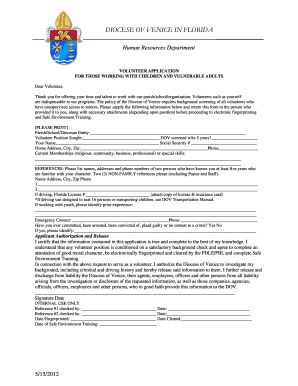
Volunteer Application Diocese Of Venice In Florida Form
Use a Volunteer Application Diocese Of Venice In Florida template to make your document workflow more streamlined.
What the Diocese volunteer application does
The Volunteer Application Diocese Of Venice In Florida Form collects information from people seeking volunteer service with the Diocese of Venice in Florida or an affiliated ministry. In signNow, staff upload the approved application, review detected fillable fields, assign applicant and diocesan recipients, and send the document electronically. The applicant completes the designated responses and signs, while the organization reviews the returned application. signNow preserves the completed PDF and audit trail, but diocesan staff remain responsible for screening, approval, privacy decisions, and retention requirements.
Who uses this volunteer application
Diocesan offices
Parish and diocesan administrative staff can upload the approved volunteer application, assign applicant fields, send it for signature, and retain the signed PDF with its audit trail. The workflow is suited to intake records, volunteer consent documents, and internal review, subject to Diocese policy.
Affiliated ministries
Affiliated ministries, schools, and healthcare programs can use the application workflow when they need remote completion and controlled access. Each organization should identify its own reviewers, privacy obligations, and retention schedule before collecting applicant information electronically.
Complete the volunteer application online
Prepare the Diocese of Venice volunteer application in four controlled steps, from uploading the form through preserving its completed audit trail.
Upload the form:
Upload the Diocese form into signNow and confirm the document displays correctly. Review fields:
Use signNow’s field detection, then check each required volunteer response and signature field. Send securely:
Add the authorized diocesan recipient and send the application through signNow. Store records:
Review the completed application and retain its audit trail with the signed document.
How this volunteer application workflow works
signNow turns the Diocese application into a controlled electronic workflow while leaving diocesan review, eligibility decisions, and approval with the responsible organization.
Upload: Upload the approved Diocese volunteer application PDF. Detect fields: Let signNow detect fields, then verify placement. Send: Send the prepared application to the applicant. Complete: Capture the signature, signed PDF, and audit trail.
 Best ROI. Our customers achieve an average 7x ROI within the first six months.
 Scales with your use cases. From SMBs to mid-market, airSlate SignNow delivers results for businesses of all sizes.
 Intuitive UI and API. Sign and send documents from your apps in minutes.



Features for the Diocese volunteer form
signNow provides document preparation, electronic signing, audit history, mobile access, and integrations that can be mapped to the Diocese volunteer intake process.
PDF preparation
Upload the approved Diocese application and prepare it without recreating the document from scratch, reducing transcription between the source PDF and the electronic workflow.
Field detection
Field detection helps identify fillable areas, while staff can review each placement before assigning applicant or diocesan responsibilities.
Flexible delivery
Send the application to a named applicant by email or use a controlled signing link when the intake process requires a shareable access method.
Mobile completion
Applicants can complete and sign from desktop or mobile devices, supporting volunteer intake when an in-person appointment is unavailable.
Audit trail
The audit trail records signing activity and timestamps, giving reviewers a document history to retain alongside the completed application.
Connected records
Completed applications can connect with systems such as Google Drive, Box, Microsoft 365, Salesforce, or NetSuite when the organization’s plan and workflow support those integrations.
Technical requirements for online completion
The Diocese volunteer application can be prepared through signNow in Chrome, Firefox, Safari, or Edge on Windows and macOS. Signers can also use signNow mobile apps on iOS and Android, provided their device has internet access and supports the current application.
Supported browsers Chrome, Firefox, Safari, and Edge Desktop systems Windows and macOS desktops Mobile access iOS and Android mobile apps
Organizations should manage access through approved devices, current browser versions, and role-based signNow permissions. Enterprise deployments may add SSO provisioning, API access, or managed storage. Confirm that the completed application and audit trail can be retained under the Diocese’s records policy before rollout.
Track each volunteer application stage
The Diocese determines its review schedule; signNow provides a clear document status from preparation through signed-record archival.
Prepare document
Deliver to signer
Applicant turnaround
Complete and archive
Best practices for diocesan intake
Accuracy, recipient control, and record handling matter because this application may contain personal information about people seeking volunteer service.
Verify the Diocese-approved application before sending
Separate applicant and diocesan responsibilities
Protect applicant information during intake
Archive the signed application and audit trail
Security controls for volunteer records
Stored data:
Data transfer:
Security report:
Security standard:
Electronic signatures:
Protected health data:
What the audit trail records
The audit trail separates the applicant’s signing event from later diocesan review and provides a record of how the electronic application was completed.
Authenticate signer:
Capture timestamps:
Track document history:
Seal record:
Review history:
Export evidence:
Privacy pitfalls in volunteer intake
Sending the application to the wrong recipient can expose volunteer information and create an unreliable intake record requiring correction and controlled replacement. Leaving required consent or signature fields unassigned can produce an incomplete application that diocesan reviewers cannot process without contacting the applicant again. Forwarding a completed application through unmanaged email can expand access beyond authorized diocesan or ministry staff and weaken the organization’s privacy controls. Storing the signed PDF without its audit trail can make it harder to demonstrate who signed, when actions occurred, and how the electronic record was completed.
Volunteer application troubleshooting
Resolve document setup, signer access, plan selection, electronic-signature, privacy, and record-preservation questions before diocesan review.
Upload the Diocese-approved PDF again, then inspect detected fields at the page level. signNow’s field detection can accelerate setup, but staff must verify labels, required status, recipient assignment, and signature placement before sending the application.
Confirm that the applicant’s email address is correct and resend the invitation from the document’s status view. If the recipient still cannot open it, provide a controlled signing link or ask the applicant to check spam filtering.
The signNow Business plan provides legally binding eSignatures and audit trails. Business Premium adds bulk send and kiosk mode, while Enterprise adds advanced signer authentication; select controls based on the Diocese workflow and applicant population.
ESIGN and UETA generally recognize electronic signatures when intent, consent, attribution, and record retention are established. Consumer-facing workflows also require the ESIGN disclosure and access procedures under 15 U.S.C. §7001(c).
If the application includes protected health information in a covered workflow, signNow identifies HIPAA compliance as requiring a BAA. The Diocese or ministry remains responsible for determining whether HIPAA applies and configuring access appropriately.
Download the completed PDF and its audit trail after all required parties finish. Preserve both under the Diocese records policy; signNow’s audit trail documents actions, timestamps, and the signing history associated with the application.
Key performance indicators that demonstrate SignNow's proven track record.
BE READY TO GET MORE
Get this form now!

If you believe that this page should be taken down, please follow our DMCA take-down process.