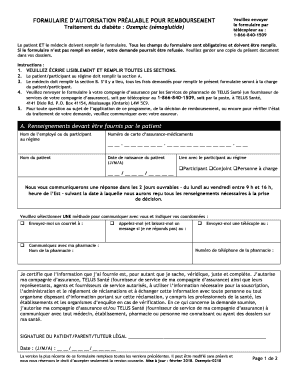
Traitement Du Diabte Ozempic Smaglutide Form
Use a Traitement Du Diabte Ozempic smaglutide template to make your document workflow more streamlined.
What this Ozempic form does
The Traitement Du Diabte Ozempic Smaglutide Form is a medication-related healthcare document for recording information and signatures connected with Ozempic or semaglutide treatment. The supplied form name does not identify an issuing agency, official federal form number, required fields, dosage schedule, filing deadline, or prescribing rule, so those details should not be invented. In signNow, a healthcare team can upload the document, review detected fillable fields, add patient and professional signature fields, send it securely, and retain the completed record with an audit trail. Clinical accuracy remains the prescriber’s responsibility.
Who uses this Ozempic form
Healthcare teams
Clinics and prescribing teams use this form to collect patient information, treatment acknowledgments, and signatures before documenting Ozempic or semaglutide-related care. Any required clinical review remains with the licensed professional responsible for the patient.
Patients and representatives
Patients or authorized representatives complete the requested fields and sign only after reviewing the treatment information provided by their healthcare professional. The completed record can remain associated with its audit trail.
Features for completing this form
signNow connects the form’s clinical review and signature steps without changing the healthcare information supplied by the responsible professional.
Field detection
Upload the Traitement Du Diabte Ozempic Smaglutide Form and review the detected fields before entering patient or prescriber information. Manual correction keeps the final document aligned with the source form.
Signature fields
Place signature, date, initials, and acknowledgment fields on the exact pages requiring patient or representative action. Separate signer responsibilities from internal review fields before delivery.
Flexible delivery
Send the completed request through signNow’s web workflow, or create a controlled signing link when the healthcare organization has an approved distribution process.
Mobile completion
The signer can review and complete the form on a desktop or supported mobile device, helping clinics collect acknowledgments without requiring every patient to visit an office.
Audit trail
The completed document retains an audit trail recording signing activity, timestamps, and related transaction history. This supports later review of how the healthcare form was executed.
Controlled storage
Store the signed form with access controls appropriate for protected health information. HIPAA compliance requires a BAA where applicable; signNow identifies HIPAA compliance as requiring a BAA.
How to complete this form online
Use this sequence to move the Traitement Du Diabte Ozempic Smaglutide Form from an uploaded source document to a signed healthcare record.
Upload form:
Upload the Traitement Du Diabte Ozempic Smaglutide Form and review its pages. Review fields:
Let signNow detect fields, then correct field placement manually. Assign signer:
Add the patient, representative, or professional as the appropriate signer. Send request:
Send the form and monitor completion in signNow. Store record:
Download the completed document and preserve its audit trail.
 Best ROI. Our customers achieve an average 7x ROI within the first six months.
 Scales with your use cases. From SMBs to mid-market, airSlate SignNow delivers results for businesses of all sizes.
 Intuitive UI and API. Sign and send documents from your apps in minutes.
Mobile options for this form
The signNow mobile apps support completing and signing the Traitement Du Diabte Ozempic Smaglutide Form from iOS and Android devices. A clinic can capture a paper source with a device camera, then review the uploaded document before adding fields. Use a current operating system and a secure connection when handling patient information.
iOS app iOS 15 or later Android app Android 10 or later Camera capture Camera capture for paper forms
Healthcare organizations should manage mobile devices through approved controls, restrict local copies, and verify that staff use authorized signNow accounts. For API, SSO, or certificate-based workflows, administrators should confirm the selected signNow plan and configure access before connecting the Traitement Du Diabte Ozempic Smaglutide Form to clinical systems.
Authentication options for this form
PKI signatures:
X.509 certificates:
Two-factor authentication:
SMS OTP:
ID verification:
Signing evidence:
How the audit trail records this form
The audit trail separates the patient’s submitted information from the technical evidence showing how the Traitement Du Diabte Ozempic Smaglutide Form was completed.
Signer authentication:
Timestamp capture:
Document hashing:
Tamper-evident sealing:
Activity history:
Audit export:
Best practices for this form
Accurate clinical content, controlled access, and a reproducible signing record matter more than speed when completing this healthcare form.
Verify clinical details before sending
Protect patient information during delivery
Capture informed electronic consent
Archive the signed record securely
Healthcare use cases for this form
Healthcare teams can adapt the signing workflow to patient acknowledgments while preserving professional review of every medication-related entry.
Healthcare workflow
A healthcare organization sends patient acknowledgment forms after a clinician reviews treatment information. The form moves from upload to signature without requiring paper routing between departments.
- Patient acknowledgment fields remain visible
- Authorized staff review before delivery
This scenario uses signNow for document routing and signature evidence, while the clinician remains responsible for the accuracy of the medical information. Any HIPAA-covered workflow should use the organization’s privacy controls and a BAA where required.
Fertility care
Fertility Centers of Illinois identifies signNow as useful for API-connected healthcare operations requiring responsive electronic document workflows. The customer story provides a real healthcare reference without establishing details about this specific Ozempic form.
- Healthcare API workflow reference
- Patient-facing signing remains controlled
The customer example supports considering an API workflow when a healthcare organization must connect document completion with internal systems. It does not replace clinical review, patient consent requirements, or the organization’s own retention and access policies for protected health information.
Legal standing of this signed form
A completed electronic Traitement Du Diabte Ozempic Smaglutide Form may be admissible when the signer shows intent, consents to electronic records, can be attributed to the signature, and the record remains reproducible under ESIGN, 15 U.S.C. ch. 96, and applicable state law. Wills, court filings, and other statutory exceptions remain outside that general rule.

Privacy challenges with this form
Patient names, medication details, and health information can appear in the completed document; sending it to the wrong address may disclose protected health information. A missing acknowledgment or signature field can leave the patient’s consent record incomplete even when the document appears visually finished. Shared accounts or excessive permissions can allow staff without a care-related need to view or download the completed form. Saving an unencrypted local copy can separate sensitive medication information from the access controls applied to the official signed record.
Troubleshooting this healthcare form
These answers address document preparation, patient delivery, plan selection, HIPAA handling, audit evidence, and clinical review for this specific form.
Upload the original PDF again and inspect each page before sending. signNow’s field detection can identify fillable areas, but staff should confirm that patient, prescriber, dosage, acknowledgment, and signature fields match the source document.
Use a unique recipient address, resend the invitation, or generate a controlled signing link through the approved workflow. Confirm that the recipient can access electronic records before requesting a signature under ESIGN’s consumer-consent requirements.
Business includes templates, audit trails, mobile apps, and legally binding eSignatures at $8/user/month with annual billing. Business Premium is $15/user/month annually and adds bulk send and kiosk mode.
signNow identifies HIPAA compliance as requiring a BAA. A healthcare organization should execute the BAA when applicable, restrict access, and establish its own policies for protected health information before sending this form.
The audit trail records signing activity, timestamps, IP information, and transaction history. Export and retain the completed form with its evidence, then apply the covered entity’s retention policy and HIPAA’s six-year rule where applicable.
The form name alone does not establish a prescribing requirement, dosage, deadline, or issuing agency. Ask the responsible healthcare professional to verify every clinical field; signNow provides document workflow, not medical or legal advice.
Key performance indicators that demonstrate SignNow's proven track record.
BE READY TO GET MORE
Get this form now!

If you believe that this page should be taken down, please follow our DMCA take-down process.