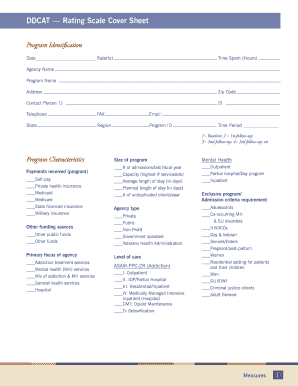
Dual Diagnosis Workbook Form
Use a Dual Diagnosis Workbook Pdf template to make your document workflow more streamlined.
What the Dual Diagnosis Workbook Form does
The Dual Diagnosis Workbook Form is a structured record for documenting information about co-occurring mental-health and substance-use conditions. It can organize participant responses, clinician observations, consent, dates, and signatures in one workflow. Because the supplied form name does not identify an issuing agency, official field requirements, filing deadline, or statutory version, organizations should verify their approved workbook before use. In signNow, staff upload the document, add or confirm fields, assign recipients, collect signatures, and retain the completed file with its audit trail.
Who benefits from this workbook workflow
The Dual Diagnosis Workbook Form fits behavioral-health workflows that require participant input, professional review, consent evidence, and controlled record handling.
Solo behavioral-health practitioners can send one Dual Diagnosis Workbook Form to a participant, collect consent and signatures, then retain the completed record without coordinating multiple paper copies. Community mental-health clinics can route workbook sections among participants, clinicians, and authorized reviewers while maintaining a reusable template and an auditable completion history. Enterprise behavioral-health networks can standardize workbook templates, permissions, and storage across locations while connecting signNow workflows with approved systems such as Salesforce, Microsoft 365, or Box.
These tasks are executed by both individual contributors and centralized administrators depending on organizational policy and required controls.
Features for dual-diagnosis workbook workflows
signNow organizes the Dual Diagnosis Workbook Form from field preparation through authorized completion, signature capture, audit evidence, and controlled record storage.
Field preparation
Upload the Dual Diagnosis Workbook Form and place fields for participant responses, clinician review, dates, initials, and signatures without rebuilding the document manually.
Role-based routing
Route the workbook to the participant, clinician, or authorized reviewer in a defined order so each person completes only the assigned sections.
Audit trail
Capture signer actions, timestamps, and document history in an audit trail that helps establish what happened during the workbook workflow.
Reusable templates
Use templates for recurring assessment workflows while preserving the workbook’s questions, response areas, consent language, and approval sequence across submissions.
Mobile completion
Complete the workbook from a desktop or mobile device, supporting behavioral-health teams that collect information during visits or remote sessions.
Record storage
Store the completed workbook and audit evidence together so authorized staff can retrieve the record for care coordination, review, or compliance documentation.
Complete the Dual Diagnosis Workbook Form
Prepare the workbook in signNow, assign each participant or reviewer, collect signatures, and preserve the completed record with its audit evidence.
Upload workbook:
Upload workbook Add fields:
Add response and signature fields. Assign roles:
Assign participant and reviewer roles. Send request:
Send the signing request. Store record:
Review and store the completed record.
How the workbook workflow works
The signNow workflow converts the Dual Diagnosis Workbook Form into an assigned, reviewable record without requiring staff to circulate paper copies.
Upload workbook: Upload the Dual Diagnosis Workbook Form. Prepare fields: Auto-detect or place response and signature fields. Assign recipients: Assign participant and reviewer recipients. Complete record: Collect signatures and store the audit trail.
 Best ROI. Our customers achieve an average 7x ROI within the first six months.
 Scales with your use cases. From SMBs to mid-market, airSlate SignNow delivers results for businesses of all sizes.
 Intuitive UI and API. Sign and send documents from your apps in minutes.
Recommended workbook workflow setup
Configure the Dual Diagnosis Workbook Form around participant identity, consent evidence, auditability, protected information, and controlled staff access.
| Setting | Recommendation |
|---|---|
| Authentication method | Email link with SMS verification |
| Signature type | Typed or drawn electronic signature |
| Audit trail | Retain completion history with the workbook |
| Document retention | Follow the organization’s approved health-record policy |
| Encryption | TLS 1.2/1.3 in transit and AES-256 at rest |
Security controls for sensitive workbooks
Data in transit:
Data at rest:
Health information:
Control reporting:
Security certification:
Privacy compliance:



Privacy safeguards for dual-diagnosis workbooks
Signed workbooks may expose diagnoses, treatment details, or other sensitive health information to recipients without a documented need to know. Missing electronic-consent language can leave participants unable to show that they agreed to complete and sign the workbook digitally. Unrestricted template or folder permissions can let unauthorized staff view, edit, download, or resend a sensitive dual-diagnosis workbook. Sending the completed workbook to the wrong email address can disclose protected behavioral-health information and create an avoidable privacy incident.
What the workbook audit trail records
The audit trail connects the Dual Diagnosis Workbook Form to signer actions, timestamps, document history, completion evidence, and later retrieval.
Authenticate signer:
Capture timestamp:
Track document history:
Protect integrity:
Export evidence:
Archive record:
Best practices for workbook completion
Use a controlled template, verify recipients, document consent, and preserve the completed workbook with evidence that supports later review.
Validate every required workbook field
Maintain one approved workbook template
Limit disclosure to authorized recipients
Apply the applicable retention policy
Why teams look for DocuSign alternatives
Organizations seek alternatives when they need different pricing models, stronger native automation, simpler bulk affidavit workflows, or more flexible identity-verification options than those available in a legacy envelope-based vendor.

Rollout and retention for the workbook
A controlled rollout combines workbook preparation, first delivery, staff onboarding, the signNow trial period, and organization-specific record retention.
Template preparation:
First send:
Team onboarding:
Seven-day trial:
Record retention:
Audit preservation:
Access review:
Policy update:
Mobile options for the workbook
The Dual Diagnosis Workbook Form can be prepared and signed through signNow’s mobile apps for iOS and Android. Teams can use mobile workflows when participants or clinicians complete the workbook during visits, remote sessions, or field work.
Mobile apps iOS and Android apps Offline work Offline signing availability Document capture Camera document capture
Organizations should manage mobile access through approved devices, user permissions, and privacy procedures. Confirm whether offline signing and camera capture fit the organization’s security policy, then synchronize and retain the completed Dual Diagnosis Workbook Form with its audit evidence when connectivity returns.
Troubleshooting the Dual Diagnosis Workbook Form
Resolve field, consent, plan, and compliance questions before sending a completed Dual Diagnosis Workbook Form to participants or reviewers.
How can I verify electronic consent for this workbook?
Use signNow’s signing flow to present the record electronically and capture the signer’s action. For consumer-facing healthcare records, ESIGN, 15 U.S.C. §7001(c), requires disclosure of paper-record rights, electronic access, and consent-withdrawal procedures.
Why are workbook fields missing after upload?
Review the uploaded file and use signNow’s field-placement tools to add response, date, initials, and signature fields. A scanned or image-based workbook may require manual placement because its printed lines are not interactive fields.
Does the Business plan include an audit trail?
Yes. signNow’s Business plan includes audit trails, templates, mobile apps, and legally binding eSignatures at $8 per user per month with annual billing. The audit record should be retained with the completed workbook under the organization’s applicable policy.
Key performance indicators that demonstrate SignNow's proven track record.
BE READY TO GET MORE
Get this form now!

If you believe that this page should be taken down, please follow our DMCA take-down process.