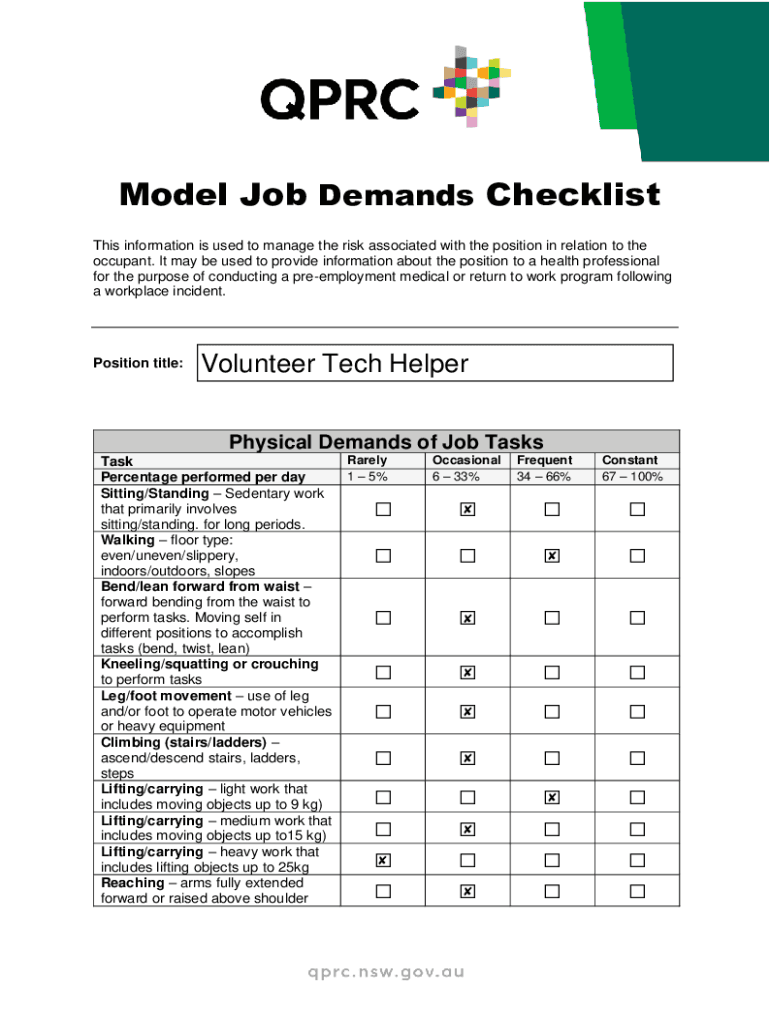
Model Job Demands Checklist Form April
Use a Model Job Demands Checklist Fillable Form April template to make your document workflow more streamlined.
What this checklist does
Model Job Demands Checklist Form April is a digital checklist for documenting job-demand information, acknowledgments, and signatures in a structured record. Because the supplied form name does not identify an issuing agency, statutory filing deadline, or required field list, its exact business purpose should be confirmed from the source document. In signNow, upload the checklist, review automatically detected fillable areas, place or assign missing fields, send it to designated recipients, collect signatures, and retain the completed document with its audit trail.
Who benefits from this checklist
Model Job Demands Checklist Form April fits individual practitioners, field-based businesses, and centralized teams that need consistent completion and signed record handling.
A solo safety consultant can use Model Job Demands Checklist Form April to collect job-demand acknowledgments from clients, preserve signed responses, and retrieve the completed checklist without coordinating paper copies. A construction contractor can send Model Job Demands Checklist Form April from a job site, collect worker or supervisor acknowledgments on mobile devices, and keep the signed record with project documentation. An enterprise operations team can standardize Model Job Demands Checklist Form April through shared templates, delegated sending, role-based access, and audit trails across departments with different review responsibilities.
These tasks are executed by both individual contributors and centralized administrators depending on organizational policy and required controls.
How this checklist workflow works
Model Job Demands Checklist Form April moves from document preparation to field assignment, signer delivery, completion, and auditable storage in one signNow workflow.
Upload: Upload the checklist PDF Prepare: Detect or place required fields Send: Send assigned signing invitations Complete: Store the signed checklist and audit trail
Complete the checklist in signNow
Prepare Model Job Demands Checklist Form April by uploading the source document, checking its fields, assigning recipients, sending invitations, and preserving the completed record.
Upload:
Upload the completed source PDF. Check fields:
Review detected fields and add missing ones. Assign roles:
Assign each field to its signer. Send:
Send the checklist for electronic signature. Archive:
Download the signed copy and audit trail.
 Best ROI. Our customers achieve an average 7x ROI within the first six months.
 Scales with your use cases. From SMBs to mid-market, airSlate SignNow delivers results for businesses of all sizes.
 Intuitive UI and API. Sign and send documents from your apps in minutes.
Inside the audit trail for this checklist
signNow records the signing events surrounding Model Job Demands Checklist Form April so reviewers can connect signer identity, timing, document integrity, and completion history.
Signer authentication:
Timestamp capture:
Document hashing:
Tamper-evident sealing:
Audit history:
Audit export:
Recommended checklist workflow setup
Configure Model Job Demands Checklist Form April around authenticated recipients, recorded signing activity, protected transmission, and an organization-approved retention policy.
| Setting | Recommendation |
|---|---|
| Authentication method | Email invitation with SMS verification |
| Signature type | Legally binding electronic signature |
| Audit trail | Enabled with completion history |
| Document retention | Retain according to policy |
| Encryption | TLS 1.2/1.3 and AES-256 |
Key features for this checklist
Model Job Demands Checklist Form April can be prepared, routed, signed, tracked, and retained through signNow features designed for document-based workflows.
Field preparation
Upload Model Job Demands Checklist Form April, review detected fields, and add missing response, date, initials, or signature fields before sending it to recipients.
Signer assignment
Assign each checklist field to a named recipient so the right person supplies each response, acknowledgment, date, or signature without relying on paper routing.
Digital delivery
Send invitations by email or signing link and track outstanding actions for Model Job Demands Checklist Form April from the signNow workspace.
Audit trail
Capture signer actions, timestamps, and document history in an audit trail that remains associated with the completed Model Job Demands Checklist Form April.
Mobile signing
Use signNow mobile apps when checklist participants need to review or sign Model Job Demands Checklist Form April away from a desk.
Record retrieval
Store the signed checklist and completion evidence together so authorized reviewers can retrieve the record during internal review or an information request.
Mobile options for this checklist
The signNow mobile apps let participants review and sign Model Job Demands Checklist Form April from iOS and Android devices. Mobile workflows can support field-based completion, while camera-based capture can help convert paper source material before the checklist is prepared for signing.
iOS app iOS app Android app Android app Offline signing Offline signing
Organizations should manage mobile access through approved devices, user permissions, and documented handling procedures. For regulated deployments, review whether the checklist contains protected information, configure appropriate authentication, and confirm that completed records and audit trails are retained in accordance with the organization’s policy and applicable law.
Security for checklist records
Encryption at rest:
Encryption in transit:
Security certification:
Information security:
Health information:
Electronic signatures:



Privacy controls for Model Job Demands Checklist Form April
Personal information in Model Job Demands Checklist Form April can be exposed when completed copies are emailed without controlled recipient access. Missing consent language may leave signers unable to demonstrate informed agreement to electronic records or disclosures within Model Job Demands Checklist Form April. Shared accounts and broad permissions can let unauthorized staff view, edit, or send Model Job Demands Checklist Form April. Untracked revisions can create uncertainty about which Model Job Demands Checklist Form April version a signer reviewed and accepted.
Best practices for this checklist
Use a controlled template, deliberate signer assignments, complete field review, and restricted permissions when processing Model Job Demands Checklist Form April.
Lock the approved checklist template
Assign recipients individually
Review every completed field
Restrict administrative permissions
Troubleshooting Model Job Demands Checklist Form April
Resolve field, consent, access, plan, and compliance questions before distributing Model Job Demands Checklist Form April for signature.
Upload Model Job Demands Checklist Form April as a PDF, then use signNow’s document editor to place fields manually when automatic field recognition misses a checklist area. The Business plan includes templates, audit trails, and legally binding eSignatures; review every detected field before sending.
A signer can complete Model Job Demands Checklist Form April without a signNow account through the email invitation or signing link. If stronger attribution is required, Business Premium adds request payments and quick invite links, while Enterprise adds advanced signer authentication capabilities.
For consumer-facing use, obtain electronic-record consent and disclose the right to receive paper records under ESIGN, 15 U.S.C. §7001(c). Configure the Model Job Demands Checklist Form April workflow so the consent event and signer actions remain in the audit trail.
The Business plan is listed at $8 per user per month when billed annually and includes 100 signature invites per user per year. Additional invitations may incur overage fees; Business Premium is listed at $15 annually billed and includes bulk send.
signNow states that its ESIGN and UETA compliance supports electronic signatures, audit trails, timestamps, and document history. Legal effect still depends on intent, consent, attribution, and reliable record retention for the completed checklist.
Use role-based access, controlled templates, and an audit trail for Model Job Demands Checklist Form April. HIPAA workflows require a business associate agreement when protected health information is involved; signNow identifies HIPAA compliance as requiring a BAA.
Key performance indicators that demonstrate SignNow's proven track record.
BE READY TO GET MORE
Get this form now!

If you believe that this page should be taken down, please follow our DMCA take-down process.