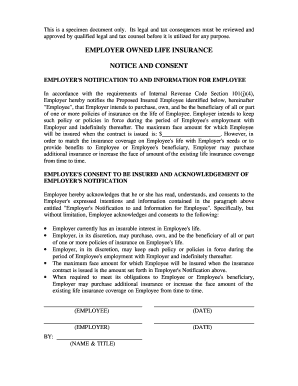
Employer Owned Life Insurance Notice And Consent Form
Use a Employer Owned Life Insurance Notice And Consent Form PDF template to make your document workflow more streamlined.
What this employer insurance consent form does
An Employer Owned Life Insurance Notice And Consent Form records an employee’s written consent before an employer purchases or maintains life insurance on that employee. The form identifies the employer, insured employee, policy purpose, coverage amount or policy details, and consent terms. The employer should explain the arrangement clearly, obtain the employee’s signature before policy issuance, and retain the executed record with related policy documents. Federal tax treatment can depend on Internal Revenue Code §101(j), ownership, notice, consent, and applicable exceptions; legal and tax professionals should review the completed form.
Who benefits from this consent workflow
The form is most useful when an employer needs documented employee consent before arranging employer-owned life insurance coverage.
A closely held business can document an owner’s or key employee’s consent before obtaining coverage intended to support continuity, succession, or business financing decisions under its insurance plan and professional advice. A regional employer can use a controlled template to identify covered employees, explain policy ownership, and preserve each signed consent record for its insurance and corporate governance files. An enterprise insurance department can route notices through role-based teams, retain completed consents with policy records, and coordinate review with tax counsel when Internal Revenue Code §101(j) applies.
These tasks are executed by both individual contributors and centralized administrators depending on organizational policy and required controls.
How the consent workflow works
The signNow workflow moves the employer-owned life insurance notice from preparation through authenticated consent and documented storage.
Upload document: Upload the notice and consent PDF. Add fields: Place employee and employer fields. Send notice: Route the notice to assigned signers. Archive evidence: Store the signed record and audit trail.
Complete the form in four steps
Prepare the employer-owned life insurance notice and consent record in signNow before sending it to the employee and authorized employer representative.
Upload form:
Upload the employer’s notice and consent document to signNow. Check fields:
Review detected fields and add employee and employer fields. Assign signers:
Assign the employee and employer representatives in signing order. Complete record:
Send the notice, collect consent, and download the completed record.
Configure the notice and consent workflow
Use a controlled workflow to collect, authenticate, preserve, and retrieve employer-owned life insurance consent records.
| Setting | Recommendation |
|---|---|
| Authentication and signature | Email verification with typed or drawn consent signature |
| Audit trail | Capture signer identity, timestamps, IP address, and actions |
| Document retention | Retain signed records under the employer’s documented policy |
| Encryption | Use TLS 1.2 or 1.3 and AES-256 protection |
| User provisioning | Assign role-based access to authorized insurance administrators |
 Best ROI. Our customers achieve an average 7x ROI within the first six months.
 Scales with your use cases. From SMBs to mid-market, airSlate SignNow delivers results for businesses of all sizes.
 Intuitive UI and API. Sign and send documents from your apps in minutes.



Authenticate each consent signer
Signer authentication:
Two-factor authentication:
SMS OTP:
ID verification:
PKI signatures:
X.509 certificates:
Review the signNow audit trail
The audit trail shows how this employee consent was authenticated, signed, sealed, and retrieved for the employer’s records.
Authenticate signer:
Capture timestamp:
Hash document:
Seal record:
Log consent:
Export evidence:
Keep complete consent records
A complete record should connect the employee’s notice, consent, signed PDF, audit trail, and applicable policy documentation.
Preserve the complete evidence package
Explain ownership and policy purpose
Limit access to authorized administrators
Set a documented retention schedule
Set a retention schedule for consent
Retention depends on the record’s tax, insurance, corporate, and state-law context. Apply the longest documented requirement after professional review.
Before policy issuance
3 years from filing
6 years for understatement
Indefinite for fraud
State period if longer
Check exclusions and state requirements
State law
Missing consent
Excluded documents
Notary requirement
Avoid consent and recordkeeping mistakes
Leaving the employee’s identity, policy purpose, or coverage details incomplete can make the consent record difficult to match to the issued policy. Sending the notice before explaining employer ownership and intended use may undermine informed consent and create later employee disputes. Separating the signed consent from its audit trail can weaken the employer’s ability to show who signed and when. Granting broad access to employee insurance records can expose personal information beyond the people managing the policy.
Legal standing of electronic consent
A properly executed electronic consent can satisfy federal electronic-record principles when intent, attribution, consent, and record reproducibility are established under ESIGN and applicable state law, including UETA or New York ESRA. This form does not replace legal review of IRC §101(j), insurance rules, or excluded documents such as wills and court orders.

Troubleshoot consent and signing issues
Resolve field, disclosure, authentication, plan, and record-protection questions before treating the employee’s consent as complete.
The Business plan includes legally binding eSignatures, templates, and audit trails at $8/user/month when billed annually. Verify required fields after upload and assign each signer before sending the employer-owned life insurance notice.
For consumer-facing electronic records, ESIGN 15 U.S.C. §7001(c) requires disclosure of paper-record rights, electronic access, and withdrawal procedures. Add the applicable disclosure before requesting an employee’s electronic consent.
signNow supports ESIGN and UETA compliance, but those laws do not determine whether this insurance arrangement satisfies Internal Revenue Code §101(j). Have tax counsel review notice, consent, ownership, and beneficiary details.
Business Premium is listed at $15/user/month annually and adds bulk send, which may help distribute repeated notices. Enterprise is $30/user/month annually and adds advanced signer authentication and conditional fields.
If an employee cannot complete the signing link, verify the recipient email, resend the invitation, or use SMS authentication where configured. The sender should confirm identity before changing the assigned signer.
signNow encrypts data in transit with TLS 1.2 or 1.3 and at rest with AES-256. Limit access through assigned roles, retain the audit trail, and follow the employer’s approved records policy.
Key performance indicators that demonstrate SignNow's proven track record.
BE READY TO GET MORE
Get this form now!

If you believe that this page should be taken down, please follow our DMCA take-down process.