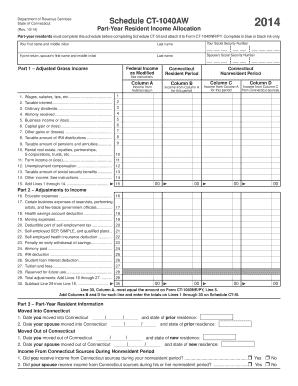
Schedule Ct 1040AW Part Year Resident Income Allocation Form
Use a Schedule CT 1040AW Part Year Resident Income Allocation template to make your document workflow more streamlined.
What this Connecticut allocation schedule does
Schedule Ct 1040AW Part Year Resident Income Allocation Form is used to organize income allocation for an individual who was a Connecticut resident for only part of the tax year. It separates income associated with the Connecticut residency period from amounts attributable elsewhere, allowing the related Connecticut return to reflect the taxpayer’s residency change. The preparer enters the taxpayer’s identifying information, residency dates, income amounts, and Connecticut allocation calculations, then reviews the totals and signs where required. Supporting records should be retained with the completed schedule and filed according to Connecticut Department of Revenue Services instructions.
Who uses this Connecticut schedule
Part-year taxpayers
Connecticut part-year taxpayers use the schedule to report income allocation associated with a change in residency during the tax year. They review dates, amounts, and supporting records before signing or approving the completed allocation.
Tax preparers
Tax preparers and certified public accountants prepare the schedule from client records, verify Connecticut allocation calculations, and route the final document for signature through a controlled workflow.
Business types that use this schedule
Tax professionals, accounting firms, and multistate employers benefit when residency changes require documented Connecticut income allocation.
Solo tax practitioners use the schedule to organize Connecticut income earned before and after a residency change, preserving supporting calculations for each client’s part-year allocation. Regional accounting firms use it to standardize part-year resident workpapers, coordinate client signatures, and retain completed allocations with the related Connecticut individual income tax filing. Multistate employers and enterprise tax departments use the schedule to document employee income allocation during Connecticut residency changes, while centralized administrators control templates and signing permissions.
These tasks are executed by both individual contributors and centralized administrators depending on organizational policy and required controls.
Features that support this allocation form
The schedule benefits from a controlled preparation and signing process that keeps residency calculations, signer actions, and completed records connected.
Form preparation
Upload the Connecticut allocation schedule and review detected fields before entering residency dates, income amounts, and signature information.
Signer routing
Route the completed schedule to the taxpayer or authorized preparer with assigned fields that clarify who must review and sign.
Audit trail
Keep a completion record with timestamps and signer actions to support the electronic history of the signed schedule.
Reusable template
Use templates for recurring part-year resident workflows while preserving the form’s specific tax-year and taxpayer information.
Mobile access
Review the schedule from a desktop or mobile device before signing, then download the completed PDF for tax records.
System connections
Connect the workflow to approved storage or accounting systems when authorized, while maintaining access controls for taxpayer information.
 Best ROI. Our customers achieve an average 7x ROI within the first six months.
 Scales with your use cases. From SMBs to mid-market, airSlate SignNow delivers results for businesses of all sizes.
 Intuitive UI and API. Sign and send documents from your apps in minutes.
How the signNow workflow works
The signNow process keeps preparation, review, signature, and record storage in a defined sequence for this Connecticut allocation schedule.
Upload: Upload the schedule PDF to signNow. Detect fields: Auto-detect fillable fields and review them. Complete schedule: Enter residency and allocation information. Finalize: Send, sign, and store the record.
Complete and sign the schedule
Use this sequence to prepare, route, sign, and retain the Connecticut part-year income allocation schedule.
Upload form:
Upload the Connecticut schedule PDF to signNow. Check fields:
Review detected fields and add missing tax or signature fields. Add signers:
Enter each signer’s email and assign signing responsibilities. Send form:
Send the allocation schedule for electronic signatures. Store records:
Download the completed schedule and audit trail.
Recommended schedule workflow settings
Configure the schedule workflow around signer identity, reproducible records, and the federal tax-record period that applies to the related return.
| Setting | Recommendation |
|---|---|
| Authentication method | Email verification with SMS OTP |
| Signature type | Electronic signature with signer intent |
| Audit trail | Enabled for every completed schedule |
| Document retention | 3 years from filing under IRC §6501(a) |
| Encryption | TLS 1.2/1.3 in transit and AES-256 at rest |
Audit evidence for the signed schedule
signNow records the events surrounding completion of the Connecticut allocation schedule, helping preparers retrieve evidence without changing the tax calculations.
Authenticate signer:
Capture timestamp:
Hash document:
Seal document:
Export trail:
Retrieve record:
Platform requirements for completing the schedule
Complete Schedule Ct 1040AW Part Year Resident Income Allocation Form in Chrome, Firefox, Safari, or Edge on Windows 10, Windows 11, or macOS. Mobile access supports Safari on iOS and Chrome on Android; TLS-secured connections protect transmission.
Desktop browsers Chrome, Firefox, Safari, and Edge on Windows 10, Windows 11, and macOS Mobile browsers Safari on iOS 15 or later; Chrome on Android 10 or later Device access Desktop and mobile access through a current internet connection
Tax preparers can use managed Windows or macOS devices for controlled preparation, then send the completed schedule to authorized signers. Review browser updates, document permissions, and organizational retention policies before relying on mobile access for Connecticut tax records.
Record-keeping practices for this schedule
Accurate calculations and a reproducible record matter after the schedule is signed, especially when it supports a Connecticut part-year return.
Retain the schedule with filing records
Export the audit trail after completion
Archive taxpayer information securely
Reconcile figures before signature
Retention periods for allocation records
Choose the applicable period based on the related federal return and any longer Connecticut or professional record-keeping requirement.
Three years: federal tax records
Six years: 25% understatement
Indefinite: fraud or no return
State period: verify requirements
Completion record: signed schedule
Risks from incorrect allocation
Tax misstatement
Calculation error
Audit challenge
Evidence gap
Troubleshooting the Connecticut allocation workflow
Resolve field, signer, plan, and compliance questions before the completed schedule becomes part of a Connecticut tax record.
signNow’s document editor lets you upload the schedule, review auto-detected fields, and add missing signature or date fields manually. Confirm that allocation figures and residency dates are accurate before sending; signNow does not determine Connecticut tax amounts.
The Business plan includes legally binding eSignatures, templates, audit trails, and mobile apps at $8 per user per month when billed annually. If the workflow requires bulk sending, Business Premium adds that capability at $15 per user per month annually.
For a consumer-facing electronic record, ESIGN requires consent and access conditions under 15 U.S.C. §7001(c). Capture the signer’s electronic consent and preserve the completed schedule and audit trail so the record remains reproducible.
signNow supports ESIGN and UETA compliance, but those frameworks do not decide whether Connecticut accepts a particular tax filing method. Follow the Connecticut Department of Revenue Services filing instructions and retain the signed schedule as supporting documentation.
If a signer cannot access the email invitation, verify the address, resend the request, or provide a controlled signing link. Use SMS authentication when configured, then confirm the audit trail records the signer’s actions and completion timestamp.
The Enterprise plan adds advanced signer authentication, formula fields, and conditional fields at $30 per user per month with annual billing. Those features can help govern complex schedules, but tax professionals remain responsible for accurate Connecticut allocations.
Key performance indicators that demonstrate SignNow's proven track record.
BE READY TO GET MORE
Get this form now!

If you believe that this page should be taken down, please follow our DMCA take-down process.