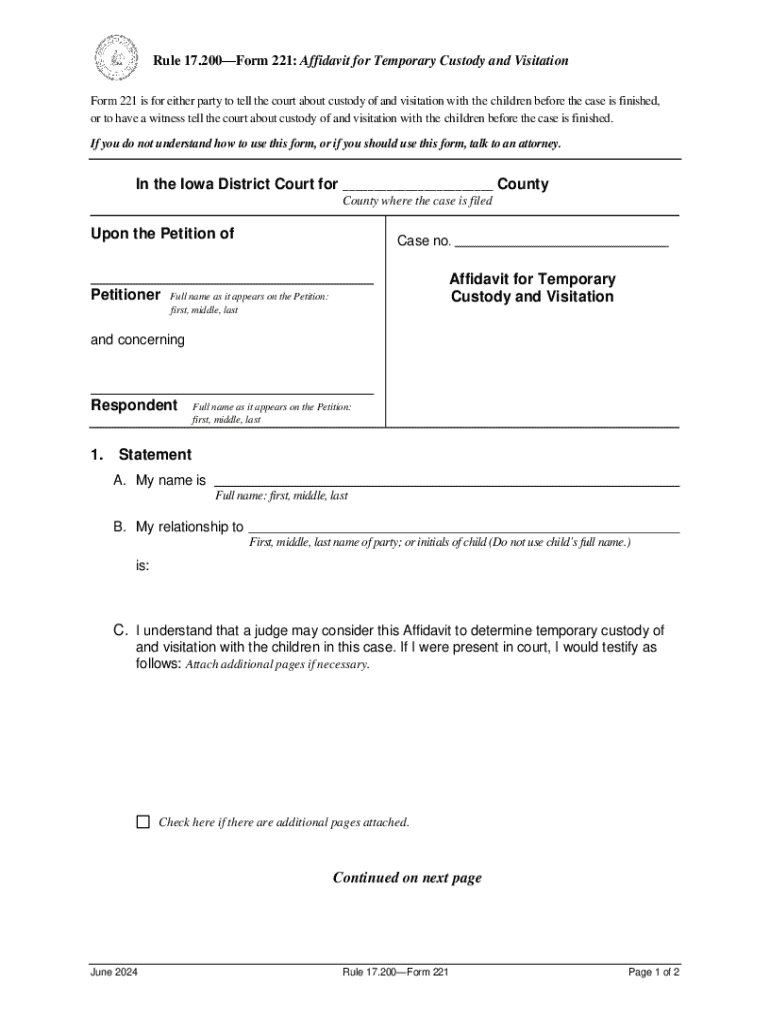
In The Iowa District Court For County Upon The Petition Of Affidavit For Form
Use a In The Iowa District Court For County Upon The Petition Of Affidavit For template to make your document workflow more streamlined.
What this Iowa affidavit form does
This form is a court-facing affidavit associated with a petition in an Iowa district court for a specified county. It records a petitioner’s sworn factual statements for review in a court matter, rather than serving as a general business contract. The filer should identify the county, case information, parties, factual statements, signature details, and any required acknowledgment or exhibits. signNow can help upload the document, detect fillable fields, route it for signature, and preserve an audit trail, but Iowa court rules control notarization, filing, and acceptance.
Businesses and legal teams using affidavits
The form is most useful where a petitioner, attorney, reviewer, or court-facing administrator must coordinate a sworn statement and its supporting record.
Solo Iowa attorneys can prepare petition affidavits, collect client signatures, and retain the completed record without coordinating paper exchanges across offices. County-focused legal practices can route affidavits among petitioners, counsel, and authorized reviewers while preserving a searchable audit trail for each court matter. Larger legal departments can standardize affidavit templates, delegate sending, and apply role-based access before records move into approved litigation or court-filing archives.
These tasks are executed by both individual contributors and centralized administrators depending on organizational policy and required controls.
How to prepare the affidavit
Use this sequence to prepare the court affidavit while separating electronic signing from any Iowa filing or notarization requirement.
Upload document:
Upload the Iowa affidavit PDF to signNow. Check fields:
Review detected fields and add missing entries. Assign recipients:
Assign petitioner, attorney, or notary roles. Complete record:
Send, sign, and preserve the audit trail.
What the affidavit audit trail records
The audit trail documents how the Iowa affidavit moved from upload through completion, giving reviewers evidence about identity, timing, and document handling.
Authenticate signer:
Capture timestamps:
Hash document:
Seal record:
Track activity:
Export trail:
 Best ROI. Our customers achieve an average 7x ROI within the first six months.
 Scales with your use cases. From SMBs to mid-market, airSlate SignNow delivers results for businesses of all sizes.
 Intuitive UI and API. Sign and send documents from your apps in minutes.
Recommended affidavit workflow setup
Configure the affidavit workflow around signer identity, court-specific filing instructions, audit evidence, and controlled access to personal information.
| Setting | Recommendation |
|---|---|
| Authentication method | Email verification with SMS OTP |
| Signature type | Typed or drawn electronic signature |
| Audit trail | Capture timestamps, IP address, and actions |
| Document retention | Follow Iowa court and counsel policy |
| Encryption | TLS 1.2 or 1.3 and AES-256 |
Signer authentication and certificates
Digital certificates:
Certificate identity:
Signer verification:
Mobile verification:
Identity proofing:
Signing evidence:
Mobile options for affidavit workflows
Use signNow on iOS and Android devices to prepare this affidavit, capture paper pages, and review signature fields. Browser access supports desktop workflows over TLS 1.2 or later.
Mobile apps iOS and Android apps Document capture Camera capture for paper affidavits Offline work Offline signing availability
Mobile preparation can help Iowa legal teams collect information away from the office, but it does not determine whether the district court requires notarization, wet ink, or a specific filing method. Confirm those requirements before submission.



Recordkeeping practices for Iowa affidavits
Keep the signed affidavit, filing details, and related audit evidence together while checking county-specific court requirements before submission.
Preserve the complete signed record
Capture court-specific metadata
Limit access to sensitive information
Verify filing and notarization rules
Affidavit preparation and filing stages
The platform can coordinate preparation and signatures, but the Iowa district court controls filing, notarization, and acceptance requirements.
Prepare affidavit
Deliver to signers
Signer turnaround
Archive and file
Iowa filing and document exclusions
Notarization
Court filing
Wills
Real-estate deeds
Privacy and disclosure pitfalls
Uploading an affidavit containing addresses, birth dates, or case details can expose personal information without role-based access controls. A signer may complete the signature field without providing the separate consent or acknowledgment required by the court. Sending the petition to the wrong recipient can disclose confidential allegations or identifying information. An electronic signature may be preserved correctly yet fail to satisfy a required notarial acknowledgment or filing method.
Troubleshooting Iowa affidavit workflows
These answers address field detection, signer verification, notarization, court acceptance, privacy, and record preservation for this Iowa affidavit workflow.
If the court requires an acknowledgment, signNow’s electronic signature and audit trail do not by themselves replace the notary’s required act. Confirm Iowa county instructions and complete any required notarization through an authorized process before filing.
signNow Business includes templates, audit trails, mobile apps, and legally binding eSignatures. The Business Premium plan adds bulk send, while Enterprise adds advanced signer authentication. Select the plan based on workflow needs, not court acceptance.
The sender can upload the affidavit, use field detection, add petitioner or attorney recipients, and place signature and date fields. Review every detected field against the court form before sending, because automation does not verify legal completeness.
ESIGN and UETA generally recognize qualifying electronic signatures, but court orders and official court filings are exceptions under federal law. Iowa district court rules may impose additional filing or signature requirements, so confirm acceptance before relying on electronic submission.
For sensitive petitioner information, use role-based access, recipient verification, and controlled sharing. signNow provides audit trails and encryption, while HIPAA compliance requires a BAA and applies only when the workflow actually handles protected health information.
Export the completed affidavit together with its certificate of completion and audit trail. Preserve the county, case number, signer identity, and filing confirmation under the retention policy required by counsel or the Iowa court.
Key performance indicators that demonstrate SignNow's proven track record.
BE READY TO GET MORE
Get this form now!

If you believe that this page should be taken down, please follow our DMCA take-down process.