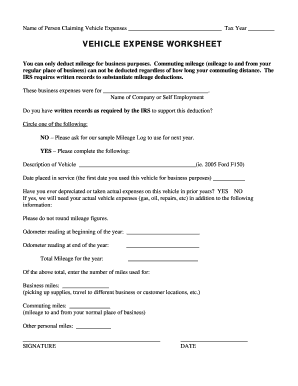
Vehicle Expense Worksheet Form
Use a Vehicle Expense Worksheet template to make your document workflow more streamlined.
What is a vehicle expense worksheet?
A Vehicle Expense Worksheet Form records business driving costs in one organized document. It can capture trip dates, destinations, mileage, fuel, maintenance, parking, tolls, and other vehicle expenses for review, reimbursement, budgeting, or tax documentation. The person completing it should distinguish business travel from personal use, retain supporting receipts, and confirm totals before signing. With signNow, a prepared worksheet can be uploaded, its fillable areas detected, assigned to the appropriate signer, completed electronically, and stored with an audit trail. Tax treatment depends on the business and applicable IRS rules.
Who benefits from vehicle expense tracking?
Fleet coordinators use the worksheet to collect driver mileage, fuel, repair, toll, and parking details before reimbursement review. A shared signNow template gives operations teams a consistent record while preserving the completed document and signing history for internal controls. Independent contractors and sales teams use it to separate business trips from personal driving. They can complete entries from a phone, attach supporting information, and send the finished worksheet to an administrator for approval without exchanging paper copies.
Features that support vehicle expense workflows
The Vehicle Expense Worksheet Form becomes easier to complete and review when expense fields, signer responsibilities, audit evidence, and storage are managed together.
Fillable fields
Upload the Vehicle Expense Worksheet Form and place fields for mileage, dates, amounts, approvals, and signatures without rebuilding the document manually.
Role-based routing
Send the worksheet to a driver, supervisor, or finance reviewer in a defined signing order with clear responsibility for each field.
Audit trail
Capture timestamps, signer actions, and document history so reviewers can connect the completed worksheet to its approval process.
Mobile access
Use mobile apps to record or review vehicle expenses when drivers work away from an office or submit records from job sites.
Secure storage
Store signed worksheets with controlled access and encrypted data protection for organized expense administration.
Reusable template
Reuse a reviewed worksheet layout for recurring driver or department submissions while preserving each completed record separately.
How the worksheet workflow works
Move the Vehicle Expense Worksheet Form from an unfilled file to a signed, traceable expense record in four steps.
Upload worksheet: Upload the worksheet PDF to signNow. Detect fields: Auto-detect fillable areas and review fields. Assign signers: Assign expense review and signature fields. Finalize record: Complete, sign, and store the audit trail.
Complete the worksheet in signNow
Use this sequence to prepare, route, sign, and preserve a Vehicle Expense Worksheet Form without losing expense details.
Choose template:
Upload the completed worksheet template. Add fields:
Place fields beside each expense entry. Send document:
Invite the driver or reviewer. Complete worksheet:
Verify totals and apply signatures.
 Best ROI. Our customers achieve an average 7x ROI within the first six months.
 Scales with your use cases. From SMBs to mid-market, airSlate SignNow delivers results for businesses of all sizes.
 Intuitive UI and API. Sign and send documents from your apps in minutes.



Platform requirements for the worksheet
The Vehicle Expense Worksheet Form can be prepared in a current browser such as Chrome, Firefox, Safari, or Edge on Windows or macOS. signNow transfers data using TLS 1.2/1.3 and provides mobile apps for iOS and Android, allowing drivers and reviewers to access assigned worksheets from supported mobile devices.
Browsers Chrome, Firefox, Safari, and Edge Desktop systems Windows and macOS desktop access Mobile systems iOS and Android mobile apps
Organizations should manage mobile access through their device policies and confirm that drivers can view receipts, enter mileage, and complete assigned signature fields. Enterprise deployments can also evaluate API access, SSO provisioning, and certificate or long-term validation requirements before connecting worksheet records to operational systems.
Recommended worksheet workflow setup
Configure the Vehicle Expense Worksheet Form around signer identity, record integrity, retention needs, and controlled access.
| Setting | Recommendation |
|---|---|
| Authentication method | Email link with SMS OTP for higher-risk records |
| Signature type | Typed or drawn electronic signature |
| Audit trail and encryption | Detailed history with AES-256 storage and TLS 1.2/1.3 |
| Document retention | Three years from filing for federal tax records (IRC §6501(a)) |
| User provisioning | Administrator-managed roles and shared templates |
Security for vehicle expense records
Encryption at rest:
Encryption in transit:
Security certification:
Information security:
Signature compliance:
Healthcare safeguards:
Avoid these worksheet problems
Mixing personal and business mileage can overstate reimbursable travel and weaken the worksheet’s usefulness during expense review. Missing fuel, toll, parking, or maintenance receipts makes individual worksheet entries difficult to substantiate later. Unclear driver names, dates, destinations, or vehicle identifiers can prevent an administrator from matching expenses to business activity. Unsigned worksheets leave approval status uncertain, especially when several drivers submit records during the same reporting period.
Best practices for accurate vehicle records
Accurate entries, supporting documentation, and a controlled signing process make the Vehicle Expense Worksheet Form easier to review and preserve.
Separate business mileage before calculating totals
Record each trip’s supporting details
Attach receipts to unusual or high-value costs
Keep receipts with related entries
Vehicle worksheet processing timeline
Processing depends on field preparation and signer availability; the workflow identifies each stage without assigning an unsupported filing deadline.
Prepare document
Deliver to signers
Signer turnaround
Complete and archive
What the worksheet audit trail records
The audit trail documents who handled the Vehicle Expense Worksheet Form, what happened, and when each signing event occurred.
Authenticate signer:
Capture timestamp:
Hash document:
Seal record:
Connect activity:
Export audit trail:
Vehicle expense worksheet troubleshooting
Resolve field, signing, plan, compliance, and retention questions before relying on a completed Vehicle Expense Worksheet Form.
Upload the worksheet PDF, then use signNow’s field detection and editor to review every mileage, amount, approval, and signature area. If detection misses a field, add it manually before sending so the driver cannot omit a required entry.
Business costs are $8 per user per month when billed annually. The Business plan includes templates, mobile apps, and audit trails. Business Premium costs $15 per user per month annually and adds bulk send for recurring worksheet distributions.
signNow supports ESIGN and UETA compliance, but legal validity still depends on intent, consent, signer attribution, and record retention. For consumer-facing records, provide the ESIGN disclosure and access procedures required by 15 U.S.C. §7001(c).
Use SMS OTP or another stronger authentication method when an expense record requires additional signer attribution. The audit trail should preserve the signer identity, timestamps, and actions; authentication does not replace accurate mileage or receipt documentation.
Federal tax records generally follow IRC §6501(a): retain them for three years from filing, six years when income is understated by more than 25%, or indefinitely for fraud or no filed return. Confirm any longer state or industry rule.
Business Premium includes bulk send, while the Business plan does not list that feature in the provided plan details. For individual worksheets, send each assigned document separately or use an approved template and controlled routing process.
Key performance indicators that demonstrate SignNow's proven track record.
BE READY TO GET MORE
Get this form now!

If you believe that this page should be taken down, please follow our DMCA take-down process.