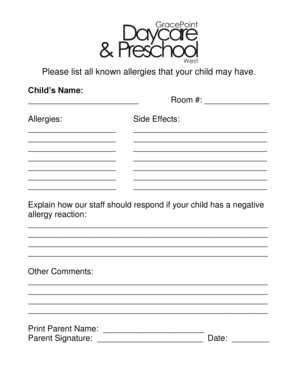
Please List All Know Allergies That Your Child May Have Gracepoint Form
Use a Please List All Know Allergies That Your Child May Have Gracepoint template to make your document workflow more streamlined.
What this Gracepoint allergy form records
The Please List All Know Allergies That Your Child May Have Gracepoint Form is a child-health disclosure used to record known allergies, reaction information, and related care instructions for the people responsible for that child. A parent or guardian reviews the child’s details, completes each applicable field, and signs the record before submitting it to Gracepoint. With signNow, the organization can upload the form, auto-detect fillable fields, route it to the appropriate signer, and retain the completed document with an audit trail. The form does not replace medical advice or emergency protocols.
Who uses this allergy form
Parents and guardians
Parents and guardians complete allergy disclosures, reaction details, medication information, and emergency instructions for schools, camps, clinics, and youth programs.
Care and education teams
School nurses, childcare administrators, and healthcare teams collect signed allergy records before supervising children, administering medication, or planning accommodations.
Challenges with allergy information
Parents may omit less obvious allergens, creating an incomplete record for staff who rely on the form during meals, activities, or urgent care. Handwritten allergy descriptions can be difficult to read, especially when medication names, reaction symptoms, or emergency instructions require precise interpretation. Outdated allergy information can remain in circulation when families do not update the form after diagnosis changes, resolved allergies, or new prescriptions. Sending a child’s allergy details to unintended recipients can expose sensitive health information and weaken the organization’s access-control practices.
How the Gracepoint workflow works
The signNow workflow keeps the child-specific allergy record connected to its signer, completed fields, and signing evidence.
Upload the form: Upload the Gracepoint PDF to signNow and review the detected fields. Review child details: Check allergy, reaction, medication, and contact fields for completeness. Route for signature: Assign the parent or guardian as signer and send securely. Archive the record: Store the signed form with its audit trail for Gracepoint staff.
 Best ROI. Our customers achieve an average 7x ROI within the first six months.
 Scales with your use cases. From SMBs to mid-market, airSlate SignNow delivers results for businesses of all sizes.
 Intuitive UI and API. Sign and send documents from your apps in minutes.
Complete the Gracepoint allergy form
Follow these steps to prepare, route, review, and retain the child-specific allergy record.
Upload:
Upload the Gracepoint allergy form. Prepare:
Check detected fields and add missing fields. Assign:
Assign the parent or guardian signer. Send:
Send the form through signNow. Review:
Review the completed allergy information. Store:
Store the signed form and audit trail.
What the allergy form audit trail records
The audit trail separates signing evidence from the child’s allergy answers, creating a chronological record of how the Gracepoint form was completed.
Signer authentication:
Timestamp capture:
Document integrity:
Action history:
Event tracking:
Audit retrieval:
Security for child allergy information
Data in transit:
Stored data:
Health information:
Service controls:
Security management:
Privacy frameworks:
Recommended allergy-form workflow setup
Use a controlled signing workflow that protects the child’s health information while preserving clear evidence of parent or guardian completion.
| Setting | Recommendation |
|---|---|
| Authentication method | Email verification with SMS OTP |
| Signature type | Typed or drawn electronic signature |
| Audit trail | Retain the completed audit trail |
| Document retention | Follow Gracepoint policy and HIPAA rules |
| Encryption | TLS 1.2/1.3 and AES-256 |
Platform requirements for this form
Gracepoint staff and parents can complete this form through signNow on supported browsers, including Chrome, Firefox, Safari, and Edge, using Windows or macOS computers. signNow also provides mobile apps for iOS and Android, allowing the allergy record to be reviewed and signed away from a desktop.
Browsers Chrome, Firefox, Safari, Edge Operating systems Windows, macOS, iOS, Android Mobile access signNow web and mobile apps
Organizations should use managed devices and role-based access when allergy records contain protected health information. Confirm that staff accounts, mobile access, integrations, and retention controls follow Gracepoint policy. HIPAA-covered workflows require a Business Associate Agreement with signNow, and access should be limited to personnel involved in the child’s care or supervision.



Best practices for completing allergy records
Accurate completion and controlled access help Gracepoint staff use this child-specific health information safely.
Verify every allergy detail
Match the form to the child
Restrict health information access
Update records after changes
Legal standing of signed allergy records
A signed Gracepoint allergy record can provide evidence of the parent or guardian’s stated information when intent, consent, signer attribution, and reliable record retention are established under ESIGN, 15 U.S.C. ch. 96, and applicable state law. It does not override medical requirements, emergency protocols, or documents excluded by ESIGN, including wills and certain court filings.

Key performance indicators that demonstrate SignNow's proven track record.
Troubleshooting the Gracepoint allergy form
These answers address field detection, signer identity, protected health information, and record evidence for this child-specific form.
Upload the original Gracepoint PDF again and allow signNow to auto-detect its fillable fields. If a field is not detected, add the required text, date, checkbox, or signature field manually before sending the form.
The Business plan includes templates and audit trails, while Business Premium adds bulk send and kiosk mode. Choose the plan based on whether Gracepoint sends one form or many child-specific forms.
If the child’s record contains protected health information, configure the workflow for the organization’s HIPAA obligations and confirm that a Business Associate Agreement is required. signNow identifies HIPAA compliance as requiring a BAA.
Use signNow’s signer authentication options, including two-factor authentication or SMS one-time passcodes, when Gracepoint needs stronger assurance that the intended parent or guardian signed the record.
Review the completed document and certificate of completion, then inspect the signNow Audit Trail for timestamps, signer actions, and delivery details. Export those records with the signed allergy form when policy requires.
Do not treat an electronic signature as medical authorization by itself. The parent or guardian must provide accurate instructions, and Gracepoint staff must follow applicable clinical, school, and emergency-care policies.
BE READY TO GET MORE
Get this form now!

If you believe that this page should be taken down, please follow our DMCA take-down process.