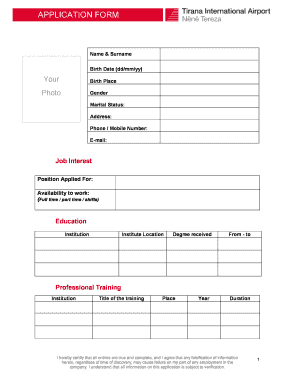
Application Form 2 Tirana Airport Com
Use a APPLICATION FORM 2 Tirana airport com template to make your document workflow more streamlined.
What this airport application does
Application Form 2 Tirana Airport Com is an airport-related application record that can be prepared and signed electronically through signNow. Upload the source PDF, let signNow identify fillable areas, and check each field before assigning recipients. Applicants can review the document, complete required information, and apply an electronic signature. The sender then receives the finished PDF and audit trail for controlled storage. No issuing agency, filing deadline, or statutory field list is provided for this form, so those details should be confirmed with the responsible airport authority.
Who benefits from this airport form
Application Form 2 Tirana Airport Com is most useful when several people must complete, review, or retain the same airport-related record.
Airport service providers use the form to collect traveler or operational details electronically, then route completed applications to designated reviewers without requiring repeated paper handling. Travel coordinators and corporate travel departments use reusable templates to collect passenger information, approvals, and supporting acknowledgments from distributed applicants. Small businesses and enterprise operations teams use signNow to standardize the form, preserve completion evidence, and connect signed records with existing document systems.
These tasks are executed by both individual contributors and centralized administrators depending on organizational policy and required controls.
Key features for this application
signNow combines document preparation, recipient routing, electronic signing, and record evidence for teams handling Application Form 2 Tirana Airport Com.
PDF preparation
Upload the airport application as a PDF and prepare it for electronic completion without rebuilding the document from scratch.
Fillable fields
Place required fields for applicant details, dates, acknowledgments, and signatures in the correct locations.
Signer routing
Route the prepared application to designated recipients by email with controlled signing assignments.
Reusable template
Reuse the prepared application as a template for repeated airport-related requests and consistent data collection.
Audit trail
Capture signer actions and completion events in an audit trail linked to the finished application.
Mobile access
Complete and review the form from supported signNow mobile applications when work occurs away from a desk.
How the airport application works
Application Form 2 Tirana Airport Com moves from document preparation to signing and record storage in four clear steps.
Upload the form: Upload the airport application PDF and review its detected fields. Enter details: Complete applicant, travel, and authorization details in the prepared fields. Request signatures: Send the completed application to required signers by email. Store records: Download the signed record with its audit trail for your files.
 Best ROI. Our customers achieve an average 7x ROI within the first six months.
 Scales with your use cases. From SMBs to mid-market, airSlate SignNow delivers results for businesses of all sizes.
 Intuitive UI and API. Sign and send documents from your apps in minutes.
Complete the airport application online
Use this focused workflow to prepare, route, sign, and retain Application Form 2 Tirana Airport Com in signNow.
Upload document:
Upload the Application Form 2 Tirana Airport Com PDF to signNow. Check fields:
Review detected fields and add any missing applicant information. Assign signers:
Assign signature fields and send the application to recipients. Export record:
Review the completed PDF and export its audit trail.
Security for signed airport applications
Data encryption:
Security certification:
Information security:
Privacy controls:
Electronic records:
Healthcare workflows:
Recommended application setup
Use controlled signer access, a reusable template, an audit trail, and encrypted storage when preparing this airport application.
| Setting | Recommendation |
|---|---|
| Authentication method | Email invitation with SMS verification |
| Signature type | Legally binding electronic signature |
| Audit trail | Enable completion history and export |
| Document retention | Follow the organization’s written policy |
| Encryption | TLS 1.2/1.3 and AES-256 protection |



Best practices for this application
A careful template review and controlled record process reduce errors when Application Form 2 Tirana Airport Com is completed electronically.
Verify every detected field
Assign clear signing roles
Preserve the signed record
Test the template first
Legal standing of the completed form
For a U.S. business transaction, an electronically signed Application Form 2 Tirana Airport Com can be admissible when the signer shows intent, consents to electronic records, can be identified, and the record remains reproducible. ESIGN and applicable state UETA rules support electronic contracting, but they do not cover wills, certain court orders, or family-law decrees.

Pricing for airport application workflows
signNow pricing is verified from its annual billing information; competitor prices and feature details are not verified here.
| Features | signNow | DocuSign | Adobe Sign | PandaDoc | Dropbox Sign |
|---|---|---|---|---|---|
| Annual Business price | $8/user/month billed annually | Not verified | Not verified | Not verified | Not verified |
| Free trial availability | 7 days, no credit card required | Not verified | Not verified | Not verified | Not verified |
| Bulk send availability | Business Premium includes bulk send | Not verified | Not verified | Not verified | Not verified |
| Audit trail availability | Included with Business plan | Not verified | Not verified | Not verified | Not verified |
Key performance indicators that demonstrate SignNow's proven track record.
Troubleshooting airport application signing
These answers address field recognition, recipient routing, plan capabilities, electronic-signature compliance, and record evidence for this application.
Upload the original PDF again and confirm the file opens normally before field detection. If fields still fail to appear, add them manually in signNow and compare the prepared document with the source application before sending.
Open the recipient settings and verify the email address, signing order, and assigned fields. signNow allows the sender to resend an invitation; changing a recipient may require correcting the workflow before the application is completed.
The Business plan includes legally binding eSignatures, templates, and audit trails. Business Premium adds bulk send, while Enterprise adds advanced signer authentication; choose the plan based on the volume and identity controls required.
signNow states that its electronic-signature workflows comply with ESIGN and UETA. For consumer-facing records, separately provide the required electronic-record disclosure and confirm the signer can access and retain the completed application.
Use signNow’s audit trail and certificate of completion to document signer actions, timestamps, and the completed record. Store exports under the organization’s retention policy and limit access to personnel responsible for the airport application.
Business Premium includes bulk send, while the Business plan does not list that feature. For repeated applications, use a reusable template and confirm the selected plan’s sending capabilities before importing multiple recipients.
BE READY TO GET MORE
Get this form now!

If you believe that this page should be taken down, please follow our DMCA take-down process.