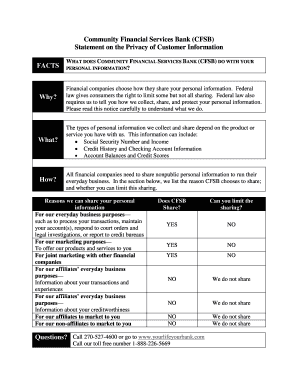
Community Financial Services Bank Cfsb Form
Use a Community Financial Services Bank CFSB template to make your document workflow more streamlined.
What this bank form does
Community Financial Services Bank Cfsb Form is a bank-specific document used to collect, confirm, or authorize information requested by Community Financial Services Bank Cfsb. Its exact legal effect depends on the form’s fields, transaction, signer authority, and applicable bank instructions. With signNow, a sender uploads the document, reviews automatically detected fillable fields, assigns recipients, and sends it for electronic completion. Each signer reviews assigned information, applies an electronic signature when permitted, and receives an executed copy. The audit trail records signing actions, timestamps, and document history for controlled retrieval.
Who benefits from this bank form
The form fits financial-services workflows where individuals, branch teams, and enterprise administrators need controlled completion, signatures, and retrievable records.
Solo financial consultants can use Community Financial Services Bank Cfsb Form to collect client-authorized banking information, document service arrangements, and preserve signed records without coordinating paper exchanges across separate offices. Community banks and credit unions can route the form among relationship managers, compliance reviewers, and authorized customers, keeping signer order, completed copies, and audit evidence together in one digital workflow. Enterprise finance departments can standardize Community Financial Services Bank Cfsb Form across branches, assign controlled templates, and connect completed documents with existing records while limiting access through administrative permissions.
These tasks are executed by both individual contributors and centralized administrators depending on organizational policy and required controls.
How to complete this bank form
Use this sequence to prepare Community Financial Services Bank Cfsb Form, route it to authorized signers, and preserve the completed record.
Upload form:
Upload the current bank form file. Check fields:
Review detected fields and required entries. Assign signers:
Assign each field to the correct signer. Send form:
Send the form through signNow. Complete signing:
Review, sign, and submit assigned fields. Store records:
Download the signed form and audit trail.
Best practices for completing this form
Accurate information, authorized signers, and organized records help teams complete Community Financial Services Bank Cfsb Form without avoidable rework.
Verify every field before sending
Enter the institution’s requested details
Confirm signer authority and identity
Preserve the executed record securely
 Best ROI. Our customers achieve an average 7x ROI within the first six months.
 Scales with your use cases. From SMBs to mid-market, airSlate SignNow delivers results for businesses of all sizes.
 Intuitive UI and API. Sign and send documents from your apps in minutes.
Processing stages for this bank form
Completion time depends on document accuracy, signer availability, and Community Financial Services Bank Cfsb’s internal review requirements.
Prepare the document
Deliver to signers
Complete signer review
Archive completed records
Retention periods for signed records
Choose the retention period based on the record’s actual purpose, not merely the signature date; state requirements and bank policy may require longer storage.
Three years for tax records
Six years for understatements
Six years for HIPAA records
Three years for payroll records
Longer periods when required
Risks of improper form handling
Missing required information
Unauthorized signature
Incomplete audit trail
Poor document retention
Security for bank form records
Transport encryption:
Stored data encryption:
Security certification:
Information security:
Electronic signature law:
Execution evidence:



Challenges when completing this form
Bank staff may receive different versions of Community Financial Services Bank Cfsb Form, creating inconsistent fields, outdated instructions, and duplicate review work. A signer may complete a signature field while leaving required banking information blank, delaying acceptance or requiring a corrected execution package. Email delivery can fail when addresses are mistyped, filtering blocks invitations, or the signer lacks access to the account used for routing. Completed documents may be difficult to retrieve when filenames, execution dates, audit trails, and storage ownership are not defined before sending.
Why teams look for DocuSign alternatives
Organizations seek alternatives when they need different pricing models, stronger native automation, simpler bulk affidavit workflows, or more flexible identity-verification options than those available in a legacy envelope-based vendor.

Troubleshooting this bank form
Resolve field, signer, consent, plan, and record issues before the completed Community Financial Services Bank Cfsb Form enters the bank’s official workflow.
Upload the latest Community Financial Services Bank Cfsb Form file, then inspect signNow’s detected fields manually. Auto-detection can identify fillable areas, but the sender remains responsible for confirming labels, required fields, signer assignments, and the bank’s requested information before sending.
The signNow Business plan includes legally binding eSignatures, templates, audit trails, and mobile apps at $8 per user per month when billed annually. Business Premium adds bulk send at $15 per user per month annually; choose it only when repeated bank-form distribution requires that feature.
A completed signature is not enough if the signer lacks authority or electronic consent. Confirm intent, identity, and organizational authorization, and preserve the signNow audit trail. ESIGN and UETA support electronic signatures when the transaction satisfies applicable legal requirements.
Consumer-facing electronic records require disclosures under 15 U.S.C. §7001(c), including paper-record rights and electronic-access capability. Configure the workflow so the recipient can review the disclosure and understand how to withdraw consent before signing.
If a signer cannot open the email, verify the address, resend the invitation, or provide a controlled signing link. For stronger identity assurance, signNow plans can support additional authentication options; select the method required by Community Financial Services Bank Cfsb policy.
Paid signNow subscription plans include 100 signature invites per user per year, with overage fees. Business Premium includes bulk send, while the Site License uses $1.50 per signature invite and supports unlimited users for qualifying high-volume deployments.
Key performance indicators that demonstrate SignNow's proven track record.
BE READY TO GET MORE
Get this form now!

If you believe that this page should be taken down, please follow our DMCA take-down process.