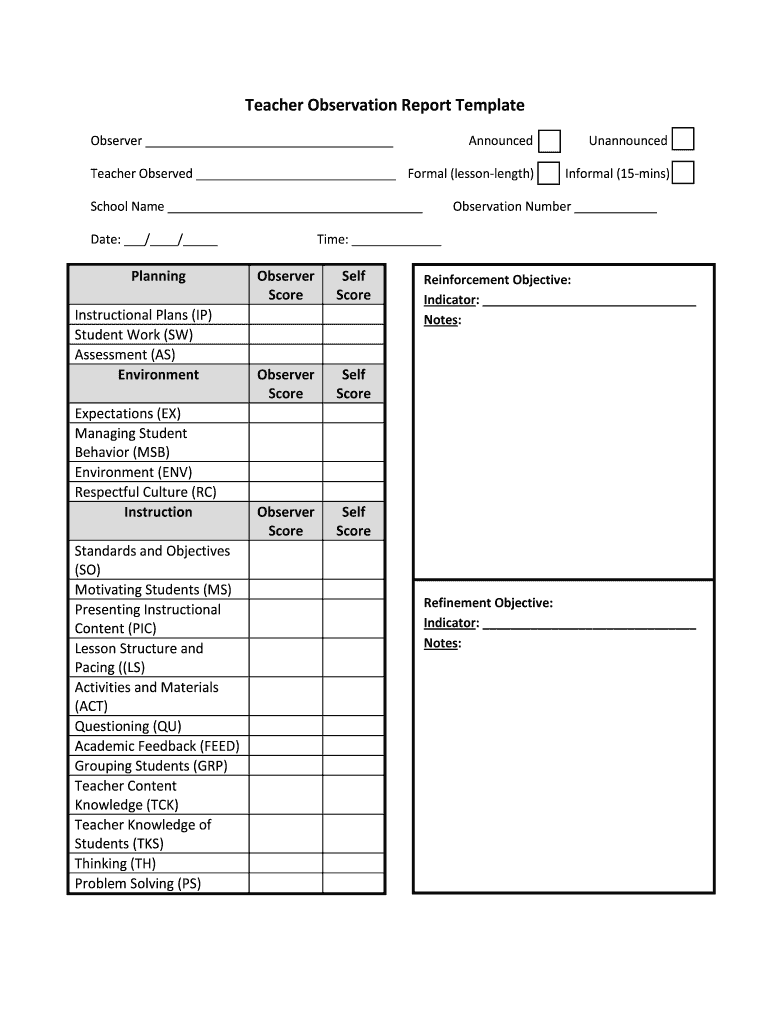
Tennessees Statewide Teacher Observation Report Form
Use a Tennessees Statewide Teacher Observation Report Template template to make your document workflow more streamlined.
About Tennessee’s observation report
Tennessee’s Statewide Teacher Observation Report Form is a structured record for documenting an educator observation, instructional evidence, feedback, ratings, and required acknowledgments. An observer completes the classroom-observation details, identifies the teacher and school context, records findings, and routes the report for review and signatures. The form does not itself establish a universal statewide filing deadline or retention period in the supplied authorities, so districts should follow Tennessee Department of Education guidance and local policy. signNow can convert the report into a fillable workflow, route it, and preserve its audit trail.
Who benefits from observation workflows
The form is most useful where educators, observers, and administrators must document classroom feedback and preserve a review record.
Tennessee public school districts can standardize teacher observation reports, route them to observers and administrators, and retain signed records under district-controlled access and retention policies. Private schools and charter networks can reuse a prepared observation template while assigning each report to the relevant teacher, observer, and reviewing administrator. Education consultants conducting contracted evaluations can complete observation reports on mobile devices, obtain acknowledgments electronically, and return the signed record to the authorized Tennessee education organization.
These tasks are executed by both individual contributors and centralized administrators depending on organizational policy and required controls.
Features for Tennessee observation reports
Tennessee school teams can complete, route, sign, and retain observation reports in one structured workflow with signNow.
Reusable template
Upload the Tennessee report once, then reuse a prepared template to preserve observation criteria, teacher details, dates, ratings, and comments across completed reports.
Required fields
Place initials, signatures, dates, and required acknowledgments directly on the observation report so reviewers see which fields remain incomplete before sending.
Signer routing
Route each report to the observer, teacher, and administrator in a defined order, reducing missed approvals when several school personnel review one observation.
Audit trail
Capture the completed report and its signing history together, giving Tennessee education teams a clearer record of who reviewed, signed, and received the document.
Mobile completion
Use the signNow web or mobile experience to complete observation paperwork without retyping the report into a separate system after an in-person classroom visit.
Centralized records
Keep teacher observation records in one controlled workflow, making it easier to locate the signed report when administrators review instructional feedback or personnel documentation.
How to complete the observation report
Prepare the Tennessee report in signNow by checking its fields, assigning reviewers, and preserving the completed document with its audit trail.
Upload report:
Upload the Tennessee observation report to signNow. Add fields:
Place fields for ratings, comments, dates, initials, and signatures. Assign reviewers:
Assign the observer, teacher, and administrator as signers. Complete and store:
Send, monitor completion, and download the signed record.
 Best ROI. Our customers achieve an average 7x ROI within the first six months.
 Scales with your use cases. From SMBs to mid-market, airSlate SignNow delivers results for businesses of all sizes.
 Intuitive UI and API. Sign and send documents from your apps in minutes.
Inside the observation report audit trail
For this Tennessee report, the audit trail shows how the observation record moved from assigned review through authenticated signing and archival.
Authenticate signer:
Capture timestamps:
Protect document integrity:
Seal signing history:
Link completion certificate:
Export audit evidence:
Ways to send and sign reports
- Use the signNow web app when a district administrator prepares the Tennessee observation report, assigns fields, and monitors several reviewers from a desktop workflow.
- Use the mobile app when an observer or administrator needs to review classroom-observation details, enter comments, or sign the report from a supported mobile device.
- Use kiosk mode when staff complete reports on a managed shared device and need the next participant to sign without receiving an individual email invitation.
- Use a shareable signing link when a district distributes the same prepared observation workflow to authorized participants through an established internal process.
Processing the observation report
The Tennessee observation workflow has four practical stages, from preparing the report through retaining the completed record.
Prepare the report
Deliver to reviewers
Complete review
Archive the record
Best practices for observation reports
A consistent workflow helps Tennessee districts preserve accurate observation evidence while keeping responsibility for policy decisions with the appropriate education administrators.
Use the district-approved report version
Assign fields to accountable reviewers
Review ratings before signing
Document the district retention rule
Security for observation records
Data in transit:
Data at rest:
Security assurance:
Information security:
Electronic signatures:
Signer verification:
Platform requirements for report workflows
Tennessee observation teams can prepare and sign the report through signNow on supported desktop browsers, including Chrome, Firefox, Safari, and Edge, with mobile access through iOS and Android apps. Use a current browser and an internet connection for delivery, authentication, and audit-trail synchronization.
Browser support Chrome, Firefox, Safari, Edge Desktop systems Windows and macOS computers Mobile access iOS and Android mobile apps
District administrators should manage access through approved devices and user accounts, then confirm that signers can open the Tennessee report and complete assigned fields. Larger deployments may evaluate SSO, API access, or integrations with Microsoft 365, Google Workspace, NetSuite, or other systems listed by signNow. Configure permissions and retention through district policy rather than assuming the platform determines Tennessee record requirements.
Legal standing of the observation report
A signed Tennessee observation report can provide evidence of the signer’s intent, attribution, and record history when the workflow preserves the document and audit trail under ESIGN, 15 U.S.C. chapter 96, and applicable Tennessee electronic-transactions law. Those frameworks do not replace district policy or make wills, court orders, or official court filings eligible for electronic execution.

Privacy pitfalls in observation reports
Observation comments may expose sensitive teacher or student information when the report includes more detail than the district’s approved purpose requires. A teacher may sign before reviewing ratings or narrative comments if the workflow does not clearly separate review from acknowledgment. Unrestricted editing access can make it difficult to identify who entered, changed, or approved specific observation information. Sending the report to an incorrect email address can disclose educator-performance information outside the intended Tennessee district workflow.
Troubleshooting Tennessee observation reports
These answers address field setup, signer routing, electronic-signature evidence, plan selection, and district retention decisions for this Tennessee form.
Upload the district-approved PDF again, then use signNow’s field-detection workflow to inspect whether ratings, comments, dates, and signatures are assigned correctly. Auto-detection does not determine Tennessee district policy, so compare each detected field with the source report before sending it to reviewers.
The Business plan includes templates, audit trails, and legally binding eSignatures. If the district needs bulk send for multiple teacher reports, Business Premium adds bulk send. Confirm the plan’s 100 signature invites per user per year and applicable overage fees before deployment.
signNow supports ESIGN and UETA, but those laws do not decide whether a Tennessee district’s specific observation process requires additional approval. Confirm the district’s policy, Tennessee Department of Education guidance, and any applicable personnel-record rules before treating the signed report as final.
Require the signer to review the observation ratings and narrative before signing, then retain the completed report with its audit trail. The audit trail records delivery, access, signer actions, timestamps, and completion information that can clarify the execution history.
Use role-based assignment so the observer enters findings, the teacher acknowledges the report, and an administrator completes any required approval. Do not give every participant editing access, because unrestricted changes can obscure who entered or changed observation information.
The supplied authorities do not establish one universal retention period for this Tennessee observation report. Ask the district records officer to identify the applicable education-record schedule, then configure secure storage and preserve the signed PDF and audit trail for that period.
Key performance indicators that demonstrate SignNow's proven track record.
BE READY TO GET MORE
Get this form now!

If you believe that this page should be taken down, please follow our DMCA take-down process.