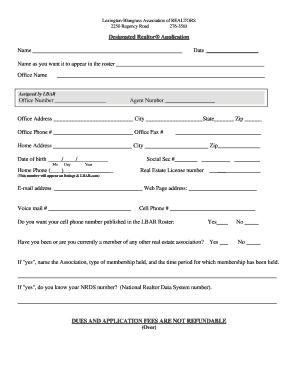
Lbar Com Form
Use a Lbar Com template to make your document workflow more streamlined.
What Lbar Com Form is
Lbar Com Form is a document template that can be completed and signed electronically when the transaction and applicable law permit electronic records. In signNow, upload the form, review automatically detected fillable areas, add or correct fields, and assign each field to a signer. Recipients open the document through an email invitation or signing link, review its contents, provide the requested information, and sign. signNow records the signing activity, creates a completion record, and lets authorized users retain the executed Lbar Com Form for later reference.
Who uses Lbar Com Form
Real estate
Real estate teams can use Lbar Com Form for transaction documents, routing the file to agents, clients, or counterparties while preserving the signed version and audit trail.
Healthcare
Healthcare organizations can use Lbar Com Form for administrative records when the workflow protects applicable health information and uses the required HIPAA safeguards.
Key features for Lbar Com Form
Lbar Com Form can be prepared, signed, tracked, and stored in one controlled signNow workflow for U.S. business transactions.
Reusable fields
Upload Lbar Com Form once, then use reusable fields for names, dates, amounts, and signatures. Consistent templates reduce retyping and help preserve the document’s intended structure across transactions.
Signer routing
Send Lbar Com Form to the correct signer by email or signing link. Ordered routing keeps approvals organized when more than one person must review or sign the document.
Audit trail
Capture each signing event in a downloadable audit trail. The record can show signer actions, timestamps, and document history when a completed Lbar Com Form needs review.
Mobile completion
Use signNow on desktop or mobile to complete Lbar Com Form without printing. Signers can review the document and add required fields from supported devices.
Secure storage
Keep signed Lbar Com Form records with their completion certificate and audit information. Centralized storage makes it easier to locate the executed version later.
Workflow connections
Connect Lbar Com Form workflows to systems such as Salesforce, NetSuite, or Google Drive. Connected records reduce duplicate entry after a form is completed.
How Lbar Com Form works
The signNow workflow turns an uploaded Lbar Com Form into a routed signing package while preserving the completed document and its audit history.
Upload form: Upload the Lbar Com Form PDF into signNow. Check fields: Review detected fields and add missing signature fields. Route signing: Send the form to each signer in order. Store records: Download the signed form and audit trail.
 Best ROI. Our customers achieve an average 7x ROI within the first six months.
 Scales with your use cases. From SMBs to mid-market, airSlate SignNow delivers results for businesses of all sizes.
 Intuitive UI and API. Sign and send documents from your apps in minutes.
Complete Lbar Com Form online
Follow these steps to prepare, route, sign, and retain Lbar Com Form in signNow.
Upload form:
Upload the Lbar Com Form file to signNow. Review fields:
Confirm detected fields and add signer assignments. Send form:
Send invitations or create a signing link. Archive record:
Download the signed form and certificate.
Recommended Lbar Com Form setup
Use a controlled signing workflow that identifies each signer, records consent, preserves the audit trail, and applies the retention rule for the underlying transaction.
| Setting | Recommendation |
|---|---|
| Authentication method | Email verification with SMS OTP |
| Signature type | Typed or drawn electronic signature |
| Audit trail | Download certificate after completion |
| Document retention | Follow the applicable record rule |
| Encryption | TLS 1.2/1.3 and AES-256 encryption |



Signer security for Lbar Com Form
PKI support:
X.509 certificates:
Two-factor authentication:
SMS OTP:
ID verification:
Signing evidence:
Challenges when completing Lbar Com Form
Incorrect signer assignments can leave required Lbar Com Form fields incomplete or route the document to the wrong recipient. Unreviewed detected fields can place a name, date, or signature request in the wrong location on Lbar Com Form. Missing consent evidence can weaken the record supporting an electronic signature under ESIGN or UETA. Saving only a printed copy can separate the completed Lbar Com Form from its audit trail and completion certificate.
Best practices for Lbar Com Form
Accurate field review, complete audit evidence, authority-based retention, and controlled access help preserve the value of a signed Lbar Com Form.
Review fields before sending
Keep audit evidence together
Map retention to authority
Control completed records
Troubleshooting Lbar Com Form
These answers address field detection, signer access, electronic-signature validity, plan selection, and record retention for Lbar Com Form workflows.
Check the uploaded PDF and field assignments first. signNow’s Business plan includes templates and audit trails, but a malformed source file may require manual field placement before sending Lbar Com Form.
Confirm that the recipient’s email address is correct and resend the invitation from the transaction. A signer can often open the document without a signNow account, depending on the sender’s workflow and authentication settings.
Use SMS OTP or another available authentication control when email-only identification is insufficient. The selected method should match the transaction’s risk and any organizational policy for signer attribution.
Electronic signing may be valid under ESIGN and UETA when intent, consent, attribution, and record retention are established. Consumer-facing records also require the disclosures in 15 U.S.C. §7001(c).
Business is priced at $8 per user monthly with annual billing and includes legally binding eSignatures and audit trails. Business Premium is $15 per user monthly annually and adds bulk send.
Download the completed Lbar Com Form together with its certificate of completion and audit trail. Store both according to the rule governing the underlying transaction, because signNow does not determine the legally required retention period.
Key performance indicators that demonstrate SignNow's proven track record.
BE READY TO GET MORE
Get this form now!

If you believe that this page should be taken down, please follow our DMCA take-down process.