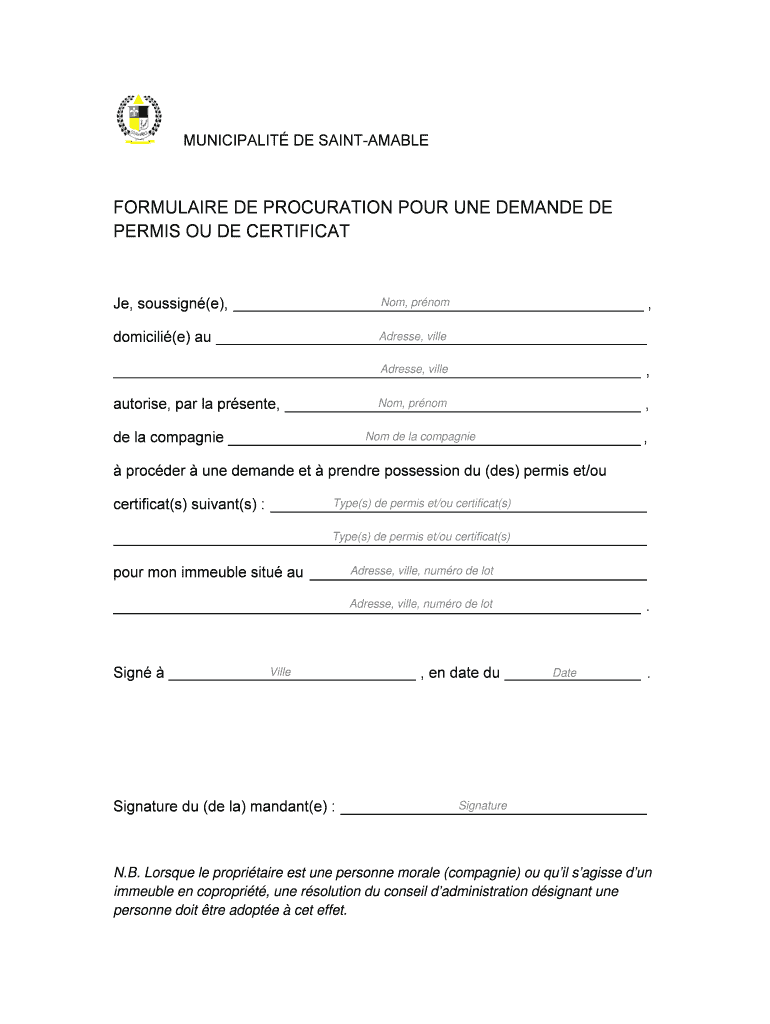
Power of attorney form for a permit or certificate application
Use a Formulaire De Procuration Pour Une Demande De Permis Ou De Certificat template to make your document workflow more streamlined.
What this authorization form does
This power of attorney form authorizes a named representative to act for an applicant in a permit or certificate request. The applicant identifies the requested permit or certificate, the representative, and the scope of authority, then signs the authorization. The receiving agency decides which fields, witnesses, notarization, filing method, and supporting documents it requires. In a signNow workflow, the sender uploads the form, reviews detected fillable fields, assigns applicant and representative roles, sends invitations, and stores the completed document with its audit trail.
Who benefits from this authorization workflow
The form fits applicants and organizations that need a documented representative to handle a permit or certificate request.
Solo permit consultants can prepare applicant authorizations, collect representative signatures, and retain completion evidence without coordinating repeated office visits. Construction and property firms can route permit or certificate authorizations between applicants, project staff, and outside representatives while preserving the related signed record. Enterprise compliance teams can standardize authorization templates, control signer access, and connect completed records to approved storage or business systems.
These tasks are executed by both individual contributors and centralized administrators depending on organizational policy and required controls.
Who uses this permit authorization form
Applicants
Applicants use this authorization to identify a representative who may handle a permit or certificate request, provide information, or sign within the stated scope. The exact authority depends on the form and receiving agency.
Representatives
Representatives, contractors, property professionals, and authorized business staff use the signed record to document who may act for the applicant during the specified request.
Complete the authorization in signNow
Upload the form, verify its fields, route it to the correct parties, and preserve the signed record with completion evidence.
Upload form:
Upload the authorization form to signNow. Check fields:
Review detected fields and add missing applicant, representative, permit, or certificate fields. Assign signers:
Assign each field to the correct signer. Send form:
Send the prepared form through signNow. Complete signing:
Review, sign, and complete the authorization. Store evidence:
Download the signed form and audit trail.
Review the authorization audit trail
A signNow audit trail records the identity, timing, actions, and completion evidence associated with this authorization form.
Authenticate signer:
Capture timestamps:
Protect document:
Seal evidence:
Retrieve records:
Export evidence:
 Best ROI. Our customers achieve an average 7x ROI within the first six months.
 Scales with your use cases. From SMBs to mid-market, airSlate SignNow delivers results for businesses of all sizes.
 Intuitive UI and API. Sign and send documents from your apps in minutes.
Set up a controlled signing workflow
Configure this authorization form around signer identity, document integrity, access control, and the retention rule supplied by the relevant issuing authority.
| Setting | Recommendation |
|---|---|
| Authentication method | Email verification with SMS OTP |
| Signature type | Typed or drawn electronic signature |
| Audit trail | Capture timestamps, IP addresses, and actions |
| Document retention | Follow the issuing authority’s retention rule |
| Encryption | AES-256 at rest and TLS 1.2 or 1.3 in transit |
Complete and sign the authorization form
Use a controlled sequence to prepare, deliver, sign, and preserve this permit or certificate authorization record.
Prepare the document
Send to signers
Collect signer approvals
Archive the record
Avoid privacy and disclosure mistakes
Including unnecessary personal information in the authorization can expose applicant data beyond the permit or certificate process. Missing consent language or an unclear representative role can make the signer’s authorization difficult to interpret. Sending the form to the wrong recipient can disclose application details and create an unreliable approval record. Allowing broad template access may let unauthorized users alter permit, certificate, or representative information.
Protect authorization records and data
Data at rest:
Data in transit:
Security reporting:
Security management:
Health information:
Electronic signatures:
Platform requirements for signing
Use signNow through Chrome, Firefox, Safari, or Edge on Windows or macOS. Signers can also use signNow mobile apps for iOS and Android when reviewing or completing the authorization form.
Browsers Chrome, Firefox, Safari, and Edge Desktop systems Windows and macOS desktop access Mobile apps iOS and Android mobile apps
Organizations should manage authorized users, devices, and access permissions before distributing this permit or certificate authorization. Teams using connected systems should confirm API, SSO, storage, and retention requirements with their administrator and the relevant issuing authority.



Follow authorization recordkeeping practices
Accurate role information, agency requirements, controlled access, and complete records help preserve the authorization’s usefulness during permit or certificate review.
Match every authorization detail to the application
Check agency and state signing requirements first
Limit access before sending the form
Archive the signed form with completion evidence
Check state rules and exclusions
Rejected filing
Authority dispute
Incomplete request
Electronic exclusion
Troubleshoot signing and filing questions
Resolve the specific signing, plan, agency, and data-protection questions that can affect this permit or certificate authorization.
Business plan users can upload the authorization form, review fields, send signature invitations, and retain an audit trail. If the agency requires notarization or in-person signing, confirm that requirement before relying on electronic execution.
Business pricing is $8/user/month when billed annually. Paid plans include 100 signature invites per user annually; additional invites may incur overage fees. Confirm current plan terms before sending a large batch of permit authorizations.
Business Premium includes bulk send, which can help distribute identical authorization templates to multiple applicants. Verify each applicant, representative, permit, and certificate field before sending because bulk distribution does not replace individual review.
ESIGN and UETA support electronic signatures when intent, consent, attribution, and record retention requirements are satisfied. They do not eliminate state or agency rules requiring notarization, witnesses, personal appearance, or paper filing.
If a signer cannot open the invitation, confirm the email address, resend the request, or provide a controlled signing link. The sender should verify the recipient before sharing authorization details or application information.
For sensitive records, signNow offers TLS 1.2 or 1.3 in transit, AES-256 at rest, audit trails, and optional authentication controls. Healthcare workflows require a BAA for HIPAA-covered information.
Key performance indicators that demonstrate SignNow's proven track record.
BE READY TO GET MORE
Get this form now!

If you believe that this page should be taken down, please follow our DMCA take-down process.