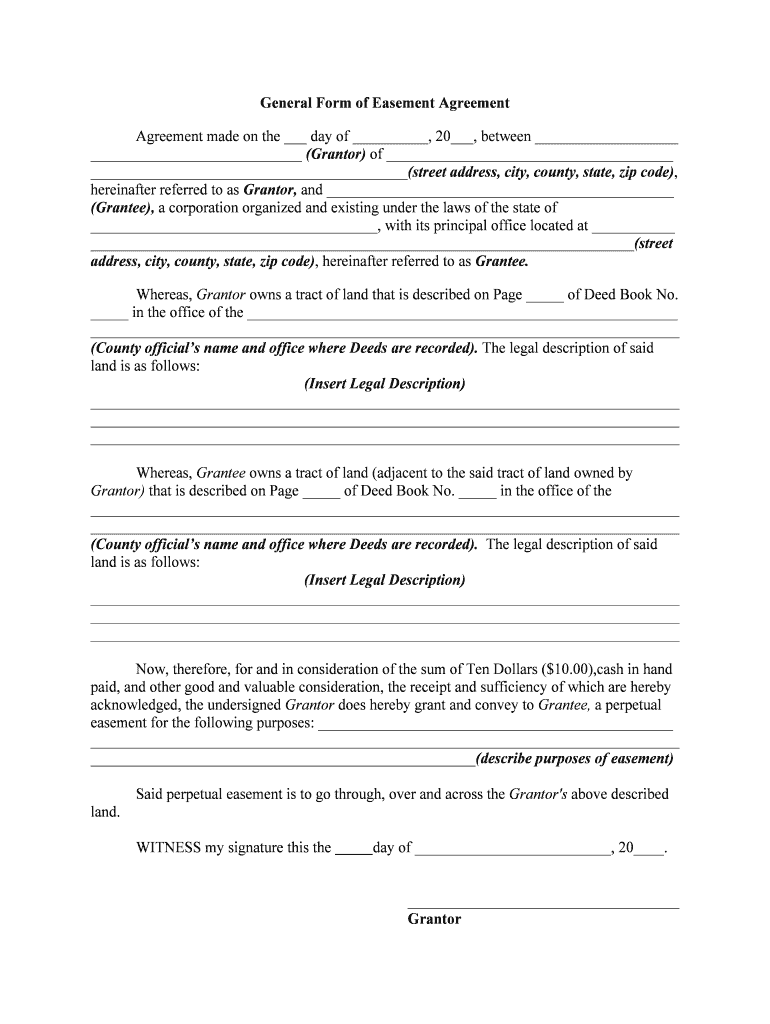
General Easement Agreement Form
Use a General Easement Agreement template to make your document workflow more streamlined.
What a general easement agreement does
A General Easement Agreement Form documents one party’s defined right to use, access, maintain, or place utilities on another party’s property. It normally identifies the parcels, parties, permitted use, location, duration, maintenance duties, restrictions, signatures, and supporting legal description or survey. The form is not a universal substitute for a deed, county recording package, or required notarization. Parties prepare the terms, verify state and county requirements, then may use signNow to route and execute the agreement electronically where ESIGN, UETA, and applicable state law permit.
Who uses a general easement agreement
Landowners and managers
Landowners and property managers use the form to define access, utility, drainage, or maintenance rights across identified parcels. They coordinate signatures with affected owners, attach a precise legal description, and retain the executed agreement for future transfers, maintenance questions, and title review.
Property professionals
Real estate counsel, developers, utilities, and construction teams use it when documenting a defined property right. Their workflows usually connect the agreement with surveys, site plans, title materials, recording instructions, and any state or county requirements affecting enforceability.
Business types that use easement forms
General Easement Agreement Form workflows help property-focused organizations document access, utility, drainage, and maintenance rights with clearer execution records.
Individual landowners can document access or utility rights affecting a parcel, coordinate signatures remotely, and preserve the final agreement with its legal description and supporting exhibits for future property transactions. Real estate developers and property managers can standardize recurring easement workflows while checking each parcel’s survey, title information, signatory authority, and county recording requirements before execution. Utilities, construction firms, and legal practices can route agreements among owners, contractors, and counsel, maintain an auditable signing record, and connect completed documents with project or property repositories.
These tasks are executed by both individual contributors and centralized administrators depending on organizational policy and required controls.
Key features for easement agreements
A General Easement Agreement Form workflow benefits from accurate field placement, controlled routing, audit evidence, and organized preservation of property-specific records.
Field placement
Place signature, date, initials, and text fields over the prepared easement agreement while preserving the negotiated property description and attached exhibits for execution.
Signer routing
Send one agreement to multiple owners or representatives in a defined signing order, reducing manual follow-up when several parties must execute the same property-rights document.
Audit evidence
Capture timestamps, signer actions, authentication events, and document history alongside the completed agreement for easier review during title, maintenance, or dispute-related inquiries.
Reusable templates
Use reusable templates for recurring access, utility, drainage, or maintenance agreements while requiring staff to verify parcel-specific legal descriptions before sending.
Mobile signing
Complete signing from a desktop or mobile device when parties are working away from the office, subject to applicable state and recording requirements.
Record organization
Connect completed agreements with approved storage or business systems so executed easements, exhibits, and audit records remain organized with related property files.
How the easement signing flow works
The signNow workflow turns a prepared property-rights agreement into a traceable signing package without changing its legal description or negotiated terms.
Upload document: Upload the prepared easement agreement and supporting exhibits. Prepare fields: Auto-detect fillable fields, then place signatures and dates. Request signatures: Send the agreement to each owner or authorized representative. Archive evidence: Store the executed PDF with its audit trail.
 Best ROI. Our customers achieve an average 7x ROI within the first six months.
 Scales with your use cases. From SMBs to mid-market, airSlate SignNow delivers results for businesses of all sizes.
 Intuitive UI and API. Sign and send documents from your apps in minutes.
Steps to complete the easement form
Complete the property terms first, then use signNow to prepare, route, execute, and preserve the General Easement Agreement Form.
Check terms:
Confirm parties, parcel details, rights, and exhibits. Upload file:
Upload the final agreement to signNow. Add fields:
Place signatures, dates, and initials. Send agreement:
Route to authorized parties for signing. Preserve records:
Download the executed PDF and audit trail.
Recommended easement agreement setup
Configure the signing workflow around the property description, required parties, authentication evidence, and applicable state recording requirements.
| Setting | Recommendation |
|---|---|
| Authentication method | Email link with SMS OTP |
| Signature type | Typed or drawn electronic signature |
| Audit trail | Export with the completed agreement |
| Document retention | Follow state recording and contract rules |
| Encryption | TLS 1.2/1.3 and AES-256 |
Ways to send and sign easement forms
- Use the signNow web app when counsel or a property administrator needs to upload the agreement, place fields, review the legal description, and route it from a desktop workflow.
- Use the signNow mobile app when a landowner, project manager, or field representative must review and sign the prepared easement agreement away from the office.
- Use kiosk mode when parties are signing together at a controlled office, closing, or project location, with staff confirming that the displayed document is the correct version.
- Use a shareable signing link when authorized recipients need access without a manually addressed email, while controlling distribution and confirming each signer’s identity before execution.
Risks of an incomplete easement agreement
Unclear legal description
Unauthorized signatory
Missing audit trail
Unmet county requirements
Challenges when preparing an easement agreement
A vague parcel description or missing survey reference can make the intended easement location difficult to identify during title review or future maintenance disputes. Routing the agreement to an employee without documented authority can create a challenge to whether the owner or entity actually consented. Attaching the wrong exhibit, outdated site plan, or superseded agreement can cause the signed package to conflict with the negotiated property rights. Electronic execution may not satisfy a county’s recording package, notarization, witness, or formatting requirements even when the signature process is otherwise valid.
What the easement audit trail records
The audit trail documents the execution evidence behind the General Easement Agreement Form, separate from preparing the property terms or assigning fields.
Signer authentication:
Timestamp capture:
Document hashing:
Tamper-evident sealing:
Audit history:
Trail retrieval:
Record-keeping practices for easement agreements
Preserve the signed General Easement Agreement Form with its supporting property records, audit evidence, amendments, and applicable retention authority.
Apply the applicable retention rule
Export the audit trail
Archive property records securely
Track amendments and releases



Security for signed easement records
Data encryption:
SOC 2 Type II:
ISO 27001:
HIPAA compliance:
Transport security:
Storage encryption:
Troubleshooting the easement signing workflow
Resolve document, authentication, plan, and recording questions by separating signNow workflow issues from state and county property-law requirements.
Upload the final PDF again and confirm that fields are placed over the correct signature, date, and initials locations. signNow supports templates and field placement, but it cannot determine whether the legal description or survey exhibit is legally accurate.
Business includes legally binding eSignatures, audit trails, templates, and mobile apps at $8/user/month with annual billing. Business Premium is $15/user/month annually and adds bulk send, kiosk mode, and quick invite links.
ESIGN and applicable UETA laws generally recognize qualifying electronic signatures, but an easement may still require notarization, witnesses, or county recording formalities. Check the property state and county before relying on electronic execution alone.
Use signNow authentication options such as SMS OTP or stronger signer verification when identity risk warrants it. Record the signer’s authority separately; authentication does not prove that the person owned the parcel or had authority to bind an entity.
Export the completed audit trail with the signed PDF and exhibits. The record should connect signer actions, timestamps, authentication events, and document history to the exact agreement version delivered for execution.
Paid subscription plans include 100 signature invites per user per year, with overage fees; Site License pricing is $1.50 per signature invite. Review the selected plan before sending repeated easement packages to many owners.
Key performance indicators that demonstrate SignNow's proven track record.
BE READY TO GET MORE
Get this form now!

If you believe that this page should be taken down, please follow our DMCA take-down process.