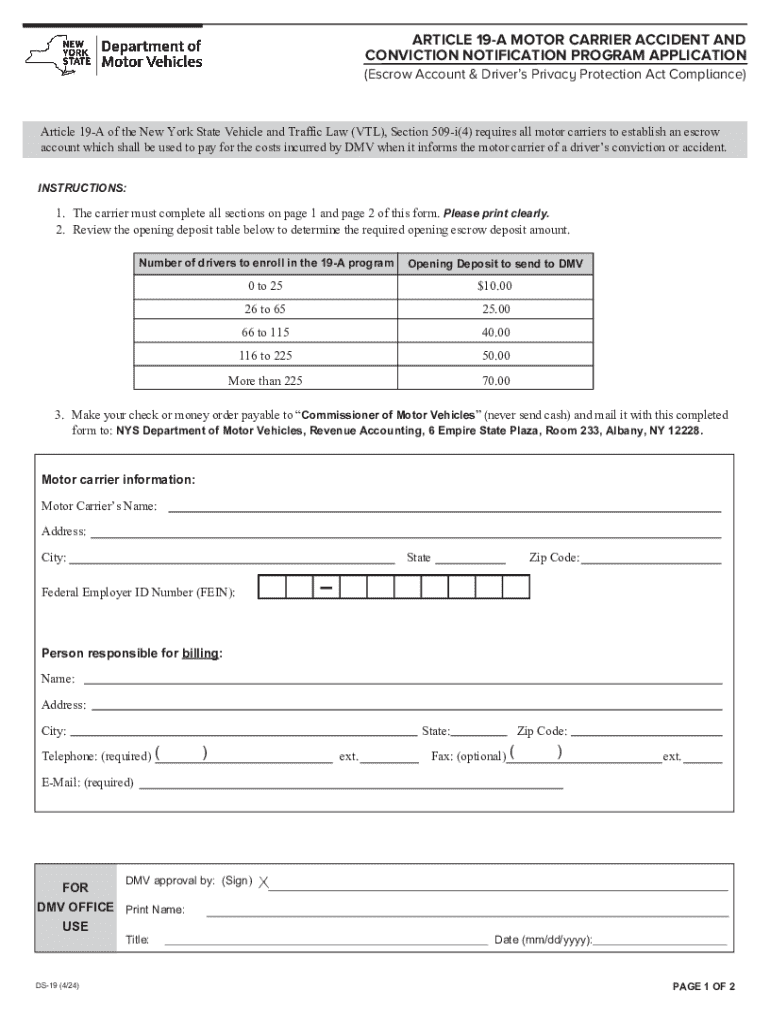
Article 19 A Motor Carrier Accident And Conviction Notification Program Application Form
Use a Article 19 a Motor Carrier Accident And Conviction Notification Program Application template to make your document workflow more streamlined.
What this motor carrier form does
The Article 19 A Motor Carrier Accident And Conviction Notification Program Application Form is a transportation compliance document used to organize a motor carrier’s accident and conviction notification information for review and submission. Because the supplied source does not identify the issuing agency, required fields, filing deadline, or governing state program, those details must be confirmed from the current form instructions. In signNow, a carrier uploads the PDF, reviews detected fields, assigns authorized signers, captures signatures, and stores the completed document with an audit trail.
Who uses the Article 19 A form
Motor carriers
Motor carrier safety teams use the form to coordinate accident and conviction information, internal review, authorized signatures, and controlled records before following the receiving agency’s submission instructions.
Compliance departments
Fleet compliance administrators use signNow templates and audit trails to route recurring notifications consistently while preserving a distinct completed record for each carrier event.
Who benefits from this workflow
The form is most useful for transportation organizations that must coordinate incident information, authorized review, signatures, and controlled recordkeeping.
A regional motor carrier’s safety administrator can prepare accident and conviction notifications, route them to an authorized signer, and preserve the completed record for internal compliance review. A fleet compliance department can standardize recurring Article 19 A applications through a reusable signNow template while keeping signer assignments and audit trails tied to each carrier event. A national transportation enterprise can connect signNow with existing systems, delegate preparation to regional teams, and retain controlled evidence of who reviewed and signed each notification.
These tasks are executed by both individual contributors and centralized administrators depending on organizational policy and required controls.
Complete the motor carrier form
Use this sequence to prepare, route, sign, and retain the Article 19 A Motor Carrier Accident And Conviction Notification Program Application Form.
Upload the form:
Upload the completed Article 19 A form PDF to signNow. Check fields:
Review detected fields and add missing signature or date fields. Add signers:
Enter authorized motor carrier representatives as signers. Send for signing:
Send the notification form for secure electronic completion. Store records:
Download the completed record with its audit trail.
What the audit trail records
The audit trail documents signing evidence for the Article 19 A form without replacing the agency’s own filing or retention requirements.
Authenticate signer:
Capture timestamps:
Hash document:
Seal record:
Export audit trail:
Store completion:
 Best ROI. Our customers achieve an average 7x ROI within the first six months.
 Scales with your use cases. From SMBs to mid-market, airSlate SignNow delivers results for businesses of all sizes.
 Intuitive UI and API. Sign and send documents from your apps in minutes.
Recommended workflow configuration
Configure the Article 19 A workflow around verified signer identity, controlled access, audit evidence, and protected storage for completed notifications.
| Setting | Recommendation |
|---|---|
| Authentication method | Email link with SMS verification |
| Signature type | Typed or drawn electronic signature |
| Audit trail and retention | Export signed PDF and audit trail |
| Encryption | TLS 1.2/1.3 and AES-256 |
| User provisioning | Role-based access with approved senders |
Processing stages for the notification form
No statutory processing interval is provided in the available source material, so track each handoff and completion event in signNow.
Prepare the document
Deliver to signers
Obtain signatures
Archive the record
Best practices for this application
Accuracy, signer authority, record preservation, and agency-specific instructions should guide every Article 19 A notification workflow.
Verify carrier and incident details
Separate preparation and authorization
Preserve the signed evidence
Check agency submission requirements
Security for signed carrier records
Transport encryption:
Stored encryption:
Security certification:
Information security:
Electronic signatures:
Protected health data:
Platform requirements for signNow
Complete the Article 19 A Motor Carrier Accident And Conviction Notification Program Application Form through signNow using Chrome, Firefox, Safari, or Edge on Windows or macOS. signNow also provides mobile apps for iOS and Android, allowing authorized users to review and sign documents away from a desk.
Browsers Chrome, Firefox, Safari, and Edge Desktop systems Windows and macOS desktop access Mobile systems iOS and Android mobile apps
Organizations should manage access through approved devices and role-based permissions. Enterprise deployments can evaluate API access, SSO provisioning, and certificate or long-term-validation requirements against the carrier’s records policy and the receiving agency’s submission rules before production use.



Risks of an incomplete application
Signer authority
Factual omission
Record loss
Agency procedure
Pricing for electronic form workflows
signNow pricing is verified from its published plan information; competitor prices and features are marked Not verified where the supplied source provides no value.
| Features | signNow | DocuSign | Adobe Sign | PandaDoc | Dropbox Sign |
|---|---|---|---|---|---|
| Starting annual price | $8/user/month, Business plan | Not verified | Not verified | Not verified | Not verified |
| Free trial | 7 days, no card required | Not verified | Not verified | Not verified | Not verified |
| Bulk send | Business Premium includes it | Not verified | Not verified | Not verified | Not verified |
| Audit trail | Included with Business plan | Not verified | Not verified | Not verified | Not verified |
| HIPAA compliance | Available with BAA | Not verified | Not verified | Not verified | Not verified |
Troubleshooting the notification workflow
Use these answers to resolve field, signer, plan, submission, retention, and privacy questions when preparing the Article 19 A application.
Upload the original PDF again, then review signNow’s detected fields before sending. Add missing signature, date, and initials fields manually. The Business plan includes templates and audit trails, which help preserve a repeatable version of the Article 19 A workflow.
Use signNow’s signer routing to assign the authorized motor carrier representative rather than forwarding the document informally. Email-link signing can identify the recipient, while SMS verification provides an additional authentication step when the workflow requires it.
The Business plan is listed at $8 per user per month with annual billing and includes 100 signature invites per user per year. Check current usage and plan terms before sending high-volume notification batches.
signNow supports ESIGN and UETA requirements, but those laws do not replace an agency’s filing instructions. Confirm whether the receiving authority accepts electronic signatures, electronic delivery, or requires a separate submission method.
Export the completed PDF and its signNow audit trail after signing. The audit trail records signing activity and supports attribution, while the organization remains responsible for storing the record for the period required by applicable agency, state, or company rules.
If the form contains protected health information, signNow identifies HIPAA compliance as requiring a business associate agreement. Confirm that a BAA is in place before routing PHI through the workflow; otherwise, remove unrelated health information.
Key performance indicators that demonstrate SignNow's proven track record.
BE READY TO GET MORE
Get this form now!

If you believe that this page should be taken down, please follow our DMCA take-down process.