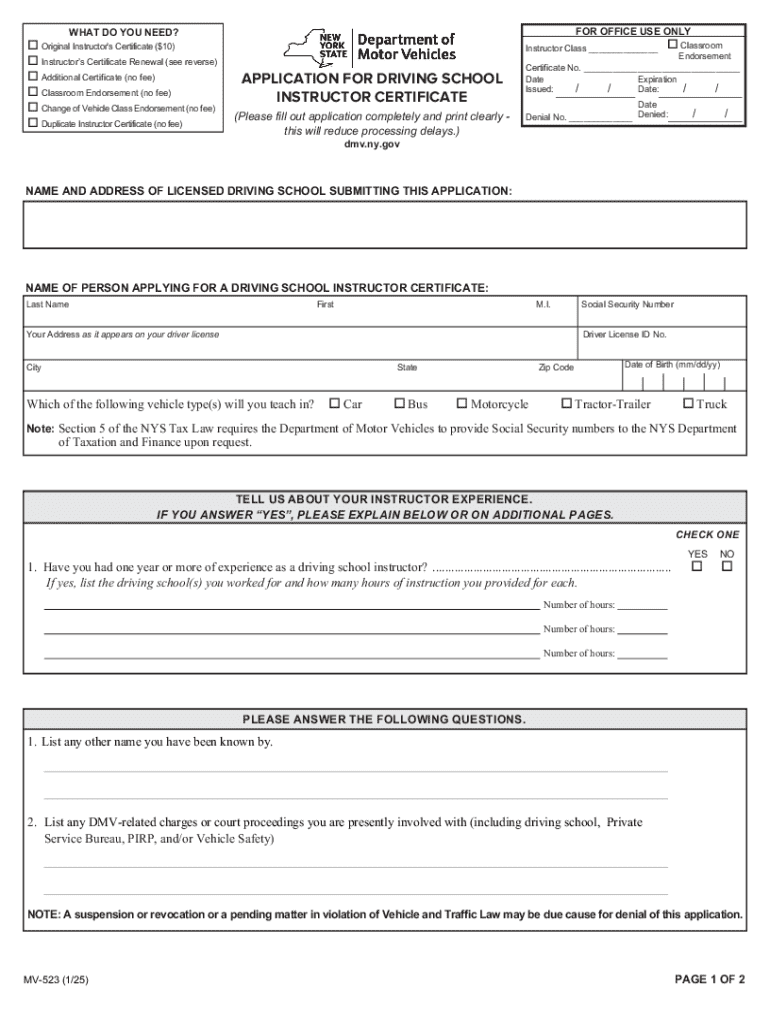
Application For Driving School Instructor Certificate Form
Use a Application For Driving School Instructor Certificate template to make your document workflow more streamlined.
What this instructor certificate form does
The Application For Driving School Instructor Certificate Form is a state-specific licensing record used to collect information needed to evaluate or document a driving school instructor’s certificate application. The exact fields, supporting documents, signature rules, and submission destination depend on the issuing state agency. With signNow, a school can upload the form, review auto-detected fillable fields, assign applicant and school signatures, send the document, and preserve the completed copy with an audit trail. Confirm electronic acceptance with the responsible licensing authority before submission.
Who benefits from this certificate form
Driving schools and instructors use this form to coordinate certificate information, signatures, supporting records, and submission-ready copies.
A state-licensed driving school can send instructor certificate applications to new hires, collect signatures remotely, and retain each completed form with its audit trail for agency review. An independent driving instructor can complete assigned fields from a mobile device, sign the application electronically where the issuing agency permits it, and share the completed record with school administrators. A multi-location driving-school operator can use reusable templates, delegated sending, and controlled access to standardize instructor certificate applications across branches without repeatedly rebuilding the document.
These tasks are executed by both individual contributors and centralized administrators depending on organizational policy and required controls.
How the certificate application workflow works
signNow turns the paper-style application into a controlled signing workflow while leaving state-specific filing requirements with the issuing authority.
Upload: Upload the certificate application PDF into signNow. Prepare: Review detected fields and add missing fields. Route: Assign applicant and school representative roles. Complete: Send, sign, and retain the completed record.
Complete the instructor certificate application
Use this sequence to prepare the Application For Driving School Instructor Certificate Form, collect the required signatures, and preserve completion evidence.
Upload form:
Upload the current Application For Driving School Instructor Certificate Form to signNow. Check fields:
Review auto-detected fields and add missing applicant or instructor fields. Assign signers:
Assign each field to the correct signer and send securely. Store evidence:
Review the completed copy and export its audit trail.
 Best ROI. Our customers achieve an average 7x ROI within the first six months.
 Scales with your use cases. From SMBs to mid-market, airSlate SignNow delivers results for businesses of all sizes.
 Intuitive UI and API. Sign and send documents from your apps in minutes.
Recommended application workflow settings
Configure the Application For Driving School Instructor Certificate Form to identify each signer, preserve completion evidence, and follow the responsible state agency’s retention rules.
| Setting | Recommendation |
|---|---|
| Authentication method | Email verification with SMS OTP |
| Signature type | Typed or drawn electronic signature |
| Audit trail | Enable completion certificate and action history |
| Document retention | Follow the issuing state agency schedule |
| Encryption | TLS 1.2/1.3 and AES-256 protection |
Security for instructor certificate applications
Encrypted transmission:
Encrypted storage:
Security certification:
Information security:
Privacy compliance:
Signature compliance:
How the audit trail records signing
The audit trail preserves evidence that each instructor certificate application was reviewed, signed, and completed through a traceable sequence.
Signer authentication:
Timestamp capture:
Document hashing:
Tamper-evident sealing:
Event logging:
Audit retrieval:



Best practices for certificate applications
Accurate fields, controlled routing, preserved evidence, and agency-specific retention practices reduce rework when preparing this instructor certificate application.
Validate every certificate application field
Assign each signer a defined responsibility
Export the signed record and audit trail
Restrict access to sensitive application data
Challenges when preparing this application
Driving schools may use an outdated Application For Driving School Instructor Certificate Form, causing field mismatches when the state licensing authority changes required information. A missing instructor signature, date, or supporting detail can delay review because signNow cannot determine whether the state agency will accept an incomplete application. Sending the application to the wrong recipient can expose personal information and weaken confidence that the named instructor actually approved the submitted record. Keeping only the signed PDF without its signNow audit trail may leave the school unable to show timestamps, signer actions, or completion history during an agency question.
Why this certificate form matters
The Application For Driving School Instructor Certificate Form gives a driving school a consistent record of instructor information, consent, and approval. ESIGN and UETA generally recognize qualifying electronic signatures for U.S. transactions, but the issuing state agency controls whether this certificate application may be signed or submitted electronically.

Processing stages for the certificate application
The form has four operational stages; the responsible state licensing authority determines any official filing deadline or review period.
Prepare the application
Deliver to signers
Collect signatures
Archive completion evidence
Troubleshooting instructor certificate applications
Resolve field detection, plan, authentication, legal, privacy, and evidence questions before submitting an Application For Driving School Instructor Certificate Form.
Upload the exact Application For Driving School Instructor Certificate Form as a PDF, then confirm that signNow detected the intended applicant, instructor, and date fields. If detection misses a field, place the required field manually before sending.
Business includes legally binding eSignatures, templates, audit trails, and mobile apps at $8/user/month when billed annually. The plan includes 100 signature invites per user per year; overage fees apply, so review usage before sending many applications.
Business Premium adds bulk send at $15/user/month billed annually. It can distribute the same certificate application to multiple instructors, while each recipient completes only the fields assigned to that signer.
signNow is ESIGN and UETA compliant for electronic signatures. Confirm that the issuing state agency accepts electronic submission or signatures before treating the completed application as an official certificate filing.
For PHI-containing records, signNow lists HIPAA compliance with a BAA required. A driving-school application should not include unnecessary health information; limit access and confirm the agency’s privacy requirements.
Use the audit trail and completion certificate to document signer identity, timestamps, actions, and document history. Retain the exported evidence according to the issuing state agency’s record schedule, because signNow does not determine that schedule.
Key performance indicators that demonstrate SignNow's proven track record.
BE READY TO GET MORE
Get this form now!

If you believe that this page should be taken down, please follow our DMCA take-down process.