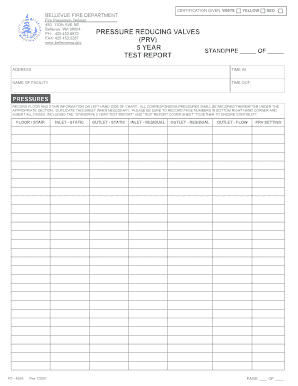
Bellevue Fire Department Prv Valve Testing Form
Use a Bellevue Fire Department Prv Valve Testing Form template to make your document workflow more streamlined.
Bellevue PRV valve testing overview
The Bellevue Fire Department Prv Valve Testing Form records pressure-reducing valve testing information for a Bellevue fire-protection inspection workflow. In practice, an authorized tester or contractor completes the document, identifies the relevant equipment and results, and obtains the required review or signature from responsible parties. With signNow, the document can be uploaded, its fillable fields reviewed, and signature roles assigned before delivery. Completed records can be stored with an audit trail. Local fire-department instructions, technical testing requirements, and submission rules still control the inspection itself.
Who uses the Bellevue PRV form
Fire-protection contractors
A Bellevue fire-protection contractor can complete the PRV testing record, attach supporting inspection information, and obtain signatures from the designated property representative. The workflow helps preserve a readable electronic record, while the contractor must still follow Bellevue Fire Department submission instructions and any technical requirements governing the test.
Property and facilities teams
Property managers and municipal facilities teams can use the form to coordinate testing records across buildings, assign review responsibilities, and retain completed documents with their audit trails. Access, approval, and retention should follow the organization’s records policy and the fire department’s instructions.
Who benefits from Bellevue testing records
The form is most useful where contractors, property representatives, and public-facility teams must coordinate documented PRV testing.
A Bellevue fire-protection contractor can use a reusable template to capture PRV testing observations, route the record to the responsible reviewer, and retain the signed document with its audit trail for the property file. A commercial property management company can coordinate building representatives and service contractors, using required fields and role-based sending to reduce missing acknowledgments across Bellevue inspection records. A municipal facilities team can standardize testing submissions across fire-protection assets, preserve completed records centrally, and restrict access according to departmental policy and assigned responsibilities.
These tasks are executed by both individual contributors and centralized administrators depending on organizational policy and required controls.
How the Bellevue form works
signNow turns the Bellevue PRV testing document into a controlled workflow from upload through signature, completion, and evidence storage.
Upload the form: Upload the Bellevue PRV valve testing form to signNow. Check the fields: Review detected fields and add missing readings or signers. Route for signatures: Send the testing record to assigned reviewers and signers. Archive the record: Store the completed record with its audit trail.
Inside the Bellevue audit trail
The audit trail records technical evidence around each Bellevue PRV valve testing signature, separate from preparing fields or sending the document.
Signer authentication:
Timestamp capture:
Document hashing:
Tamper-evident sealing:
History preservation:
Audit export:
 Best ROI. Our customers achieve an average 7x ROI within the first six months.
 Scales with your use cases. From SMBs to mid-market, airSlate SignNow delivers results for businesses of all sizes.
 Intuitive UI and API. Sign and send documents from your apps in minutes.
Features for Bellevue PRV testing
signNow connects the Bellevue testing document’s inspection information, signer assignments, completion evidence, and retained record in one controlled workflow.
Field mapping
Upload the Bellevue PRV testing document and review signNow’s detected fields before assigning inspection details, dates, and signature responsibilities.
Role-based routing
Route the exact testing record to contractors, property representatives, or municipal reviewers without printing and scanning each page.
Audit trail
Capture signatures and completion events alongside the Bellevue document, creating a single reviewable evidence package.
Reusable templates
Use templates for approved Bellevue testing layouts while preserving control over required fields and signer assignments.
Mobile access
Review or sign from supported desktop and mobile workflows when field personnel are away from the office.
Record control
Store the finalized record with controlled access and exportable completion evidence for property or departmental files.
Recommended Bellevue form setup
Configure the Bellevue PRV testing workflow around signer identity, inspection evidence, controlled access, and the retention policy governing the property or department.
| Setting | Recommendation |
|---|---|
| Authentication method | Email link with SMS OTP |
| Signature type | Typed or drawn electronic signature |
| Audit trail | Enable completion history export |
| Document retention | Follow Bellevue records policy |
| Encryption | TLS 1.2/1.3 and AES-256 |
Best practices for Bellevue valve testing
Accurate readings, controlled signatures, and a retrievable audit trail make Bellevue PRV testing records easier to review and defend.
Verify every valve reading
Protect the approved layout
Assign review roles clearly
Archive the evidence package
Security for testing records
Data in transit:
Data at rest:
Security assurance:
Information security:
Electronic signatures:
Protected health data:
Challenges with Bellevue valve records
Missing equipment identifiers or pressure readings can make a Bellevue PRV testing record difficult for reviewers to connect to the inspected valve. Assigning every signer the same role can obscure who performed the test, who reviewed the results, and who accepted the completed record. Uploading a scanned form without checking detected fields may leave required inspection information, dates, or signature areas unavailable for completion. Keeping the signed document without its audit trail can weaken the record’s ability to show when and by whom the Bellevue submission was completed.
Rules outside the Bellevue workflow
Separate notary process
Possible rejection
ESIGN exclusion
Court procedure controls
State acknowledgment rules
Legal standing of the Bellevue form
A completed Bellevue Fire Department PRV valve testing record can support a business transaction when the signer’s intent, consent, attribution, and reproducible record are preserved under ESIGN and applicable UETA rules. Those frameworks do not automatically cover wills, certain court orders, or excluded family-law documents, which may require separate procedures.

Bellevue testing workflow examples
These examples show how Bellevue PRV testing records can move between field teams, property representatives, and authorized reviewers.
Construction contractor
A Bellevue-area fire-protection contractor needs inspection records signed by field personnel and property representatives without returning paper documents to the office.
- Upload the PRV testing record
- Route signatures by role
signNow can keep the contractor’s completed Bellevue testing document and audit trail together. The workflow does not replace any fire-department inspection rule, but it gives authorized parties a clearer electronic record of who reviewed and signed the submitted information.
Property management
A commercial property team must organize valve testing records across buildings while giving service vendors a consistent signing experience.
- Reuse the approved form template
- Export the completed evidence
A controlled signNow template can reduce repeated setup for Bellevue properties and make completed records easier to locate. The property team remains responsible for confirming technical readings, local submission requirements, and the retention period required by its own policy or contract.
Pricing for Bellevue workflows
The verified comparison below separates signNow pricing from competitor information that is not available in the supplied product reference.
| Features | signNow | DocuSign | Adobe Sign | PandaDoc | Dropbox Sign |
|---|---|---|---|---|---|
| Annual starting price | $8/user/month | Not verified | Not verified | Not verified | Not verified |
| Free trial | 7 days, no card | Not verified | Not verified | Not verified | Not verified |
| Bulk send | Business Premium | Not verified | Not verified | Not verified | Not verified |
| Audit trail | Included in Business | Not verified | Not verified | Not verified | Not verified |
| HIPAA compliance | Available with BAA | Not verified | Not verified | Not verified | Not verified |
Bellevue form troubleshooting
Resolve the specific upload, signer, plan, compliance, and archival questions that can affect a Bellevue PRV valve testing record.
Upload the original PDF again and inspect signNow’s detected fields before sending. If a field is missing, add it manually and confirm that the Bellevue testing record’s readings, dates, and signatures remain aligned with the source document.
Open the document in a supported browser, check the signer’s email address, and resend the invitation if necessary. Business includes templates and audit trails; authentication options should match the department’s identity-control policy.
Business includes 100 signature invites per user annually when billed annually, with overage fees applying. Business Premium adds bulk send. Select the plan according to expected Bellevue document volume rather than assuming unlimited subscription invites.
signNow supports ESIGN and UETA requirements, including an electronic record and signature history. The organization must still confirm that Bellevue Fire Department instructions accept electronic records and that the signer’s intent and consent are documented.
If the record contains protected health information, signNow identifies HIPAA compliance as requiring a business associate agreement. Confirm that a BAA is in place and limit access before sending the Bellevue document.
Export the completed document and its audit trail from signNow, then store both under the applicable property or departmental record policy. Do not substitute a platform default for a retention period required by the responsible authority.
Key performance indicators that demonstrate SignNow's proven track record.
BE READY TO GET MORE
Get this form now!

If you believe that this page should be taken down, please follow our DMCA take-down process.