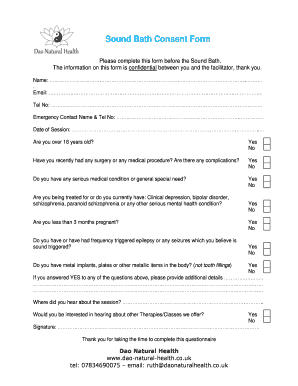
Sound Bath Consent Form Dao Natural Health Dao Natural Health Co
Use a Sound Bath Consent Form Dao Natural Health Dao natural health Co template to make your document workflow more streamlined.
What this consent form does
The Sound Bath Consent Form Dao Natural Health Dao Natural Health Co is a participant acknowledgment used before a sound bath session. It gives the participant a place to review the practice information, provide the requested personal details, acknowledge stated risks or conditions, and sign their consent. In signNow, Dao Natural Health can upload the document, review detected fillable fields, assign the participant as signer, and send it electronically. The completed form and audit trail can then be retained together for internal records, subject to applicable state law and privacy obligations.
Who benefits from this consent workflow
The form is most useful where a practitioner must document participant agreement before a sound bath session and preserve the signed record afterward.
Solo sound bath practitioners use the form to document each participant’s informed consent before a scheduled session and retain the signed record with attendance details. Wellness studios use reusable consent templates to collect participant signatures during registration, reducing paper handling while keeping completed forms available for staff review. Multi-location health and wellness organizations use controlled templates, signer authentication, and audit trails to apply the same consent process across studios and practitioners.
These tasks are executed by both individual contributors and centralized administrators depending on organizational policy and required controls.
Choose the right way to send and sign
- Use the signNow web app to upload this consent form, place signer fields, and send it from a desktop workflow.
- Use the signNow mobile app when practitioners or participants need to review and sign the consent form away from the office.
- Use kiosk mode for in-person sound bath sessions when several participants complete consent forms on one managed device.
- Share a signing link through a registration email or website when participants should open and complete the consent form independently.
What the audit trail records
The audit trail separates the participant’s consent event from the form’s underlying text, preserving technical evidence about how the signed record was completed.
Authenticate signer:
Capture timestamp:
Hash document:
Seal history:
Log activity:
Retrieve evidence:
 Best ROI. Our customers achieve an average 7x ROI within the first six months.
 Scales with your use cases. From SMBs to mid-market, airSlate SignNow delivers results for businesses of all sizes.
 Intuitive UI and API. Sign and send documents from your apps in minutes.
Mobile options for participant consent
Participants can use the signNow iOS app on iOS 15 or later or the Android app on Android 10 or later. The apps support offline signing and camera-based document capture when a practitioner needs to prepare or complete this consent form away from a desk.
iPhone app iOS 15 or later Android app Android 10 or later Mobile tools Offline signing and camera capture
For a sound bath practice, managed iPhone and Android devices can support supervised intake, while offline signing helps when connectivity is limited. Camera capture can convert a paper copy into a digital workflow, but staff should review every captured field before sending the completed consent record for storage.
Features that fit sound bath consent
signNow connects document preparation, participant signing, and record handling in one workflow for Dao Natural Health’s sound bath consent process.
Field preparation
Upload the Sound Bath Consent Form and use detected fields to prepare participant names, dates, acknowledgments, and signatures without rebuilding the document manually.
Flexible delivery
Send the consent form to a participant by email or signing link, allowing completion before arrival or during supervised registration.
Mobile signing
Collect signatures on desktop or mobile devices when practitioners need to complete intake at a studio, event location, or private session.
Audit trail
Capture participant actions, timestamps, and document history in an audit trail that supports internal review of the completed consent record.
Record storage
Store the signed consent form and completion record together so staff can retrieve the participant’s authorization when reviewing session documentation.
Reusable templates
Use templates and controlled sending workflows to keep the form’s consent language consistent across practitioners, sessions, and participating studio locations.
Security controls for consent records
Data encryption:
Transport security:
Security reporting:
Security management:
Health information:
Electronic signatures:
Recommended consent workflow setup
Configure the Sound Bath Consent Form around participant identity, signature evidence, controlled access, and a retention policy matched to the services and records involved.
| Setting | Recommendation |
|---|---|
| Authentication method | Email verification with SMS OTP |
| Signature type | Typed or drawn electronic signature |
| Audit trail | Enable completion history and export |
| Document retention | Retain six years when HIPAA applies |
| User provisioning | Assign controlled studio team access |
Why this consent record matters
A completed Sound Bath Consent Form records the participant’s intent and acknowledgment before a session. Under ESIGN and applicable state electronic-transactions law, a properly attributable electronic signature and retained record may support admissibility, while wills, certain court orders, and other statutory exclusions remain outside ordinary e-signature treatment.

How this consent workflow works
The process turns Dao Natural Health’s participant consent document into a controlled digital record from preparation through signed retention.
Upload form: Upload the Dao Natural Health consent form to signNow. Prepare fields: Review detected fields and add participant signature requirements. Send form: Send the prepared form by email or signing link. Store record: Store the completed document with its audit trail.
Questions about completing this consent form
These answers address document preparation, participant signing, privacy, plan selection, and retention for the Dao Natural Health sound bath consent workflow.
Upload the original Sound Bath Consent Form as a PDF or supported document, then review signNow’s detected fields. If a participant name, acknowledgment, or signature field is missing, add it manually before sending.
For a participant who cannot access the email invitation, confirm the address, resend the request, or provide a signNow signing link. Do not share a link publicly if it could expose another participant’s consent record.
The Business plan includes templates, mobile apps, and audit trails at $8 per user per month with annual billing. Business Premium adds bulk send and kiosk mode at $15 per user per month annually.
If the form contains protected health information, review whether the workflow requires a business associate agreement. signNow identifies HIPAA compliance as requiring a BAA; configure access and retention accordingly.
Electronic signatures generally receive legal recognition under ESIGN and UETA when intent, consent, attribution, and record retention are established. Consumer-facing workflows also require the disclosures described in 15 U.S.C. §7001(c).
Export the completed document and audit trail from signNow, restrict access to authorized Dao Natural Health personnel, and apply a documented retention period. State privacy requirements may impose additional controls for participant information.
Key performance indicators that demonstrate SignNow's proven track record.
BE READY TO GET MORE
Get this form now!

If you believe that this page should be taken down, please follow our DMCA take-down process.