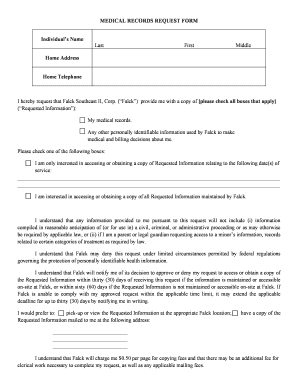
Medical Records Request Form American Ambulance Service
Use a Medical Records Request Form American Ambulance Service template to make your document workflow more streamlined.
What this medical records request form does
The Medical Records Request Form American Ambulance Service is an authorization used to identify a patient or authorized representative, describe ambulance-service records requested, name the recipient, and document consent for disclosure. The requester completes the applicable fields, signs with intent, and submits the form for review. American Ambulance Service staff can then verify identity and authorization before releasing the specified records. When protected health information is involved, HIPAA privacy procedures and the service’s retention policy remain controlling.
Documents and audiences covered
Patient requests
Patients request ambulance trip reports, treatment records, and related medical documentation.
Representative requests
Authorized representatives submit consent forms for insurers, attorneys, or care providers.
Features for this ambulance service request
signNow connects the form’s patient authorization workflow with field completion, signer verification, audit evidence, and controlled storage for American Ambulance Service.
Field detection
Upload the American Ambulance Service request form and let signNow identify fillable areas, reducing manual field placement before the authorization reaches a patient or representative.
Required fields
Place patient, representative, recipient, authorization, and signature fields directly on the request so each required response is captured in the signed record.
Flexible delivery
Send the request by email, mobile workflow, kiosk mode, or signing link according to the requester’s location and identity-verification process.
Audit trail
Capture timestamps, signer actions, and document history in an audit trail that can accompany the completed request during internal review.
HIPAA controls
Protect health information with encryption and HIPAA-compliant signNow workflows when a business associate agreement is required for the deployment.
Secure storage
Keep the signed request and completion evidence organized for authorized staff, supporting controlled retrieval when American Ambulance Service processes a records disclosure.
How the request workflow works
The signNow workflow takes the American Ambulance Service form from upload through field review, authorization, signature, and protected record storage.
Upload form: Upload the ambulance service request form. Review fields: Auto-detect and review fillable fields. Send request: Send to the authorized signer. Archive record: Store the completed form and audit trail.
Ways to complete and sign the request
- Upload the Medical Records Request Form American Ambulance Service in the signNow web app, then review the detected patient, recipient, authorization, and signature fields before sending.
- Use the signNow mobile app when staff or an authorized representative must complete the request on a phone or tablet during field-based ambulance operations.
- Use kiosk mode at an approved service location when a patient or representative completes the request on a managed shared device with staff oversight.
- Generate a shareable signing link when the ambulance service needs to distribute the same request form to an authorized recipient without creating a separate email workflow.
 Best ROI. Our customers achieve an average 7x ROI within the first six months.
 Scales with your use cases. From SMBs to mid-market, airSlate SignNow delivers results for businesses of all sizes.
 Intuitive UI and API. Sign and send documents from your apps in minutes.
Configure the medical records request workflow
Use controlled authentication, documented consent, and protected retention for requests containing protected health information.
| Setting | Recommendation |
|---|---|
| Authentication method | Two-factor authentication for patient representatives |
| Signature type | Electronic signature with recorded intent |
| Audit trail | Export the complete signing history |
| Document retention | Six years for HIPAA records (45 CFR 164.530(j)) |
| Encryption | TLS 1.2 or 1.3 in transit; AES-256 at rest |
Security and compliance controls
TLS and AES-256:
HIPAA with BAA:
SOC 2 Type II:
ISO 27001 certified:
ESIGN and UETA:
WCAG 2.0 Level AA:
Mobile options for field requests
The signNow mobile apps support Medical Records Request Form American Ambulance Service workflows on iOS and Android, including camera-based capture and offline signing when connectivity is unavailable.
iPhone app iOS 15 or later Android app Android 10 or later Mobile workflow Camera capture and offline signing
Field crews can capture a paper authorization with the device camera, complete available fields, and obtain a signature before returning online. Administrators should confirm device management, offline synchronization, and access controls before handling protected health information.



Privacy pitfalls in medical record requests
Patient names, dates of birth, incident details, and treatment information can remain visible in downloaded copies shared beyond the authorized recipient. A representative may sign without sufficient authority, leaving the ambulance service unable to establish valid authorization for the requested records. Sending the completed form to an incorrect email address can disclose protected health information before staff detect the routing mistake. Broad date ranges or record categories can produce an authorization that does not clearly limit the requested disclosure.
What the audit trail records
The audit trail links the American Ambulance Service request to signer identity, document activity, completion evidence, and later retrieval.
Authenticate signer:
Capture timestamp:
Hash document:
Seal document:
Inspect audit trail:
Export evidence:
Retention periods for related records
Apply the record class and governing rule before selecting a retention period for a completed request or supporting document.
Six years: HIPAA records
Three years: payroll records
Five years: injury records
Thirty years: exposure records
Three years: tax records
Document exclusions and authorization limits
Disclosure limitation
Identity verification
Signature evidence
Privacy incident
Legal standing of the signed request
A completed Medical Records Request Form American Ambulance Service can provide evidence of identity, intent, consent, and authorization when its record is retained accurately. ESIGN and applicable UETA rules generally recognize qualifying electronic signatures, but they do not replace HIPAA disclosure requirements or authorize wills, court orders, or family-law decrees.

Troubleshooting medical records requests
Resolve field, authorization, privacy, plan, and audit questions before American Ambulance Service releases requested medical records.
Upload the original Medical Records Request Form American Ambulance Service and use signNow’s field detection, then inspect every detected field before sending. Add missing patient, recipient, authorization, and signature fields manually so the request cannot be completed with essential information absent.
A HIPAA workflow requires appropriate privacy safeguards and a business associate agreement when applicable. signNow identifies HIPAA compliance as requiring a BAA; confirm the account configuration and your organization’s disclosure procedures before sending protected health information.
Business includes legally binding eSignatures, audit trails, templates, and mobile apps at $8 per user per month with annual billing. Business Premium is $15 per user per month annually and adds bulk send and kiosk mode.
If a representative disputes the authorization, review the audit trail, signer authentication record, timestamps, and completed document. The ESIGN Act and UETA recognize qualifying electronic signatures, but authorization scope and HIPAA disclosure requirements still need independent review.
Use two-factor authentication or stronger signer authentication when the request includes protected health information. signNow Enterprise adds advanced signer authentication, while Site License can add HIPAA and other regulated-workflow options.
A seven-day free trial is available without a credit card. Paid subscription plans include 100 signature invites per user per year, with overage fees; the Site License uses $1.50 per signature invite and unlimited users.
Key performance indicators that demonstrate SignNow's proven track record.
BE READY TO GET MORE
Get this form now!

If you believe that this page should be taken down, please follow our DMCA take-down process.