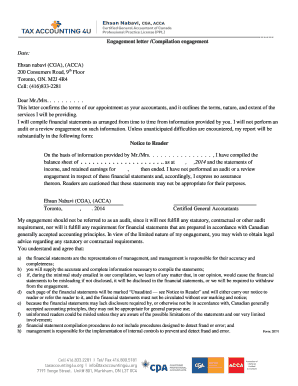
Engagement Letter Compilation Engagement TaxAccounting4U Taxaccounting4u Form
Use a Engagement Letter Compilation Engagement TaxAccounting4U Taxaccounting4u template to make your document workflow more streamlined.
What this compilation engagement form does
The Engagement Letter Compilation Engagement TaxAccounting4U Taxaccounting4u Form is a written agreement that records an accounting professional’s compilation engagement with a client. It identifies the client and entity, defines the compilation services and period, states management responsibilities, explains intended use and limitations, and records fees, dates, and approvals. The accounting firm completes the variable terms, sends the letter to authorized parties, collects signatures, and retains the signed document with supporting evidence. signNow provides the upload, field placement, routing, eSignature, and audit-trail workflow; professional requirements still depend on the engagement and applicable state law.
Business types that use this form
The form is most useful where compilation scope, client responsibilities, and signed evidence must remain consistent across multiple engagements.
Solo CPAs can prepare one client-specific engagement letter, collect the owner’s approval, and retain the signed scope without managing paper copies or separate email threads. Regional accounting firms can standardize compilation-letter templates while allowing engagement teams to update entity names, periods, fees, and authorized signers before routing each file. Enterprise finance departments can coordinate recurring compilation engagements across subsidiaries, using role-based administration, audit trails, and controlled storage for completed client-facing records.
These tasks are executed by both individual contributors and centralized administrators depending on organizational policy and required controls.
Key features for compilation engagements
These features address the actual preparation, approval, signing, and record-keeping steps required for an Engagement Letter Compilation engagement.
Document preparation
Upload the Engagement Letter Compilation document, add required signer fields, and preserve the final agreement as a completed PDF rather than printing, scanning, and emailing separate copies.
Signer routing
Route the engagement letter to the client and accounting professional in the required order, with each signer receiving only the fields assigned to that person.
Audit evidence
Capture signer actions, timestamps, and completion evidence in an audit trail that can accompany the signed engagement letter during file review.
Reusable templates
Use reusable fields for client name, entity, service scope, fees, dates, and signatures while reviewing every variable before sending the specific engagement letter.
Signer authentication
Enable SMS verification when the engagement includes confidential client or tax information, adding an identity check beyond the initial email invitation.
Client-file organization
Store the completed letter and audit record in an organized client folder, supporting retrieval when the agreed compilation scope or fee needs confirmation.
How to complete the engagement letter
Prepare the exact client engagement letter, verify its variable terms, then route it through signNow for signing and documented completion.
Upload document:
Upload the Engagement Letter Compilation document to signNow. Check fields:
Review detected fields and add missing client or signer fields. Assign signers:
Assign scope, fee, date, and signature fields to recipients. Send for signature:
Send the engagement letter through the required signing order. Store evidence:
Download the signed letter and completion audit trail.
Recommended engagement-letter setup
Configure the workflow around signer identity, engagement scope, audit evidence, and the retention rule that applies to the client file.
| Setting | Recommendation |
|---|---|
| Authentication method | Email verification with SMS OTP |
| Signature type | Electronic signature with signer intent |
| Audit trail | Exported completion certificate and event history |
| Document retention | 3 years under IRC §6501(a) |
| Encryption | TLS 1.2/1.3 and AES-256 at rest |
 Best ROI. Our customers achieve an average 7x ROI within the first six months.
 Scales with your use cases. From SMBs to mid-market, airSlate SignNow delivers results for businesses of all sizes.
 Intuitive UI and API. Sign and send documents from your apps in minutes.
Security and data protection
Transport encryption:
Storage encryption:
Security reporting:
Information security:
Protected health data:
Electronic signature law:
What the audit trail records
The audit trail separates signing evidence from document preparation by recording identity, events, timestamps, integrity, and exportable completion information.
Authenticate signer:
Capture timestamps:
Hash document:
Seal record:
Track events:
Export evidence:
Retention and record-keeping practices
Preserve the engagement letter, supporting documents, and signNow evidence according to the governing tax, professional, and state requirements.
Apply the applicable federal retention period
Export the audit trail after completion
Archive the complete signed record securely
Record holds and state-law extensions
Retention periods for engagement records
Use the record class that actually applies; an engagement letter does not automatically inherit every industry-specific retention rule.
3 years after filing
6 years after filing
6 years from creation
6 years for covered records
3 years for payroll
Challenges when preparing this form
Leaving the compilation scope, client responsibilities, or intended-use limitations incomplete can create disagreement about what the accounting professional agreed to deliver. Using a prior client’s engagement letter without updating entity names, period dates, fees, and signers can attach the wrong terms to the current engagement. Sending the document before confirming signer roles may leave the client representative unable to approve the engagement or create an incomplete signature record. Saving only the signed PDF without its signNow audit trail can weaken the file’s evidence of identity, timing, consent, and document completion.
Risks of incomplete engagement records
Scope dispute
Attribution failure
Evidentiary gap
Integrity challenge



Pricing for engagement-letter workflows
The comparison uses verified signNow plan information; competitor prices and capabilities are marked Not verified where the supplied vendor data does not confirm them.
| Features | signNow | DocuSign | Adobe Sign | PandaDoc | Dropbox Sign |
|---|---|---|---|---|---|
| Annual Business price | $8/user/month | Not verified | Not verified | Not verified | Not verified |
| Free trial | 7 days, no card | Not verified | Not verified | Not verified | Not verified |
| Bulk send | Business Premium included | Not verified | Not verified | Not verified | Not verified |
| Audit trail | Included in Business | Not verified | Not verified | Not verified | Not verified |
| HIPAA compliance | Compliant, BAA required | Not verified | Not verified | Not verified | Not verified |
Engagement letter troubleshooting
Use these answers to resolve field, signer, retention, and compliance questions before finalizing the compilation engagement record.
Business is signNow’s plan for legally binding eSignatures, audit trails, templates, and mobile apps. Upload the engagement letter, place fields, route it to authorized signers, and retain the completed PDF and audit trail. signNow’s ESIGN and UETA compliance supports electronic execution, subject to the engagement and applicable law.
Business Premium includes bulk send, but use bulk sending only when the compilation letters share the same structure and each recipient’s variable terms are reviewed. For a single customized engagement, send an individual document so entity, period, scope, and fee fields are not misapplied.
If a client’s email invitation is insufficient for the sensitivity of the engagement, add SMS OTP or another available authentication control. Record the selected method in the workflow policy and retain the resulting audit evidence with the signed letter.
An electronic signature generally requires intent, consent, attribution, and a record capable of accurate reproduction. For consumer-facing electronic records, 15 U.S.C. §7001(c) also addresses paper-copy disclosure, electronic access, and withdrawal procedures.
The federal tax retention baseline is 3 years from filing under IRC §6501(a), with 6 years applying when a 25% income understatement is involved under IRC §6501(e). State professional rules or a dispute may require longer preservation.
Export the completed PDF and signNow audit trail together. The audit record should preserve identity, timestamps, delivery, and signing events, helping demonstrate what the client approved and when without treating the audit trail as a substitute for accurate engagement terms.
Key performance indicators that demonstrate SignNow's proven track record.
BE READY TO GET MORE
Get this form now!

If you believe that this page should be taken down, please follow our DMCA take-down process.