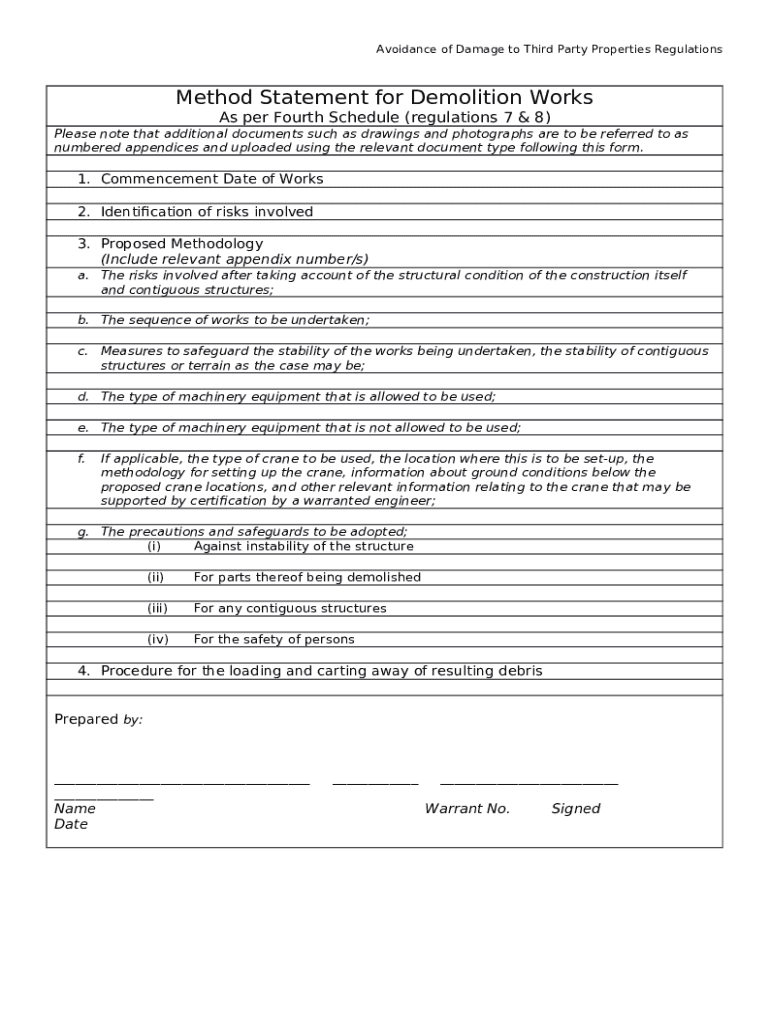
Method Statement For Demolition Works Form
Use a Method Statement for Demolition Works docx template to make your document workflow more streamlined.
What this demolition form does
A Method Statement For Demolition Works Form records how a specific demolition activity will be planned, controlled, and approved before work begins. It normally identifies the project and site, describes the demolition sequence, lists plant and equipment, assesses hazards, defines control measures, and assigns responsible personnel. Contractors and project stakeholders review the document to confirm that the proposed method matches site conditions and contractual expectations. With signNow, a prepared form can be uploaded, fields reviewed, routed to named signers, completed electronically, and stored with an audit trail.
Who uses this demolition form
Demolition contractors
Demolition contractors use the form to describe project scope, sequence, equipment, hazards, controls, exclusion zones, and emergency arrangements before crews begin work. Supervisors can assign approval fields to responsible managers and clients, then preserve the signed document with its audit trail for project administration, safety review, and later dispute analysis.
Project stakeholders
Principal contractors, site managers, property owners, and client representatives use the form to review whether the proposed demolition method matches the site and contract. They can sign from desktop or mobile devices, retain the approved version with related permits and plans, and identify which party accepted the documented controls.
How the demolition form workflow works
The signNow workflow moves the demolition method statement from preparation through field review, signature collection, and auditable storage.
Upload the form: Upload the completed demolition method statement to signNow. Assign reviewers: Review detected fields and add signer roles. Request signatures: Send the document for sequential or parallel signatures. Archive the record: Store the signed PDF with its audit trail.
Complete the demolition form online
Use this sequence to prepare the document, route approvals, and retain evidence of the completed demolition method statement.
Upload document:
Upload the current demolition method statement. Prepare fields:
Review fields and add missing approval fields. Assign signers:
Assign each field to its responsible signer. Send for signing:
Send the form and monitor completion. Store evidence:
Download the signed form and audit trail.
Features that support demolition approvals
signNow combines document preparation, role-based signing, mobile access, and audit evidence for demolition teams managing approvals across active projects.
Document upload
Upload the demolition method statement and prepare its existing fields without recreating the document manually. This keeps project-specific descriptions, controls, and approval sections together.
Signer routing
Assign supervisors, contractors, clients, or other reviewers to defined fields. Role-based routing makes responsibility visible before the demolition method statement reaches final approval.
Mobile signing
Collect signatures from desktop or mobile devices when reviewers work in the office, on site, or away from the project location.
Audit trail
Preserve timestamps, signer activity, and document history alongside the signed form. The record supports later review of who approved the stated demolition plan.
Reusable templates
Use templates for recurring project documentation while updating site-specific hazards, sequencing, and controls for each demolition job.
Secure storage
Store the signed document and completion evidence in a controlled electronic workflow, reducing reliance on paper copies and disconnected email attachments.
 Best ROI. Our customers achieve an average 7x ROI within the first six months.
 Scales with your use cases. From SMBs to mid-market, airSlate SignNow delivers results for businesses of all sizes.
 Intuitive UI and API. Sign and send documents from your apps in minutes.
Examples for demolition documentation
Construction and property teams can adapt signNow workflows to collect approvals for demolition planning and related site documentation.
Property operations
Martin Properties manages property documents across mobile and office workflows, making electronic execution useful for site-related agreements and approvals.
- Mobile signing for field teams
- Online execution with built-in security
Tim Martin, founder of Martin Properties, reports processing and executing documents online with compliance and security, including mobile and offline work. The story supports a practical field-document workflow, although the customer reference does not specifically identify demolition method statements.
Demolition contractor
A regional demolition contractor can use the form to document work sequencing, hazards, controls, equipment, and responsible approvals before mobilization.
- Recorded method and hazard controls
- Auditable approvals before site work
The workflow keeps the completed method statement in one controlled record rather than scattered email attachments. Supervisors can send the prepared document to the required reviewers, capture signatures, and preserve the audit trail for project records and later questions.



What the audit trail records
The audit trail separates the approved demolition method statement from its signing evidence by recording identity, timing, document activity, and retrieval details.
Authenticate signer:
Capture timestamps:
Hash document:
Seal activity:
Issue certificate:
Export audit trail:
Recommended workflow setup
Configure the demolition form around identifiable reviewers, controlled access, signing evidence, and the project’s documented retention policy.
| Setting | Recommendation |
|---|---|
| Authentication method | Email verification with SMS authentication |
| Signature type | Electronic signature with signer intent |
| Audit trail | Enabled for every signing event |
| Document retention | Project policy with regulatory review |
| User provisioning | Role-based access for project teams |
Best practices for completing the form
A reliable demolition method statement connects site conditions, work sequencing, controls, responsibilities, and approvals in one traceable record.
Describe the actual demolition sequence
Define approval roles clearly
Link hazards to controls
Preserve the approved version
Challenges when preparing the form
Project teams may omit site-specific hazards, work sequencing, utility isolation, or emergency controls when adapting a generic demolition method statement. Multiple reviewers can approve different document versions when revisions circulate through email without a controlled signing workflow. Unclear signer roles make it difficult to determine whether a supervisor, contractor, client, or site manager approved the planned work. Paper copies and disconnected attachments can separate the signed method statement from the audit evidence needed to explain its approval history.
Risks of incomplete demolition records
Unclear controls
Missing approval
Version dispute
Weak evidence
Security for demolition records
Transport encryption:
Stored data:
Security certification:
Information security:
Electronic signatures:
Health information:
Why teams look for DocuSign alternatives
Organizations seek alternatives when they need different pricing models, stronger native automation, simpler bulk affidavit workflows, or more flexible identity-verification options than those available in a legacy envelope-based vendor.

Key performance indicators that demonstrate SignNow's proven track record.
Troubleshooting the demolition form workflow
Resolve field, routing, plan, consent, evidence, and document-scope questions before relying on a signed demolition method statement.
Upload the original PDF again and inspect detected fields before sending. signNow supports templates and fillable fields, but a scanned or unusual layout may require manual placement of signer, date, and approval fields for this demolition document.
Check the recipient address, signing order, and assigned fields. If the site manager received the form but cannot sign, resend after confirming the correct email and role assignment rather than changing the approved demolition content.
The Business plan includes legally binding eSignatures, audit trails, templates, and mobile apps at $8/user/month when billed annually. Business Premium adds bulk send and kiosk mode at $15/user/month annually.
For a consumer-facing electronic record, ESIGN requires disclosure of the right to receive paper, access to the electronic format, and a process for withdrawing consent under 15 U.S.C. §7001(c). Apply that requirement when the signer is a consumer.
Use signNow’s audit trail and certificate of completion to preserve signer identity, timestamps, and document activity. Review the exported evidence with project counsel when a contract, permit, or state rule imposes additional requirements.
Do not use this workflow for wills, codicils, testamentary trusts, court orders, or official court filings. ESIGN’s statutory exceptions under 15 U.S.C. §7003 may require a different signing or filing process.
BE READY TO GET MORE
Get this form now!

If you believe that this page should be taken down, please follow our DMCA take-down process.