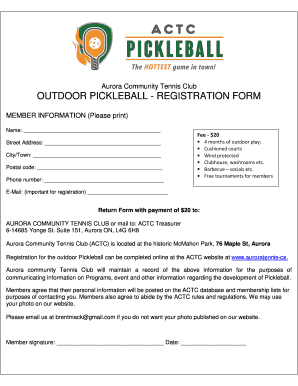
Pickleball Sign Up Sheet Form
Use a Pickleball Sign Up Sheet template to make your document workflow more streamlined.
What the pickleball signup form does
A Pickleball Sign Up Sheet Form is a registration record that lists players, sessions, availability, and acknowledgments for organized pickleball play. Staff prepare the sheet with session dates, start times, court capacity, and participant fields, then share it through signNow for completion and electronic signature. The completed record gives coordinators one source for assigning courts, contacting players, and confirming participation. Because this is a recreational business form rather than an IRS or USCIS filing, no federal filing deadline or reporting threshold applies unless a separate program rule says otherwise.
Who uses this pickleball registration form
Recreation departments
Community recreation departments use the Pickleball Sign Up Sheet Form to register residents for open play, clinics, and tournaments. Staff can include player name, email, phone number, session choice, skill level, availability, emergency contact instructions, and electronic acknowledgment. A signNow audit trail records completion activity, while controlled access limits exposure of participant information.
Clubs and instructors
Pickleball clubs, instructors, and facility operators use the form to manage recurring sessions and court capacity. They can reuse a signNow template, send it to players, collect signatures, and store the finished sheet with a completion record. Administrators should define who may edit templates, send forms, view registrations, and export records.
Who benefits from a digital signup sheet
The form fits organizations that coordinate recurring pickleball participation, court capacity, player communications, and signed acknowledgments across desktop and mobile workflows.
Community recreation departments can publish recurring court sessions, collect player availability, and preserve signed participation records without maintaining paper lists at the front desk. Pickleball clubs can reuse a controlled template for league nights, clinics, or open play while assigning administrative access to staff responsible for court capacity and attendance. Independent instructors can send a focused registration sheet for lessons, capture player details and acknowledgments, and keep completed forms organized for later scheduling or program review.
These tasks are executed by both individual contributors and centralized administrators depending on organizational policy and required controls.
How the pickleball signup workflow works
The signNow workflow turns a blank Pickleball Sign Up Sheet Form into a controlled registration record, from field preparation through player completion and audit-trail storage.
Upload the sheet: Upload or select the Pickleball Sign Up Sheet Form template in signNow. Check fillable fields: Review detected fields and add player, session, and consent fields. Share with players: Send the sheet to players or publish a controlled signing link. Store the record: Collect completed entries and retain the signed record with its audit trail.
 Best ROI. Our customers achieve an average 7x ROI within the first six months.
 Scales with your use cases. From SMBs to mid-market, airSlate SignNow delivers results for businesses of all sizes.
 Intuitive UI and API. Sign and send documents from your apps in minutes.
Platform requirements for online signup
Pickleball Sign Up Sheet Form works in a current web browser over TLS 1.2 or TLS 1.3. Use Chrome, Firefox, Safari, or Edge on Windows, macOS, iOS, or Android. signNow mobile apps support document completion and signing on iOS and Android devices.
Create one clear row per player Use one row per player so names, contact details, preferred playing time, and partner requests remain easy to read during court assignment. Identify every session detail before publishing Add specific session dates, start times, court numbers, and player limits before sharing the sheet, preventing duplicate reservations and uncertain attendance. Limit fields to scheduling information only Collect only information needed for scheduling, such as name, email, phone number, skill level, and availability; avoid unnecessary health or identity data.
For managed recreation centers, configure device access, user provisioning, and retention policies before distributing the signup sheet. Teams needing API access, SSO, or certificate configuration should confirm the required signNow plan and administrative controls before connecting registration data to scheduling or storage systems.
Choose the right way to collect registrations
- Use the signNow web app when recreation staff prepare the Pickleball Sign Up Sheet Form, review player fields, and manage completed registration records from a desktop browser.
- Use the signNow mobile app when instructors or court coordinators need to review, complete, or sign the sheet from an iOS or Android device during facility operations.
- Use kiosk mode on a managed tablet when players register at a staffed desk or event entrance and the organization needs a consistent in-person completion flow.
- Use a shareable signing link for remote registration when a club wants players to open the prepared sheet without receiving an individual email invitation.
Recommended signup sheet configuration
Configure the Pickleball Sign Up Sheet Form around identifiable players, controlled sharing, complete records, and straightforward court scheduling.
| Setting | Recommendation |
|---|---|
| Authentication method | Email verification for registered players |
| Signature type | Typed or drawn electronic signature |
| Audit trail | Enabled with completion certificate |
| Document retention | Retain through the completed season |
| Encryption | TLS 1.2 or 1.3 and AES-256 protection |
What the signup audit trail records
The audit trail separates player activity from form setup, helping staff verify how a specific Pickleball Sign Up Sheet Form was completed and finalized.
Authenticate signer:
Capture timestamps:
Hash document:
Seal record:
Track actions:
Export trail:
Security for player registration records
Data in transit:
Data at rest:
Security reporting:
Information security:
Privacy controls:
Electronic signatures:



Privacy and disclosure pitfalls
Publishing one unrestricted link can allow duplicate entries, exceed court capacity, or expose player contact details to unintended recipients. Leaving session date, start time, or court fields unclear creates conflicting registrations that staff must resolve manually before play begins. Collecting signatures without an audit trail makes it harder to confirm who completed a specific player entry and when the record changed. Retaining every player detail indefinitely increases privacy exposure when the form only needs information for scheduling and attendance.
Troubleshooting pickleball signup workflows
Use these answers to resolve field, signing, privacy, plan, and record-management questions when preparing the Pickleball Sign Up Sheet Form in signNow.
In signNow, upload the Pickleball Sign Up Sheet Form and review the detected fillable fields. If a player name, session date, or signature field is missing, add it manually before sending. Test the completed PDF so every required registration value appears in the final record.
The Business plan costs $8 per user per month with annual billing and includes templates, audit trails, and mobile apps. Business Premium costs $15 per user per month annually and adds bulk send and kiosk mode. Choose based on how the recreation program distributes entries.
signNow supports electronic signatures under ESIGN and UETA when intent, consent, attribution, and record retention requirements are satisfied. For a consumer-facing registration process, provide the required electronic-record disclosure under 15 U.S.C. §7001(c) when applicable and preserve the completed record.
Use signNow’s audit trail to review the player’s signing event, timestamps, IP information, and action history. Export the completed Pickleball Sign Up Sheet Form and its audit information together when staff need a defensible attendance or consent record.
For a public recreation program, avoid placing unrestricted player contact information in a broadly shared sheet. Use controlled recipients or a signNow signing link, limit administrative permissions, and collect only scheduling data necessary for the specific pickleball session.
Business Premium includes kiosk mode, which can suit an on-site tablet at a recreation desk. For remote registration, use email delivery or a signing link. Confirm device permissions and test the form on the selected tablet before opening player registration.
Key performance indicators that demonstrate SignNow's proven track record.
BE READY TO GET MORE
Get this form now!

If you believe that this page should be taken down, please follow our DMCA take-down process.