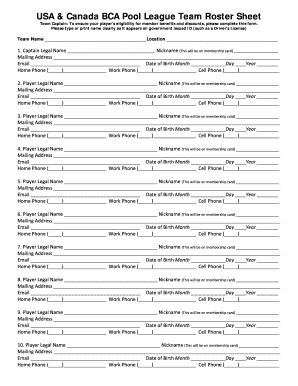
USA & Canada Bca Pool League Team Roster Sheet Napl Form
Use a USA & Canada BCA Pool League Team Roster Sheet NAPL template to make your document workflow more streamlined.
What this roster sheet is
The USA & Canada Bca Pool League Team Roster Sheet Napl Form is a team-submission document used to organize player and team information for a BCA pool league context. It records the roster details supplied by a team and may include fields for team leadership, players, contact information, league identification, and acknowledgments. Because the available form name does not identify a federal agency, IRS filing rule, official deadline, or universal field list, coordinators should follow the applicable league instructions. signNow can prepare, route, sign, and retain the specific uploaded sheet.
Features that support roster administration
signNow combines field preparation, recipient routing, signatures, and audit records for teams submitting the USA & Canada Bca Pool League Team Roster Sheet Napl Form.
Field placement
Upload the roster sheet and place signature, date, acknowledgment, or initials fields where team and league participants must complete the document. Field placement keeps the final roster readable and reduces omitted information.
Flexible delivery
Send the completed roster to named recipients by email, or use a signing link when a league coordinator needs to distribute the same document to designated participants without manually preparing every invitation.
Audit trail
Capture signer actions, timestamps, and document history in an audit trail associated with the completed roster. The record helps coordinators show who completed each required action and when the document was finalized.
Reusable templates
Use reusable templates for recurring league seasons or team submissions. A template can preserve the roster layout and required fields while allowing coordinators to update team-specific names and details before sending.
Mobile access
Complete the roster from a desktop browser or signNow mobile app when team administration occurs away from an office. Mobile access supports timely review and signing without requiring paper circulation.
Centralized records
Store the signed roster and completion record together so coordinators can retrieve the exact version submitted for a season. Controlled access reduces accidental disclosure of player contact information.
Who uses this roster sheet
Team administrators
Captains and team managers complete player names, team details, and required acknowledgments before submission.
League coordinators
League coordinators review submitted rosters, request corrections, and retain completed records for each season.
Teams that benefit from digital rosters
The roster sheet serves organizations that coordinate multiple players, team officials, and league submissions across a season.
Local pool leagues use the roster sheet to collect team membership details and signed acknowledgments before organizing seasonal play. Independent team captains use signNow to gather player information remotely when participants cannot meet at the same location. League administrators use reusable signNow templates to standardize roster collection across multiple teams while preserving separate completion records.
These tasks are executed by both individual contributors and centralized administrators depending on organizational policy and required controls.
 Best ROI. Our customers achieve an average 7x ROI within the first six months.
 Scales with your use cases. From SMBs to mid-market, airSlate SignNow delivers results for businesses of all sizes.
 Intuitive UI and API. Sign and send documents from your apps in minutes.
How to complete the roster sheet
Prepare the USA & Canada Bca Pool League Team Roster Sheet Napl Form in signNow, route each required field, and preserve the completed record.
Upload the form:
Upload the roster sheet to signNow. Review fields:
Check detected fields and add missing fields. Assign recipients:
Assign team and league participants to fields. Send for signing:
Send the roster for electronic completion. Save records:
Download the signed roster and audit trail.
How the roster workflow works
The signNow workflow converts the roster sheet into a controlled digital process while preserving the document’s team-specific information and completion history.
Upload and detect: Upload the roster sheet and let signNow identify fillable areas. Prepare fields: Place or adjust fields for captains, players, and coordinators. Route the roster: Send the assigned roster to each required participant. Complete and retain: Collect signatures and store the finished document with its audit trail.
What the roster audit trail records
The audit trail documents the technical history of the roster after delivery, including authentication, timestamps, actions, and retrieval of the completed record.
Authenticate signer:
Capture timestamp:
Link document history:
Seal record:
Log actions:
Export evidence:
Best practices for completing the roster
Accurate names, complete team details, and a controlled signing process help prevent roster corrections and eligibility questions.
Verify league and season details
Match player information carefully
Confirm roles before signing
Archive the completed roster securely
Privacy and disclosure pitfalls
Player names or contact details may be exposed when completed rosters are emailed broadly or stored in folders without role-based access controls. A roster may lack clear evidence that each participant consented to electronic records, especially when coordinators distribute links without an accompanying consent disclosure. Shared accounts can make it difficult to attribute a roster change or signature to the correct captain, manager, player, or league administrator. Collecting unnecessary personal information on the roster increases disclosure risk and complicates secure retention after the league season ends.
Platform requirements for roster signing
Complete the USA & Canada Bca Pool League Team Roster Sheet Napl Form through signNow in Chrome, Firefox, Safari, or Edge on Windows or macOS. The signNow mobile apps support iOS and Android access for reviewing and signing roster documents.
Browsers Chrome, Firefox, Safari, and Edge Desktop systems Windows and macOS desktop access Mobile apps iOS and Android signNow apps
Organizations should use managed accounts and controlled permissions when roster files contain player contact information. Administrators can connect signNow with selected business systems, configure authentication controls, and preserve completed documents with their audit trails according to league policy and applicable privacy obligations.
Security controls for roster records
Data in transit:
Data at rest:
Security certification:
Information security:
Health information:
Electronic signatures:
Troubleshooting roster completion and signing
Use these answers to resolve field assignment, consent, plan, access, and evidence questions for the USA & Canada Bca Pool League Team Roster Sheet Napl Form.
Upload the roster as a PDF or supported document, then inspect signNow’s detected fields. Add or reposition fields manually when the source sheet uses scanned lines, text boxes, or nonstandard signature areas.
Select the intended recipient for every signature, initials, date, and acknowledgment field. In signNow, unassigned fields can prevent completion or leave required roster information with the wrong participant.
For consumer-facing electronic records, ESIGN requires disclosure of the right to receive paper records, access to electronic records, and withdrawal procedures under 15 U.S.C. §7001(c). Configure and present disclosures when applicable.
Business plans include legally binding eSignatures and audit trails; Business Premium adds bulk send and kiosk mode. Choose the feature set based on whether coordinators send one roster or many team copies.
If a signer cannot access the roster, verify the invitation address, resend the request, or provide a controlled signing link. Use stronger authentication, including two-factor authentication, when the roster contains sensitive personal information.
ESIGN and UETA recognize qualifying electronic signatures, but the roster’s enforceability still depends on intent, consent, attribution, and reproducible records. Keep the completed roster and audit trail together for later review.
Key performance indicators that demonstrate SignNow's proven track record.
BE READY TO GET MORE
Get this form now!

If you believe that this page should be taken down, please follow our DMCA take-down process.