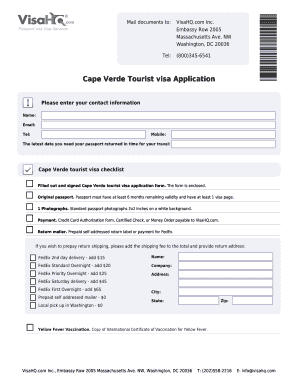
Cape Verde Visa Application Form
Use a Cape Verde Visa Application template to make your document workflow more streamlined.
What the Cape Verde visa form does
The Cape Verde Visa Application Form collects the information a traveler submits when requesting permission to enter Cape Verde. It is not a U.S. tax or immigration form, and the applicable issuing authority, required fields, supporting documents, fees, and submission channel must be confirmed from current Cape Verde government instructions. A U.S. organization can use signNow to upload a prepared copy, place fields, route it to an applicant, and preserve the completed record. Electronic signing does not itself approve a visa or replace official submission requirements.
Who uses this Cape Verde visa form
Travel agencies
Travel agencies can collect applicant details, signatures, and supporting-document acknowledgments before transmitting the package through the official Cape Verde channel.
U.S. organizations
U.S. employers and organizations can document a traveler’s internal approval while keeping official visa submission and eligibility decisions with Cape Verde authorities.
Platform requirements for Cape Verde visa forms
Complete the Cape Verde Visa Application Form in a current browser with TLS 1.2 or TLS 1.3, including Chrome, Firefox, Safari, and Edge on supported desktop and mobile operating systems.
Desktop browsers Chrome and Firefox on Windows 10 or later Apple computers Safari on macOS 12 or later Mobile browsers Safari and Chrome on iOS and Android
For regulated deployment, use managed Windows 10, Windows 11, macOS, iOS, or Android devices. Administrators should confirm API access, SSO provisioning, and certificate or long-term validation requirements before connecting the workflow to internal systems.
How this Cape Verde form workflow works
Use a controlled four-stage workflow to prepare, route, complete, and retain the Cape Verde Visa Application Form without confusing signing evidence with visa approval.
Upload form: Upload the Cape Verde Visa Application Form. Add fields: Place fields for applicant information and signature. Route document: Send the prepared form by email or link. Preserve record: Store the signed PDF with its audit trail.
 Best ROI. Our customers achieve an average 7x ROI within the first six months.
 Scales with your use cases. From SMBs to mid-market, airSlate SignNow delivers results for businesses of all sizes.
 Intuitive UI and API. Sign and send documents from your apps in minutes.
Ways to send and sign the Cape Verde form
- Use the signNow web app when preparing the Cape Verde Visa Application Form, placing fields, and reviewing the final PDF on a desktop browser.
- Use the signNow mobile app when an applicant needs to review and sign the Cape Verde form from an iOS or Android device.
- Use kiosk mode when staff supervise repeated applicant signing at a controlled location; Business Premium includes kiosk mode.
- Use a shareable signing link when distributing a prepared form, but protect sensitive visa information with recipient controls and authentication.
Inside the Cape Verde form audit trail
The audit trail links the applicant’s signing event to the document version, timestamps, authentication activity, and retrievable completion evidence.
Authenticate signer:
Capture timestamps:
Hash document:
Seal record:
Track actions:
Retrieve evidence:
Signer authentication and certificates
PKI support:
X.509 certificates:
Two-factor authentication:
SMS OTP:
ID verification:
Audit evidence:
Processing stages for Cape Verde visa forms
Processing time depends on applicant responses, supporting documents, and the Cape Verde authority’s submission and review rules.
Prepare the form
Deliver to signer
Signer turnaround
Archive completion
Recordkeeping practices for Cape Verde forms
Use a controlled recordkeeping process that separates signNow evidence from the Cape Verde authority’s substantive filing and approval requirements.
Set a documented retention period
Export the audit trail
Protect applicant information
Check official submission rules
Privacy pitfalls for Cape Verde applications
Passport numbers, travel dates, and contact details can appear in downloaded PDFs; limit recipients and use controlled storage before sharing the completed Cape Verde Visa Application Form. An applicant may sign without understanding electronic-record consequences; provide the ESIGN consumer disclosure when 15 U.S.C. §7001(c) applies to the transaction. Sending a public signing link without access controls can expose an applicant’s visa information; use identified recipients or stronger authentication for sensitive records. A completed signNow document does not confirm Cape Verde authority acceptance; retain official submission receipts separately from the signed form and audit trail.
Cape Verde visa form troubleshooting
Resolve routing, authentication, recordkeeping, and legal-scope questions before treating a signed Cape Verde application as ready for official submission.
signNow’s Business plan supports templates and audit trails, but bulk sending belongs to Business Premium. Use the plan matching the number of applicants and routing steps required for this Cape Verde workflow.
A signNow audit trail records signing actions, timestamps, and signer activity, supporting evidence under ESIGN and applicable UETA rules. It does not prove that Cape Verde’s authority accepted the application or supporting documents.
For consumer-facing electronic records, ESIGN requires disclosure of the right to receive paper records, access procedures, and consent withdrawal procedures under 15 U.S.C. §7001(c). Configure that disclosure before routing the form.
Use signNow’s SMS OTP or another available authentication control when the organization needs stronger attribution. Authentication supports signer identity evidence, but the receiving Cape Verde authority may impose separate identity requirements.
Business Premium includes bulk send, while Enterprise adds advanced signer authentication. If a workflow requires one-to-many distribution or stronger authentication, confirm the plan feature before sending applications.
ESIGN and UETA generally recognize electronic signatures when intent, consent, attribution, and record retention are established. They do not override Cape Verde filing rules, wet-signature requirements, notarization, or official submission procedures.
Key performance indicators that demonstrate SignNow's proven track record.
BE READY TO GET MORE
Get this form now!

If you believe that this page should be taken down, please follow our DMCA take-down process.