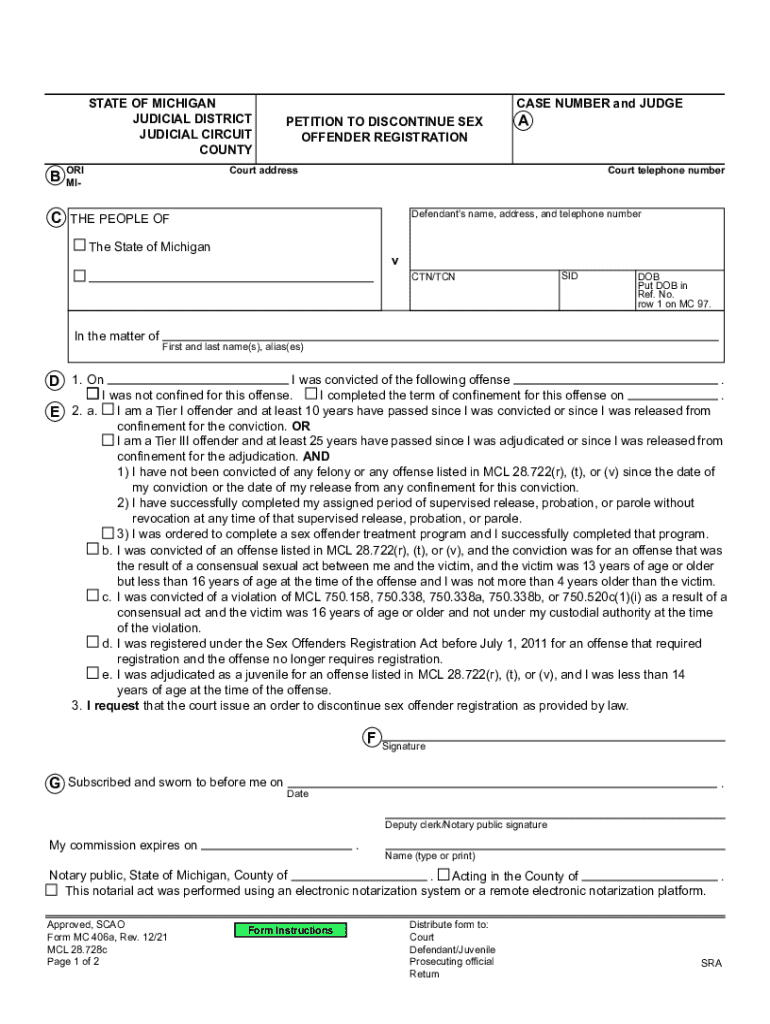
Forms Mc 406A And Mc 406B Petition To Discontinue
Use a Forms MC 406a And MC 406b PETITION TO DISCONTINUE template to make your document workflow more streamlined.
What this petition does
Forms Mc 406A And Mc 406B Petition To Discontinue is a petition document used to request discontinuation of the matter identified in its form instructions. Because the available record does not identify the issuing agency, jurisdiction, required attachments, or filing deadline, verify those details against the official form source before signing. In signNow, upload the petition, review detected fillable fields, assign fields to each signer, send it for signature, and retain the completed document with its audit trail. Electronic-signature validity depends on signer intent, consent, attribution, and reliable record retention under ESIGN and applicable state law.
Who may handle this petition
Petition filers
Individuals or authorized representatives can prepare the petition, verify the official instructions, and provide required information before routing it to every required signer.
Records teams
Administrative, legal, or compliance teams can coordinate signer order, retain the completed petition, and export signNow evidence for the underlying matter.
Features for completing the petition
Forms Mc 406A And Mc 406B Petition To Discontinue can be prepared, routed, signed, and retained in one controlled electronic workflow.
Document upload
Upload the Forms Mc 406A And Mc 406B Petition To Discontinue file, then review detected fields before assigning each field to the correct signer.
Field placement
Place signature, date, and text fields where the petition requires them, while preserving the original document layout for review.
Signer routing
Send the petition to identified signers by email or signing link, with signing order controlled through the document workflow.
Audit trail
Capture signer actions, timestamps, and document history in an audit trail that can accompany the completed petition record.
Record storage
Keep the completed petition and its signing evidence together so authorized staff can retrieve the record for later review.
Mobile access
Use signNow mobile apps when staff or signers need to review and sign the petition away from a desktop workstation.
How to complete the petition
Follow the official instructions first, then use signNow to prepare, route, sign, and preserve the petition record.
Verify source:
Confirm the official source and required filing instructions. Upload document:
Upload the petition and review detected fields. Assign fields:
Assign each field to the correct signer. Send petition:
Send the petition through signNow. Complete record:
Review signatures and download the completed record.
 Best ROI. Our customers achieve an average 7x ROI within the first six months.
 Scales with your use cases. From SMBs to mid-market, airSlate SignNow delivers results for businesses of all sizes.
 Intuitive UI and API. Sign and send documents from your apps in minutes.
How the signNow flow works
The signNow workflow keeps document preparation and signing evidence connected from upload through record storage.
Upload: Upload the petition file to signNow. Prepare: Review detected fields and assign signers. Route: Send signature requests in the required order. Retain: Store the signed petition with its audit trail.
Recommended petition workflow setup
Use a controlled signing workflow that matches the petition’s official instructions, signer identities, and required recordkeeping policy.
| Setting | Recommendation |
|---|---|
| Authentication method | Email verification with SMS OTP |
| Signature type | Intentional electronic signature under ESIGN and UETA |
| Audit trail and encryption | Audit trail with TLS 1.2 or TLS 1.3 |
| Document retention | Follow the issuing authority’s written schedule |
| User provisioning | Role-based access with administrator review |
Platform requirements for the petition
To work with Forms Mc 406A And Mc 406B Petition To Discontinue, use Chrome, Firefox, Safari, or Edge on Windows or macOS. signNow also provides mobile apps for iOS and Android, while encrypted connections use TLS 1.2 or TLS 1.3.
Browser support Chrome, Firefox, Safari, and Edge Operating systems Windows, macOS, iOS, and Android Secure connection TLS 1.2 or TLS 1.3 connection
Organizations should manage access through approved Windows, macOS, iOS, or Android devices and confirm that signers can open the petition fields. Enterprise deployments may also review API access, SSO provisioning, certificate settings, and long-term validation requirements before production use.
What the petition audit trail records
A signNow audit trail provides technical evidence of who acted, when actions occurred, and how the completed petition can be reviewed.
Authenticate signer:
Capture timestamp:
Hash document:
Seal history:
Link evidence:
Export trail:
Recordkeeping practices for the petition
Preserve the completed petition, signing evidence, and authoritative filing instructions as one reviewable record.
Verify official instructions before routing
Export the petition and audit trail
Apply the governing retention rule
Archive records with controlled access
Privacy and disclosure pitfalls
Personal information placed in Forms Mc 406A And Mc 406B Petition To Discontinue may be disclosed to unintended recipients through incorrect email addresses or unrestricted sharing permissions. A signer may complete the petition without a documented electronic-record consent process when consumer-facing disclosure requirements apply under 15 U.S.C. §7001(c). Unassigned or duplicate fields can leave the petition incomplete, create conflicting answers, or make it unclear which person supplied a required statement. Retaining the signed petition without its audit trail can weaken proof of signer attribution, intent, timestamps, and the document’s signing history.
Rules that may limit electronic signing
Wrong filing method
Missing notarization
Invalid electronic record
State-law rejection
Troubleshooting petition workflows
Resolve field, signer, authentication, plan, retention, and filing questions before treating the petition as complete.
Upload the source file again and inspect whether signature, date, and text fields were detected correctly. signNow’s document editor lets you add or reposition fields before sending Forms Mc 406A And Mc 406B Petition To Discontinue.
Confirm that every required field is assigned to the intended signer and that the signing order matches the official instructions. An incorrectly assigned field can leave the petition incomplete even when the envelope shows completion.
Use SMS authentication where stronger signer verification is needed, and retain the resulting audit trail. Under ESIGN and UETA, intent, consent, attribution, and record reproducibility remain relevant to enforceability.
The Business plan is listed at $8 per user per month with annual billing and includes audit trails and templates. Business Premium is listed at $15 and adds bulk send and kiosk mode.
signNow lists a 7-day free trial without a credit card. Before using a trial workflow for an official filing, confirm that the resulting signed record can be retained and reproduced under the issuing authority’s rules.
If a petition requires notarization, in-person appearance, or filing through a government portal, signing the PDF in signNow does not replace that requirement. Check the official instructions and applicable state law before submission.
Key performance indicators that demonstrate SignNow's proven track record.
BE READY TO GET MORE
Get this form now!

If you believe that this page should be taken down, please follow our DMCA take-down process.