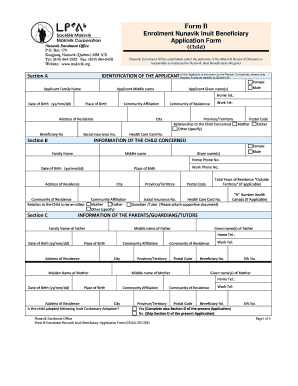
Form B New Enrolment Child Makivik Corporation
Use a Form B New Enrolment Child Makivik Corporation template to make your document workflow more streamlined.
What this enrollment form does
Form B New Enrolment Child Makivik Corporation is an enrollment document for recording a child’s information and obtaining the required organizational or guardian approvals. The supplied form name does not identify a U.S. federal form, IRS filing, USCIS application, or published statutory deadline. In signNow, an authorized user uploads the document, checks its fillable fields, assigns signer roles, and sends it for review. The completed form can be retained with its certificate of completion and audit trail, subject to Makivik Corporation’s governing policy and applicable privacy requirements.
Who handles this enrollment form
Enrollment administrators
Makivik Corporation enrollment staff can prepare the child’s form, verify required information, route it to the appropriate parent or guardian, and preserve the signed record with its audit trail. Confirm the corporation’s internal authority and review requirements before assigning signers.
Parents and guardians
Parents or guardians can review the information presented for the child and sign electronically when the organization permits electronic completion. The workflow should identify the signer’s relationship, capture consent where required, and avoid exposing the completed form to unauthorized recipients.
How this enrollment workflow works
Form B New Enrolment Child Makivik Corporation moves from document preparation to controlled signing and auditable storage.
Upload: Upload the form and review its pages. Add fields: Place fields for child and signer information. Send: Send the prepared form to authorized signers. Archive: Store the completed form with its audit trail.
Complete this form in signNow
Prepare Form B New Enrolment Child Makivik Corporation in four controlled steps, from upload through auditable storage.
Upload:
Upload the original enrollment PDF. Check fields:
Review detected fields and add missing ones. Assign roles:
Assign child and guardian signer roles. Complete:
Send, monitor, and archive the completed record.
 Best ROI. Our customers achieve an average 7x ROI within the first six months.
 Scales with your use cases. From SMBs to mid-market, airSlate SignNow delivers results for businesses of all sizes.
 Intuitive UI and API. Sign and send documents from your apps in minutes.
Choose a signing method for this form
- Use the signNow web app when preparing Form B New Enrolment Child Makivik Corporation, placing fields, checking required information, and sending it from a desktop browser.
- Use the signNow mobile app when a parent, guardian, or administrator must review and sign the form from an iOS or Android device.
- Use kiosk mode when staff supervise repeated in-person completion on a shared device, while confirming each signer’s identity before handing over the form.
- Use a shareable signing link when recipients need controlled access without a separate email invitation, and monitor completion through the document history.
Recommended setup for this form
Use a controlled signing workflow that identifies each signer, records the enrollment history, protects the document, and limits access to assigned staff.
| Setting | Recommendation |
|---|---|
| Authentication method | Email link with SMS verification |
| Signature type | Typed or drawn electronic signature |
| Audit trail | Certificate of completion with action history |
| Document retention | Organization-defined reproducible archive |
| Encryption and provisioning | AES-256 with role-based user access |
How the audit trail records this form
The signNow audit trail documents who accessed, signed, and completed Form B New Enrolment Child Makivik Corporation.
Signer authentication:
Timestamp capture:
Document hashing:
Tamper-evident sealing:
Action history:
Trail export:
Security controls for this form
Transport encryption:
Storage encryption:
Security certification:
Information security:
Electronic signatures:
Health information:
Platform requirements for this form
Complete Form B New Enrolment Child Makivik Corporation in signNow using Chrome, Firefox, Safari, or Edge on Windows or macOS. signNow also provides mobile apps for iOS and Android, while TLS 1.2 or 1.3 protects data in transit.
Browser support Chrome, Firefox, Safari, and Edge on Windows or macOS. Mobile apps iOS and Android mobile apps for signing. Connection security TLS 1.2 or 1.3 protects data in transit.
Organizations handling this form should use managed Windows, macOS, iOS, or Android devices, controlled browser updates, and role-based signNow access. Enterprise deployments can evaluate API access, SSO provisioning, and certificate settings against their internal security and records policies before rollout.
Processing stages for this form
Processing time depends on field preparation, recipient access, signer review, and the organization’s archival procedure for completed enrollment records.
Prepare the document
Deliver to signers
Signer turnaround
Complete and archive
Risks requiring review before signing
Incomplete details
Wrong recipient
Unclear consent
Excess access
Troubleshooting this enrollment form
Resolve field, signer, plan, privacy, and record-preservation questions before sending Form B New Enrolment Child Makivik Corporation.
Upload the original PDF again, then use signNow’s field placement tools to mark the child’s information, guardian details, dates, and signatures. The Business plan includes templates and audit trails, but automatic field detection may require manual review when the source PDF has unusual formatting.
A recipient can open the signing request without a paid signNow account when the sender permits guest signing. If stronger attribution is needed for this enrollment record, add SMS authentication or another available signer-verification control before sending.
The Business plan is listed at $8 per user monthly with annual billing and includes 100 signature invites per user per year. Business Premium is $15 and adds bulk send and kiosk mode; overage fees apply to subscription invitations.
If the form contains protected health information, signNow lists HIPAA compliance with a business associate agreement required. Confirm that the workflow, recipients, storage policy, and agreement cover the actual information collected before sending.
Consumer-facing electronic records require disclosure of the right to paper, access to the electronic format, and procedures for withdrawing consent under 15 U.S.C. §7001(c). Add that process when this enrollment workflow serves consumers rather than internal staff.
Export the completed certificate and audit trail from the authorized signNow workspace, then retain them with the final form under the organization’s records policy. ESIGN requires records to remain accurately reproducible; it does not create a universal retention period for this form.
Key performance indicators that demonstrate SignNow's proven track record.
BE READY TO GET MORE
Get this form now!

If you believe that this page should be taken down, please follow our DMCA take-down process.