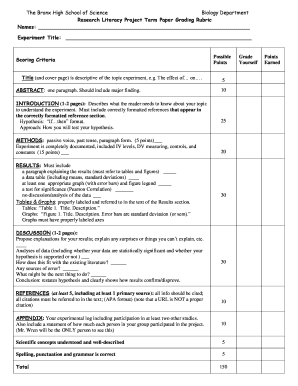
Research Literacy Project Term Paper Grading Rubric Bxscience Form
Use a Research Literacy Project Term Paper Grading Rubric Bxscience template to make your document workflow more streamlined.
What the Bxscience rubric does
The Research Literacy Project Term Paper Grading Rubric Bxscience Form is an evaluation document for reviewing a student research paper through defined research-literacy criteria. In signNow, a teacher or administrator can upload the rubric, inspect detected fillable fields, assign student and evaluator roles, and send the document for completion. Participants can enter scores or comments and add signatures where required. The finalized rubric can be retained with an audit trail showing document activity. The available source information does not identify an issuing agency, statutory filing deadline, or universal retention period for this educational form.
How the Bxscience rubric works
The Bxscience rubric workflow moves from document preparation to review, signature, and organized storage in four clear stages.
Upload document: Upload the rubric document and let signNow detect available fillable areas. Review fields: Review detected fields and add grading, comment, or signature fields. Send for review: Send the rubric to the student, teacher, or evaluator for completion. Store record: Store the completed rubric with its audit trail for reference.
Who benefits from this rubric workflow
The Bxscience rubric serves student researchers, science teachers, and school departments coordinating consistent project evaluation and record handling.
A science teacher can reuse the Bxscience rubric for student research projects, assign scoring fields, and retain signed evaluations for classroom review and approved school records management. A student researcher can receive assigned sections, add required project information, and sign or acknowledge the completed rubric without coordinating paper copies with the evaluator. A school department can standardize rubric distribution across classes while restricting template edits, delegating sending, and preserving completed evaluations for authorized academic review.
These tasks are executed by both individual contributors and centralized administrators depending on organizational policy and required controls.
Quick steps for completing the rubric
Prepare the Bxscience rubric in signNow, route it to the right participants, and preserve the completed evaluation with its activity record.
Upload:
Upload the Bxscience rubric. Review:
Check detected fields and criteria. Assign:
Assign student and evaluator roles. Send:
Send the prepared rubric. Store:
Save the completed record.
 Best ROI. Our customers achieve an average 7x ROI within the first six months.
 Scales with your use cases. From SMBs to mid-market, airSlate SignNow delivers results for businesses of all sizes.
 Intuitive UI and API. Sign and send documents from your apps in minutes.
Choose a signing method for review
- Use the signNow web app when teachers or administrators prepare the Bxscience rubric, assign fields, and monitor completion from a desktop browser.
- Use the signNow mobile app when students or evaluators need to review, complete, or sign the rubric from an iOS or Android device.
- Use kiosk mode for supervised classroom or office completion when several participants use one managed device in sequence.
- Use a shareable signing link when the rubric must be distributed to a defined audience without preparing separate email invitations.
Features for the Bxscience rubric
The Bxscience rubric becomes easier to distribute, complete, review, and retain when its evaluation workflow is organized in signNow.
Reusable template
A reusable rubric template keeps research-literacy criteria, scoring areas, and evaluator instructions consistent across student submissions without recreating the document each time.
Structured fields
Detected fields help convert the Bxscience rubric into a structured document where evaluators can enter scores, comments, dates, and signatures.
Remote review
Assigned recipients receive the rubric electronically, reducing delays when students, teachers, or reviewers work from different locations or schedules.
Completion record
The completed rubric can preserve the evaluator’s signature, completion details, and related activity in one retrievable record.
Audit trail
A signNow audit trail records document activity, supporting review of when the rubric was sent, accessed, completed, and finalized.
Mobile access
Mobile apps let authorized participants review or sign the rubric from supported devices when classroom or field access is needed.
Recommended rubric workflow setup
Configure the Bxscience rubric around verified participants, controlled access, documented completion, and the school’s approved records policy.
| Setting | Recommendation |
|---|---|
| Authentication method | Email link with optional SMS verification |
| Signature type | Typed or drawn electronic signature |
| Audit trail | Enable completion history and export |
| Document retention | Follow the school’s approved FERPA policy |
| Encryption and provisioning | Use encrypted storage with role-based access |
Best practices for rubric records
Use controlled templates, limited access, complete audit records, and the institution’s approved education-records policy when handling this rubric.
Confirm rubric criteria before sending
Archive completed rubric records securely
Limit access by participant role
Preserve version and review context
Processing stages for the rubric
The Bxscience rubric follows four operational stages; the available ground truth does not establish a fixed completion deadline for any stage.
Prepare document
Deliver to recipients
Complete review
Archive completion
Privacy and review challenges
Unclear scoring criteria can produce inconsistent evaluations when the Bxscience rubric lacks explicit instructions for each research-literacy category. Student names, grades, or comments may be exposed when completed rubrics are shared beyond the authorized classroom or review group. Missing consent or signature fields can leave reviewers unable to confirm who approved the completed Bxscience evaluation. Broad permissions may allow unintended edits to the rubric template, changing criteria after student work has already been reviewed.
Security for rubric records
Transport encryption:
Stored data:
Security reporting:
Information security:
Education records:
Signer authentication:
Troubleshooting the Bxscience rubric
These answers address field detection, access, signatures, student privacy, plan limits, and completion records for this specific educational rubric.
If detected fields do not match the Bxscience rubric, review the uploaded document before sending and manually correct field placement. signNow Business includes templates and audit trails, but the teacher remains responsible for confirming every scoring criterion and instruction appears accurately.
If a student cannot open the assigned rubric, confirm the recipient email or signing link, check device access, and resend the invitation. signNow supports mobile apps and browser workflows; access problems do not change the rubric’s approved criteria or school disclosure requirements.
If a signature is missing, inspect the assigned signature field and recipient role before sending a reminder. signNow audit trails record document activity, while ESIGN and UETA generally recognize electronic signatures when intent, consent, attribution, and record retention requirements are satisfied.
If a school handles personally identifiable student information, apply its FERPA policy and authorized-access controls before sharing the completed rubric. signNow lists GDPR, SOC 2 Type II, and ISO 27001 credentials, but those product controls do not replace institutional FERPA responsibilities.
If the Business plan’s capacity matters, verify current account limits before distributing many rubrics. The verified plan information lists $8 per user monthly when billed annually and 100 signature invites per user per year, with overage fees; Business Premium adds bulk send.
If an audit record is needed for a grade review, retrieve the completed document and its signNow audit trail after finalization. Preserve them under the school’s approved records policy; no universal statutory retention period is established for this rubric.
Key performance indicators that demonstrate SignNow's proven track record.
BE READY TO GET MORE
Get this form now!

If you believe that this page should be taken down, please follow our DMCA take-down process.