5 2 Pdsa Worksheet The Plan Do Study Act Pdsa Form
Use a 5 2 docx PDSA Worksheet The Plan Do Study Act PDSA template to make your document workflow more streamlined.
What the PDSA worksheet records
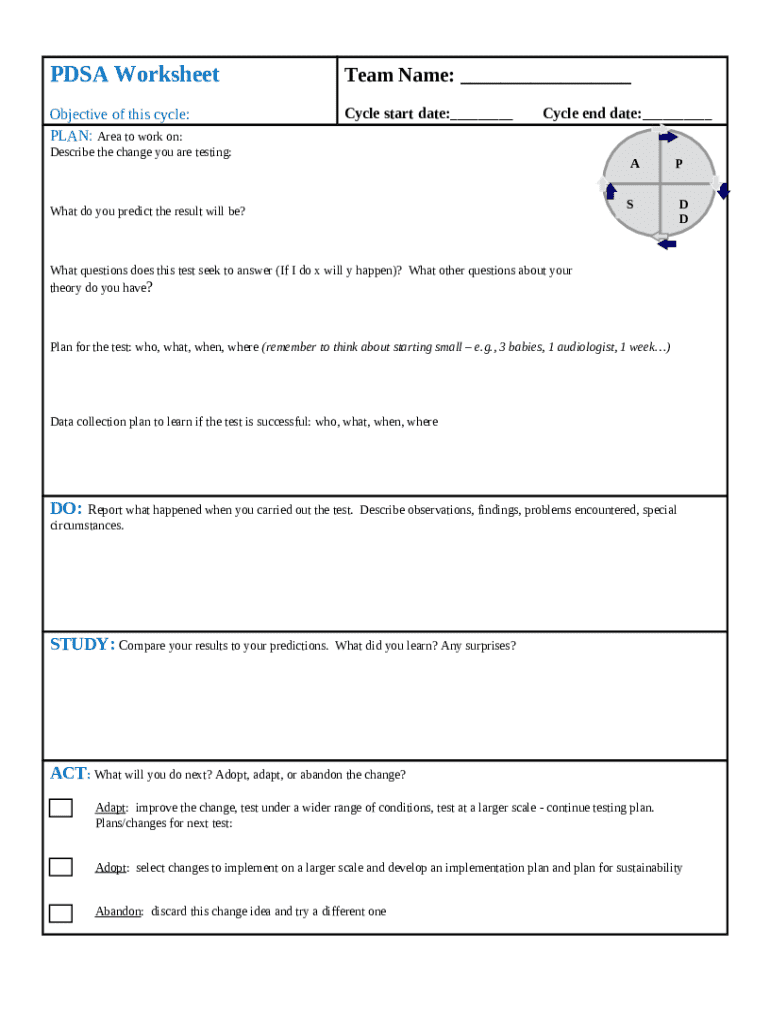
The 5 2 Pdsa Worksheet The Plan Do Study Act Pdsa Form is a structured improvement record for documenting one test cycle from objective through next action. The Plan section states the problem, prediction, measures, and proposed change; Do records implementation and observations; Study compares results with the prediction; and Act identifies whether to adopt, adapt, or abandon the change. A completed worksheet gives reviewers one traceable account of the intervention, evidence, findings, and follow-up decision. signNow can convert the worksheet into a fillable, signable workflow, while the team remains responsible for accurate process data and appropriate retention.
Teams that use the PDSA worksheet
Continuous-improvement coordinators use the 5 2 Pdsa Worksheet to define a measurable test, assign owners, record observations, and preserve each completed cycle for team review. Operations managers use the worksheet to compare planned and observed results, document corrective actions, and route a completed PDSA record to stakeholders without rebuilding the document.
Who uses this PDSA worksheet
Quality teams
Quality teams use the worksheet to define the improvement objective, planned intervention, observations, study results, and next action in one reviewable record.
Department managers
Department managers use completed worksheets to assign responsibilities, compare expected and actual outcomes, and approve the next improvement cycle.
Business types that benefit from PDSA worksheets
The worksheet fits improvement work that requires a documented hypothesis, measured result, and accountable next step.
Solo process-improvement consultants can use one reusable worksheet template to document client experiments, collect approvals, and download a complete record for each improvement cycle. Healthcare operations teams can separate planned changes from observed results, assign reviewers, and use signNow’s HIPAA-compliant service when the worksheet contains protected health information under a required BAA. Enterprise quality departments can standardize PDSA records across locations, connect workflows to systems such as NetSuite or Microsoft 365, and preserve approval evidence centrally.
These tasks are executed by both individual contributors and centralized administrators depending on organizational policy and required controls.
 Best ROI. Our customers achieve an average 7x ROI within the first six months.
 Scales with your use cases. From SMBs to mid-market, airSlate SignNow delivers results for businesses of all sizes.
 Intuitive UI and API. Sign and send documents from your apps in minutes.
Features that support PDSA documentation
signNow turns the PDSA worksheet into a controlled digital record while preserving the four-part improvement method and its review history.
Reusable template
Upload the worksheet once, then reuse its labeled Plan, Do, Study, and Act fields instead of rebuilding the document for every improvement cycle.
Assigned ownership
Assign individual fields to owners of the intervention, measurements, review, and next action so responsibility remains visible throughout completion.
Signing order
Route the worksheet to reviewers in a defined order when quality approval must follow implementation or results review.
Audit trail
Capture timestamps, signer activity, and document history with the completed worksheet for a traceable improvement record.
Mobile access
Use signNow mobile apps when supervisors or team members review PDSA records away from a desktop workstation.
System connections
Connect signNow with Microsoft 365, Google Drive, NetSuite, or Procore to move completed records into existing operational workflows.
How the worksheet workflow works
The digital workflow preserves the worksheet’s Plan, Do, Study, and Act sequence while making ownership and approval visible.
Upload: Upload the worksheet template. Prepare: Add fields to each PDSA section. Route: Route assigned fields to reviewers. Complete: Finalize and retain the signed cycle.
How to complete the PDSA worksheet
Complete each PDSA phase, route the worksheet to responsible reviewers, and preserve the signed record with its audit history.
Upload:
Upload the blank worksheet to signNow. Check fields:
Review detected fields and add missing inputs. Assign roles:
Assign each field to the correct reviewer. Send:
Send the completed worksheet for signatures. Archive:
Store the signed record with its audit trail.
What the PDSA audit trail records
A signNow audit trail documents the events surrounding completion of the worksheet, helping reviewers connect signatures with the final record.
Verify the assigned signer:
Record each signing event:
Associate the completed file:
Preserve document integrity:
Log views and actions:
Retrieve the completion record:



Protect PDSA worksheet records
Email and SMS verification:
Recorded signing events:
Detailed document history:
TLS 1.2/1.3 and AES-256:
SOC 2 Type II certification:
Role-based document permissions:
Platform requirements for the worksheet
Complete the 5 2 Pdsa Worksheet in signNow through Chrome, Firefox, Safari, or Edge on Windows or macOS, or through signNow mobile apps for iOS and Android.
Browsers Chrome, Firefox, Safari, Edge Desktop systems Windows and macOS desktop access Mobile apps iOS and Android mobile apps
Organizations should use managed devices, controlled user access, and approved storage policies when PDSA worksheets contain operational, employee, patient, or customer information. Configure retention and access rules according to the records involved and applicable organizational requirements.
Challenges when completing the PDSA worksheet
The Plan section lacks a measurable prediction, making the Study comparison difficult to evaluate against an explicit expected result. Do-stage observations combine implementation facts with conclusions, obscuring what actually happened during the PDSA test. Multiple reviewers edit one worksheet without assigned fields, leaving ownership of approvals and corrective actions unclear. The completed worksheet is stored without its audit trail, weakening evidence of who reviewed and signed each PDSA cycle.
PDSA worksheet troubleshooting
Resolve field-detection, signer-assignment, plan-selection, privacy, validity, and record-retention questions before circulating the completed worksheet.
Upload the worksheet as a PDF or supported document in signNow, then review automatically detected fields. Add fields manually where the source file has unlabeled Plan, Do, Study, or Act entries.
Assign each field to the person responsible for that PDSA section. A signer can often complete a document without an account, but the sender should verify the recipient identity and required signing order.
The Business plan includes legally binding eSignatures, audit trails, templates, and mobile apps at $8/user/month when billed annually. Business Premium adds bulk send at $15/user/month annually.
signNow states that its service is HIPAA compliant when a BAA is required. Confirm that the worksheet contains protected health information, execute the appropriate BAA, and apply your organization’s privacy controls.
ESIGN and UETA generally recognize electronic signatures when intent, consent, attribution, and record retention requirements are met. They do not make every record eligible; exclusions include wills, court filings, and family law decrees.
Export the completed worksheet and its audit trail from signNow, then retain them together under your organization’s records policy. The applicable retention period depends on the information and industry, not the worksheet title alone.
Key performance indicators that demonstrate SignNow's proven track record.
BE READY TO GET MORE
Get this form now!

If you believe that this page should be taken down, please follow our DMCA take-down process.